EasyManua.ls Logo

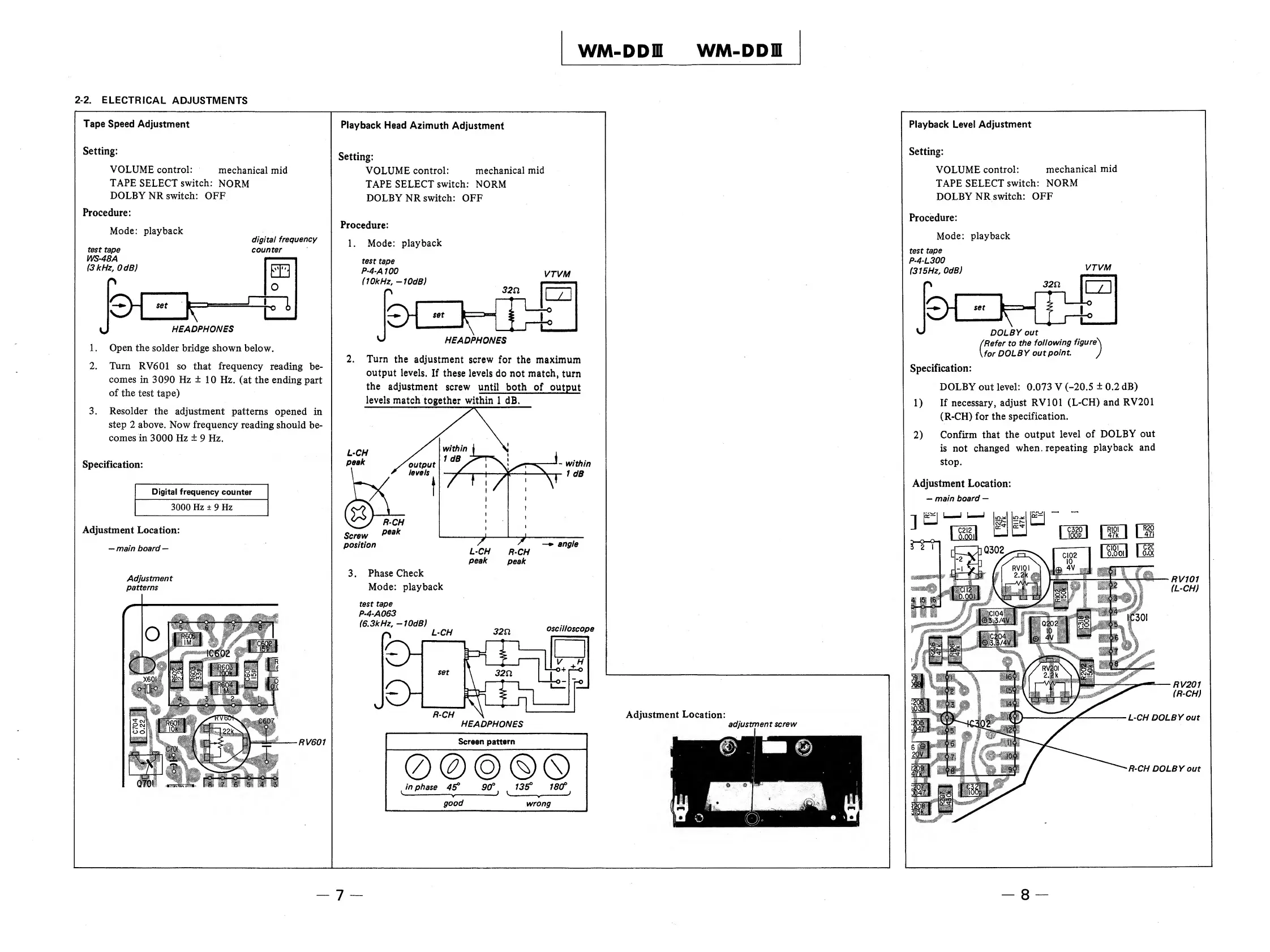
Sony WM-DDIII - Tape Speed Adjustment; Playback Head Azimuth Adjustment; Playback Level Adjustment; Phase Check

Sony WM-DDIII
14 pages
Print Icon
To Next Page IconTo Next Page
To Previous Page IconTo Previous Page
Loading...
WM
2-2.
ELECTRICAL
ADJUSTMENTS
Tape
Speed
Adjustment
Setting:
VOLUME
control:
mechanical
mid
TAPE
SELECT
switch:
NORM
DOLBY
NR
switch:
OFF
Procedure:
Mode:
playback
test
tape
WS-48A
(3
kHz,
OdB)
digital
frequency
counter
\J
HEADPHONES
1.
Open
the
solder
bridge
shown
below.
2.
Turn
RV601
so
that
frequency
reading
be¬
comes
in
3090
Hz
±
10
Hz.
(at
the
ending
part
of
the
test
tape)
3.
Resolder
the
adjustment
patterns
opened
in
step
2
above.
Now
frequency
reading
should
be¬
comes
in
3000
Hz
±
9
Hz.
Specification:
Digital
frequency
counter
3000
Hz
±
9
Hz
Adjustment
Location:
main
board
Adjustment
patterns
I
O
1
^
tc>rO
X60I
M
mm
lu
UL—C-—
i—
7
1
T
Playback
Head
Azimuth
Adjustment
Setting:
VOLUME
control:
mechanical
mid
TAPE
SELECT
switch:
NORM
DOLBY
NR
switch:
OFF
Procedure:
1.
M
o
d
e
:
playback
test
tape
P-4-A
WO
u
UD/
32n
LJ
L_
I
1—
set
1
i
%
|
—K
_Lj-i
-
U
HEADPHONES
2.
T
urn
the
adjustment
screw
for
the
maximum
output
levels.
If
these
levels
do
not
match,
turn
the
adjustment
screw
until
both
of
output
levels
match
together
within
1
dB.
Screw
position
3.
P
hase
Check
Mode:
playback
test
tape
P-4-A063
(6.3kHz,
—WdB)
L-CH
R‘CH
peak
peak
32SI
oscilloscope
HEADPHONES
Screen
pattern
0
@
®
in
phase
45°
90°
13
18(f
good
wrong
8

Related product manuals