7
US
+
SET
–
D CH (channel) indication
Displays the transmission channel.
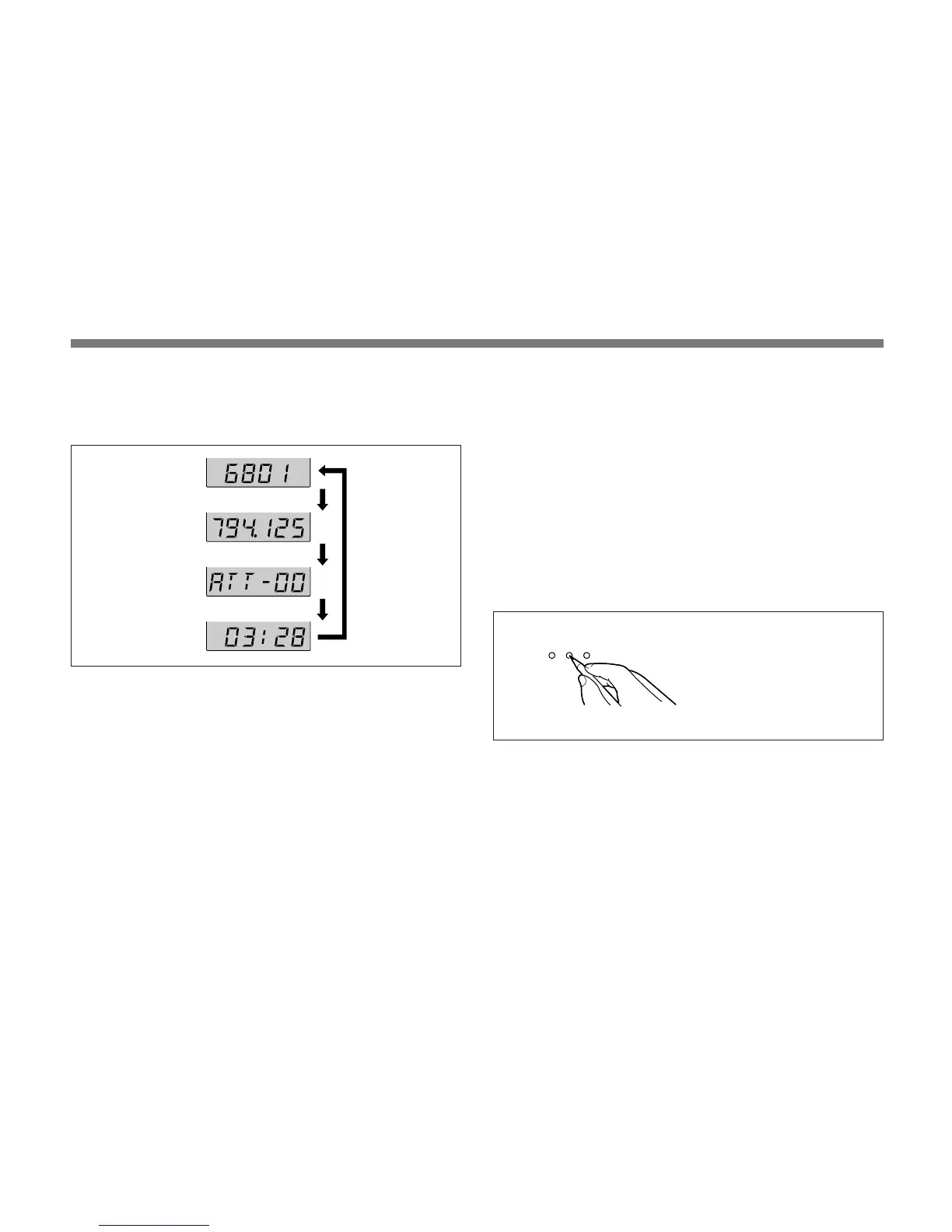
Each time you press the SET button in Transmit mode, the
channel indication changes as follows.
Transmission channel: The current transmission channel
setting.
Transmission frequency: The current transmission
frequency setting.
Attenuation: The input attenuation setting in decibels.
Can be set within a range of 0 dB to 21 dB in 3-dB
steps.
Accumulated battery use time: The accumulated time of
battery use (in 1-minute increments).
Transmission
channel
To adjust these parameters, see “Changing the
Transmission Channel” on page 5, “Changing the Input
Attenuation Setting” on page 10 or “Resetting the
Accumulated Battery Use Time Indication” on page 11.
3 SET button
In Transmit mode, press this button to change the indicated
items in the lower half of the liquid-crystal display.
To change to Setting mode, turn the POWER switch to ON
while holding this button down. Then press this button to
select the items to be indicated.
How to press the SET and +/– buttons
For details on Setting mode, see “Settings” on page 8.
Press the button with a
ballpoint pen or similar item.
Transmission
frequency
Attenuation level
Accumulated
battery use time
Press SET
button.
Display example
for U68 model


 To Next Page