Need help?
Do you have a question about the Sony WX-800UI and is the answer not in the manual?
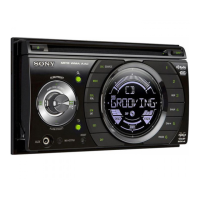
Overview of the main unit's buttons, ports, and indicators.
Procedure to reset the unit to its default settings.
Steps to adjust the unit's clock time.
Instructions for connecting a USB storage device.
Guide to connecting external audio devices via the AUX input.
How to tune into radio stations using the tuner.
Methods for automatically or manually storing radio stations.
Configure automatic station retuning and traffic alerts.
Restricts radio reception to a specific region.
Searches for stations broadcasting specific program types.
Automatically sets the clock using RDS data.
Instructions for playing audio CDs.
How to play music files from a USB device.
Control iPod/iPhone functions from the unit.
Methods for finding and playing audio tracks.
Turns off the demonstration display feature.
Configuration options for general unit functions.
Settings related to steering wheel remote control.
Adjusts audio quality and sound profiles.
Adjusts the display brightness.
Sets custom colors for the unit's buttons.
Sets custom colors for the unit's display.
Synchronizes illumination with sound.
Shows moving display patterns.
Automatically scrolls long text items.
Instructions for updating the unit's firmware.
Key advice on usage, safety, and environment.
Information on disc compatibility and care.
List of compatible iPhone and iPod models.
Technical specifications for the FM, MW, LW tuner.
Technical specifications for the CD player.
Technical specifications for USB playback.
Technical specifications for the power amplifier.
Overall specifications including dimensions and power requirements.
Solutions for common issues like no sound or low volume.
Troubleshooting tips for stations not received or noisy sound.
Resolving problems with RDS features like TA and PTY.
Solutions for discs not playing or files not being recognized.
Troubleshooting for USB device connectivity and playback errors.
Explanation of error codes and messages shown on the display.
Important safety warnings during installation.
Advice on choosing the installation location and using hardware.
Guidance on adjusting the unit's mounting angle.
Diagrams and instructions for connecting speakers and power.
Steps to remove the mounting bracket from the unit.
Instructions for installing the unit into the dashboard.
Procedure for replacing the unit's fuse.
Website addresses for product support and registration.
 General
| Display Type | LCD |
|---|---|
| Maximum Output Power / Channel Qty | 55 Watts x 4 |
| Media Type | CD |
| Frequency Response | 20Hz |
| Output Level | 2V |

 To Next Page