20
Sony XT-DTV1 2-651-675-12(1)
Locking the unit
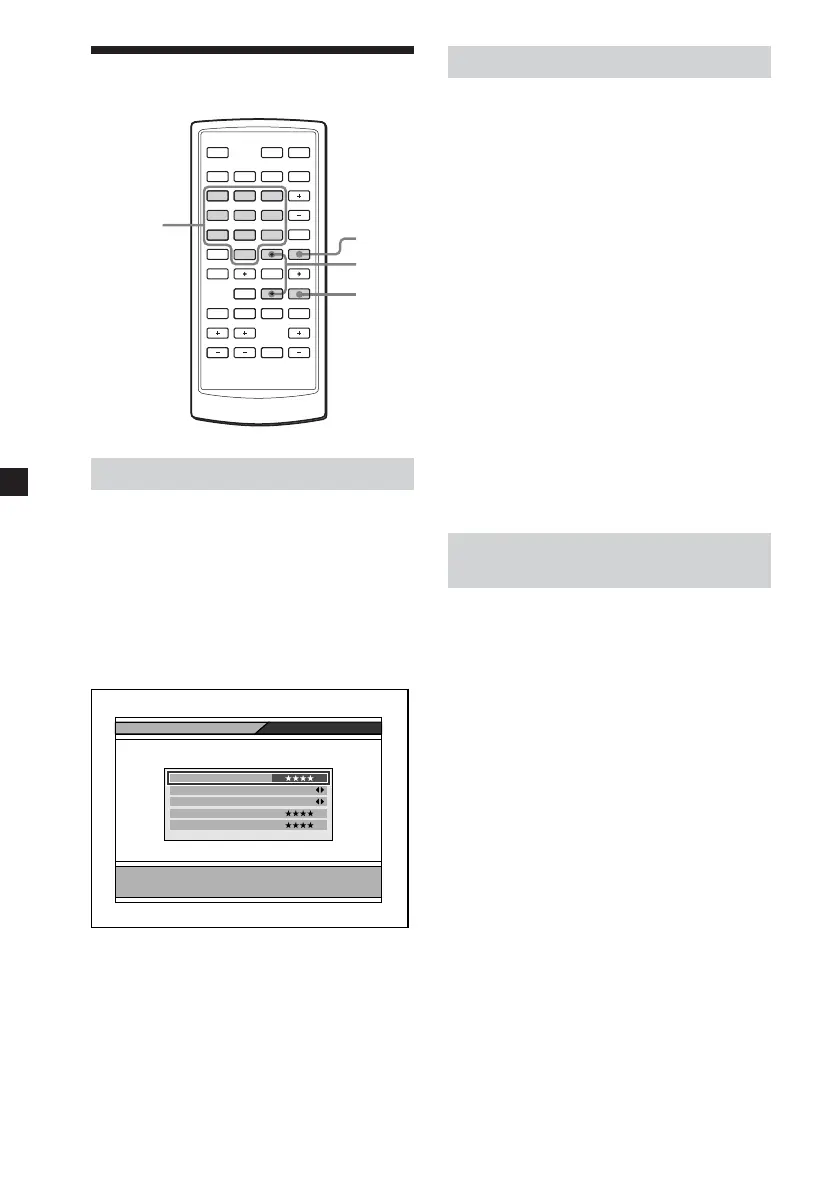
MENU
EXIT
V/v
MONITORSOURCE
FAV
EPG
.
ux
`
/
1`
/
1
>
DIGITAL TV
ENTER
123
456
789
0
VOL
PAG E VOL CHATT
RADIO
MENU
INFO EXIT
L/RTEXTAUDIO
Setting the password
1 Press (MENU).
The Main Page appears.
2 Press M or m repeatedly to select
“User Installation”, then press
(ENTER).
3 Press M or m repeatedly to select
“Parental Lock”, then press
(ENTER).
Parental Lock
Enter current password
Confirm Password
New Password
Install Lock
OFF
Parental Lock
ON
Current Password
4 Enter the current password.
The default password is 0000.
5 Press (EXIT) repeatedly to close
the Main Page.
Changing the password
1 Press (MENU).
The Main Page appears.
2 Press M or m repeatedly to select
“User Installation”, then press
(ENTER).
3 Press M or m repeatedly to select
“Parental Lock”, then press
(ENTER).
4 Enter the current password.
5 Press M or m repeatedly to select
“New Password”.
6 Enter the new password, then
press m to move the cursor to
“Confirm Password”.
7 Enter the new password again to
confirm.
8 Press (EXIT) repeatedly to close
the Main Page.
Settings for the Parental
Control
You can set the parental control using
the Parental Lock function.
1 Press (MENU).
The Main Page appears.
2 Press M or m repeatedly to select
“User Installation”, then press
(ENTER).
3 Press M or m repeatedly to select
“Parental Lock”, then press
(ENTER).
4 Enter the current password.
5 Press M or m repeatedly to select
“Parental Lock”, then press
(ENTER).
6 Press < or , repeatedly to select
“ON”.
To cancel the Parental Lock, select
“OFF”.
7 Press (EXIT) repeatedly to close
the Main Page.
Number
buttons
01GB03BAS-EUR.p65 8/24/05, 5:09 PM20


 To Next Page