EasyManua.ls Logo

Sony XVM-862 - Additional Information; Attaching and Detaching Monitor

Sony XVM-862
15 pages
Print Icon
To Next Page IconTo Next Page
To Previous Page IconTo Previous Page
Loading...
I
10
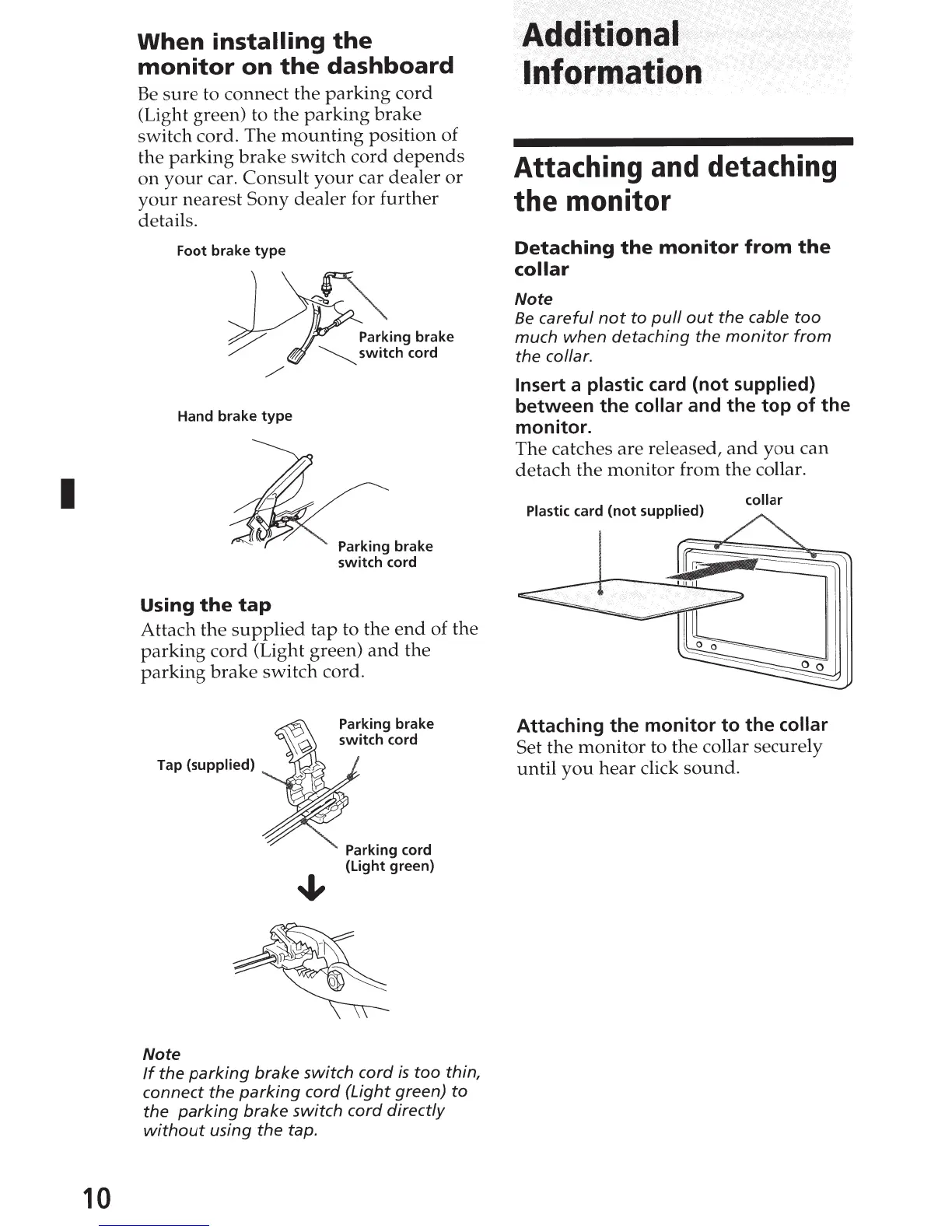
When
installing
the
monitor
on
the
dashboard
Be
sure
to connect the
parking
cord
(Light green) to the
parking
brake
switch cord. The
mounting
position of
the
parking
brake
switch
cord
depends
on
your
car.
Consult
your
car
dealer
or
your
nearest
Sony
dealer
for
further
details.
Foot brake
type
Hand brake
type
Using
the
tap
Parking brake
~switch
cord
Parking brake
switch
cord
Attach
the
supplied
tap
to the
end
of the
parking
cord
(Light green)
and
the
parking
brake
switch
cord.
Tap
(supplied)
Note
Parking brake
switch
cord
Parking cord
(Light green)
If
the
parking
brake
switch
cord
is
too
thin,
connect
the
parking
cord
(Light
green)
to
the
parking
brake
switch
cord
directly
without
using
the
tap.
~~~!~~~
t
··
nformat·io·n
Attaching and detaching
the
monitor
Detaching
the
monitor
from
the
collar
Note
Be
careful
not
to
pull
out
the
cable
too
much
when
detaching
the
monitor
from
the
collar.
Insert
a plastic card
(not
supplied)
between
the
collar and
the
top
of
the
monitor.
The catches are released,
and
you
can
detach
the
monitor
from the collar.
Plastic
card
(not
supplied)
collar
Attaching
the
monitor
to
the
collar
Set
the
monitor
to
the
collar securely
until
you
hear
click
sound.

Related product manuals