EasyManua.ls Logo

Sony XVM-862 - Operation; Changing Menu Settings

Sony XVM-862
15 pages
Print Icon
To Next Page IconTo Next Page
To Previous Page IconTo Previous Page
Loading...
Changing
the
menu
settings
You
can
adjust
the
display
settings
manually.
1:10
MENU
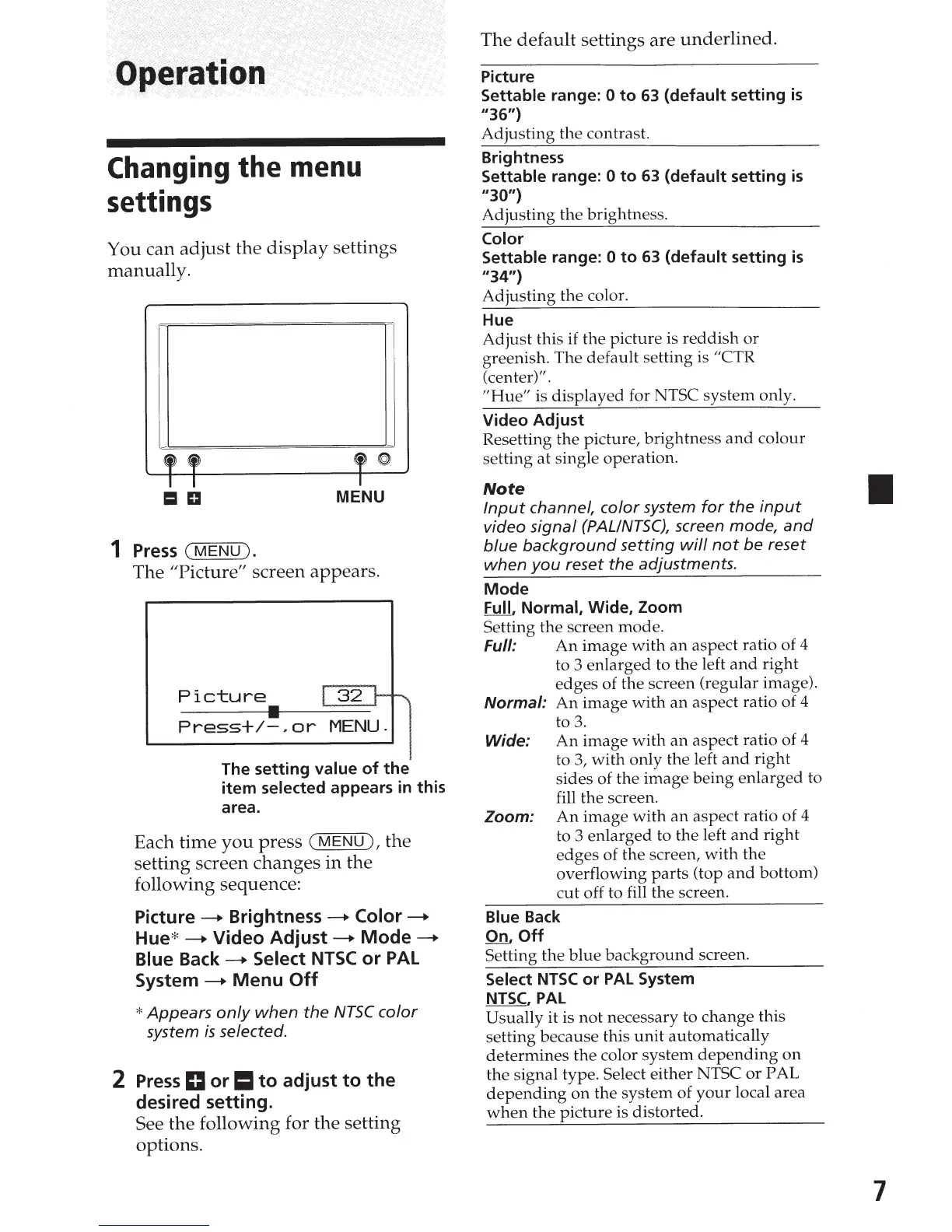
1
Press
(MENU).
The "Picture"
screen appears.
Picture
r
32
r-~
Press+/-,or
MENU.
The
setting
value
of
the
item
selected appears in
this
area.
Each time
you
press
(MENU),
the
setting screen
changes
in
the
following sequence:
Picture
----+
Brightness
----+
Color
----+
Hue*
----+
Video
Adjust
----+
Mode
----+
Blue
Back----+
Select
NTSC
or
PAL
System
----+
Menu
Off
*Appears
only
when
the
NTSC
color
system
is
selected.
2
Press
D
or
II
to
adjust
to
the
desired
setting.
See
the
following for the setting
options.
The
default
settings are
underlined.
Picture
Settable range: 0
to
63
(default
setting
is
11
36")
Adjusting
the
contrast.
Brightness
Settable range:
0
to
63
(default
setting
is
''30")
Adjusting
the
brightness.
Color
Settable
range:
0
to
63
(default
setting
is
11
34")
Adjusting
the
color.
Hue
Adjust
this
if
the picture is
reddish
or
greenish.
The
default
setting is "CTR
(center)".
"Hue"
is
displayed
for NTSC
system
only.
Video
Adjust
Resetting
the
picture, brightness
and
colour
setting
at
single operation.
Note
Input
channel,
color
system
for
the
input
video
signal
(PAL/NTSC),
screen mode,
and
blue
background
setting
will
not
be
reset
when
you
reset
the
adjustments.
Mode
Full,
Normal,
Wide, Zoom
Setting
the
screen mode.
Full:
An
image
with
an
aspect ratio of 4
to
3
enlarged
to the left
and
right
edges
of the screen (regular image).
Normal:
An
image
with
an
aspect ratio of
4
to
3.
Wide:
An
image
with
an
aspect ratio of 4
to 3,
with
only
the left
and
right
sides of the
image
being
enlarged
to
fill the screen.
Zoom:
An
image
with
an
aspect ratio of 4
to 3
enlarged
to
the
left
and
right
edges
of the screen,
with
the
overflowing
parts
(top
and
bottom)
cut
off to fill the screen.
Blue Back
On,
Off
Setting
the
blue
background
screen.
Select
NTSC
or
PAL
System
NTSC,
PAL
Usually it is
not
necessary to
change
this
setting
because
this
unit
automatically
determines
the
color
system
depending
on
the
signal type. Select either NTSC
or
PAL
depending
on
the
system
of
your
local area
when
the
picture
is distorted.
7

Related product manuals