Need help?
Do you have a question about the Sony ZS-S4IP and is the answer not in the manual?
Instructions for connecting AC power or inserting batteries for operation.
Guidance on inserting batteries into the remote control for use.
Technical details for the CD player section, including laser properties.
Lists compatible iPod models and DC output specifications.
Covers radio frequency ranges, speakers, power, dimensions, and mass.
Covers safety, power source, placement, and operational guidelines.
Instructions for cleaning the unit's cabinet and panel.
Addresses power, audio, noise, and iPod connection problems.
Details troubleshooting for CD playback and radio reception.
Solutions for when the remote control does not function correctly.
How to turn the unit on/off, adjust volume, use headphones, and bass boost.
Setting the player to automatically turn off after a set time.
Steps for connecting, playing, and managing an iPod on the unit.
Instructions for replacing the iPod cover with an exchangeable lid.
Selecting repeat, shuffle, and program play modes for CDs.
Basic steps for inserting, playing, pausing, and stopping a CD.
Tuning into FM and AM stations and adjusting reception.
Storing and recalling favorite radio stations using presets.
Procedure to modify the AM tuning step interval.
Checking information on the display for iPod, CD, and radio modes.
How to connect external audio devices like portable music players.
This document describes the Sony Personal Audio System, model ZS-S4IP, a versatile device designed for playing various audio sources, including iPods, iPhones, CDs, and radio. It also features an auxiliary input for connecting other external audio components.
The Sony ZS-S4IP serves as a portable audio entertainment system. Its primary function is to provide high-quality audio playback from multiple sources. It integrates a dock for Apple iPods and iPhones, allowing users to play music directly from their portable devices while simultaneously charging them. The system also includes a top-loading CD player, capable of playing standard audio CDs. Furthermore, it features an AM/FM radio tuner, enabling users to listen to their favorite broadcast stations. An auxiliary audio input expands its functionality, allowing connection to a wide range of external audio devices such as portable digital music players, TVs, or VCRs, effectively turning the ZS-S4IP into a speaker system for these components.
The ZS-S4IP offers a user-friendly interface with intuitive controls for each function.
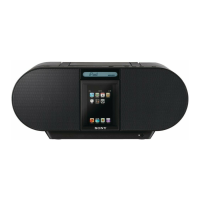
To use an iPod or iPhone, simply press the "PUSH OPEN" button to open the dock door, insert the device onto the connector, and close the door until it clicks. The system will automatically power on (if connected to AC) and begin playing the iPod/iPhone. The display will show "DC OUT" when charging. Users can control playback (pause, stop, skip tracks, locate points) either directly from the unit's buttons or from the iPod/iPhone itself. For iPod nano 1st/2nd generation, the connector position can be adjusted for a centered fit. For other iPods, the connector should be slid to the right. If an iPod touch or iPhone is used, an exchangeable lid (supplied) can replace the standard cover for a better fit. The unit also functions as a battery charger for connected iPods/iPhones when powered by AC. It's recommended to pause playback before disconnecting the device. The system automatically switches to iPod mode if an iPod is connected while another function is active.
Playing a CD involves pressing "PUSH OPEN/CLOSE" to open the CD compartment, placing a disc with the label side up, and then closing the compartment. Pressing the "CDI" button initiates playback of all tracks. Controls for CD playback include pause, stop, skipping tracks, and locating specific points within a track. The system supports various play modes: repeat a single track, repeat all tracks, shuffle play, repeat tracks in random order, program play, and repeat programmed tracks. To select a play mode, users press "MENU/MODE" repeatedly until the desired mode ("1", "", "SHUF", "SHUF" and "", "PGM", or "PGM" and "") appears on the display. Program play allows users to select up to 20 tracks in a desired order. The program is saved until the CD compartment is opened. To cancel a selected play mode, press "MENU/MODE" repeatedly until the mode disappears from the display. The total track number and playing time, as well as remaining time, can be checked on the display.
To listen to the radio, press "RADIO-BAND-AUTO PRESET" repeatedly or use the "RADIO" and "BAND" buttons on the remote to select either "FM" or "AM". Holding down "TUNE +" or "-" initiates an automatic scan for clear stations. Alternatively, users can press the buttons repeatedly to change the frequency step by step. "ST" appears on the display for FM stereo broadcasts. If an FM broadcast is noisy, selecting "Mono" via "MENU/MODE" can improve reception. Users should avoid touching or operating a connected iPod/iPhone while listening to AM/FM to prevent noise. If an iPhone causes interference, it should be removed. To stop power supply to an iPod while listening to radio (if "DC OUT" is displayed), press and hold "MENU/MODE" for a few seconds. The AM tuning interval can be changed by a specific procedure involving disconnecting and reconnecting the AC power cord while holding down "RADIO-BAND-AUTO PRESET" and "MENU/MODE". After changing the interval, preset radio stations need to be reset.
The system can store up to 30 radio stations (20 FM, 10 AM). To auto-preset, select the band, hold down "RADIO-BAND-AUTO PRESET" for 2 seconds until "AUTO" flashes, then press "DISPLAY-ENTER". Stations are stored from lower to higher frequencies. For manual presetting of weak signals, tune in the desired station, hold down "DISPLAY-ENTER" for 2 seconds until the preset number flashes, use "PRESET +" or "-" to select the desired preset number, and then press "DISPLAY-ENTER". Preset stations remain in memory even if the AC power cord is unplugged or batteries are removed. To play preset stations, select the band and then use "PRESET +" or "-".
The display provides useful information. In iPod mode, the iPod backlight can be toggled using the "DISPLAY" button on the remote. In CD mode, the total track number and playing time, as well as remaining time, can be checked. In radio mode, the frequency or preset station number can be displayed.
External audio components can be connected to the "AUDIO IN" jack on the back of the unit using an audio connecting cable (not supplied). After connecting and powering on both the unit and the external component, pressing "AUDIO IN" will output the sound from the external component through the ZS-S4IP's speakers. For connecting to a TV or VCR, an extension cable with a stereo-mini jack on one end and two phono plugs on the other is required.
The unit operates on six R14 (size C) batteries. When the batteries are low, the "BATT" indicator flashes in the display. If the unit is connected to AC power, the "BATT" indicator will not appear. To replace batteries, open the battery compartment cover on the bottom of the unit, remove the old batteries, and insert new ones with the correct polarity. It's important to use new batteries of the same type and avoid mixing old and new batteries or different types. If the unit will not be used for a long period, batteries should be removed to prevent leakage and corrosion.
To keep the CD player in good condition, avoid touching the surface of the disc. If a disc is dirty, wipe it with a soft cloth from the center outwards. Do not use solvents like benzene, thinner, or commercially available cleaners, as they can damage the disc. Do not use irregularly shaped discs, such as heart-shaped or octagonal CDs, as they may cause malfunctions.
The exterior of the unit can be cleaned with a soft cloth dampened with a mild detergent solution. Avoid using abrasive pads, scouring powder, or solvents like alcohol or benzene, as they can damage the finish. For prolonged periods of non-use, it is recommended to disconnect the AC power cord from the wall outlet. The unit should be kept away from direct sunlight, heat sources, and excessive dust, dirt, moisture, or mechanical shock.
The manual provides a troubleshooting section for common issues. For example, if the unit does not turn on, users should check the AC power cord connection or battery installation. If there is no sound, checks include volume level, headphone connection, and correct function selection. For CD playback issues, checks include disc cleanliness, correct disc insertion, and play mode selection. For radio reception issues, checks include antenna position, tuning, and interference sources. If an iPod/iPhone is not recognized or not playing, users should ensure it is properly docked and charged. The manual advises that if problems persist after following these steps, users should consult their nearest Sony dealer.
 Power
Power| power requirements | 120 V AC, 60Hz, 9 V DC, 6 R14(size C) batteries |
|---|---|
| output power | 1.7W + 1.7W |
| power consumption | AC 13W |
 Battery
| battery capacity | 6 R14(size C) batteries |
|---|---|
| battery life | Up to 20 hours |
 Audio
Audio| frequency response | 20-20000Hz |
|---|---|
| sound enhancer | MEGA BASS® On/Off selector |
| tuner type | AM, FM |
 Speaker
| speaker system | Full Range: 3 1/4" (8cm) |
|---|---|
| speaker unit | Fixed SP Net and Metal Punching Net |
Inputs and Outputs| input | Audio in Jack and iPod®1 connector |
|---|---|
| headphone input | 1 (Stereo Mini) |
| audio in | Audio line-in jack |
Dimensions and Weight| weight | 6.83 lbs. (3.1kg) |
|---|---|
| dimensions | 15.7 x 6.7 x 8.8 in (400 x 169.7 x 224 mm) |

 To Next Page