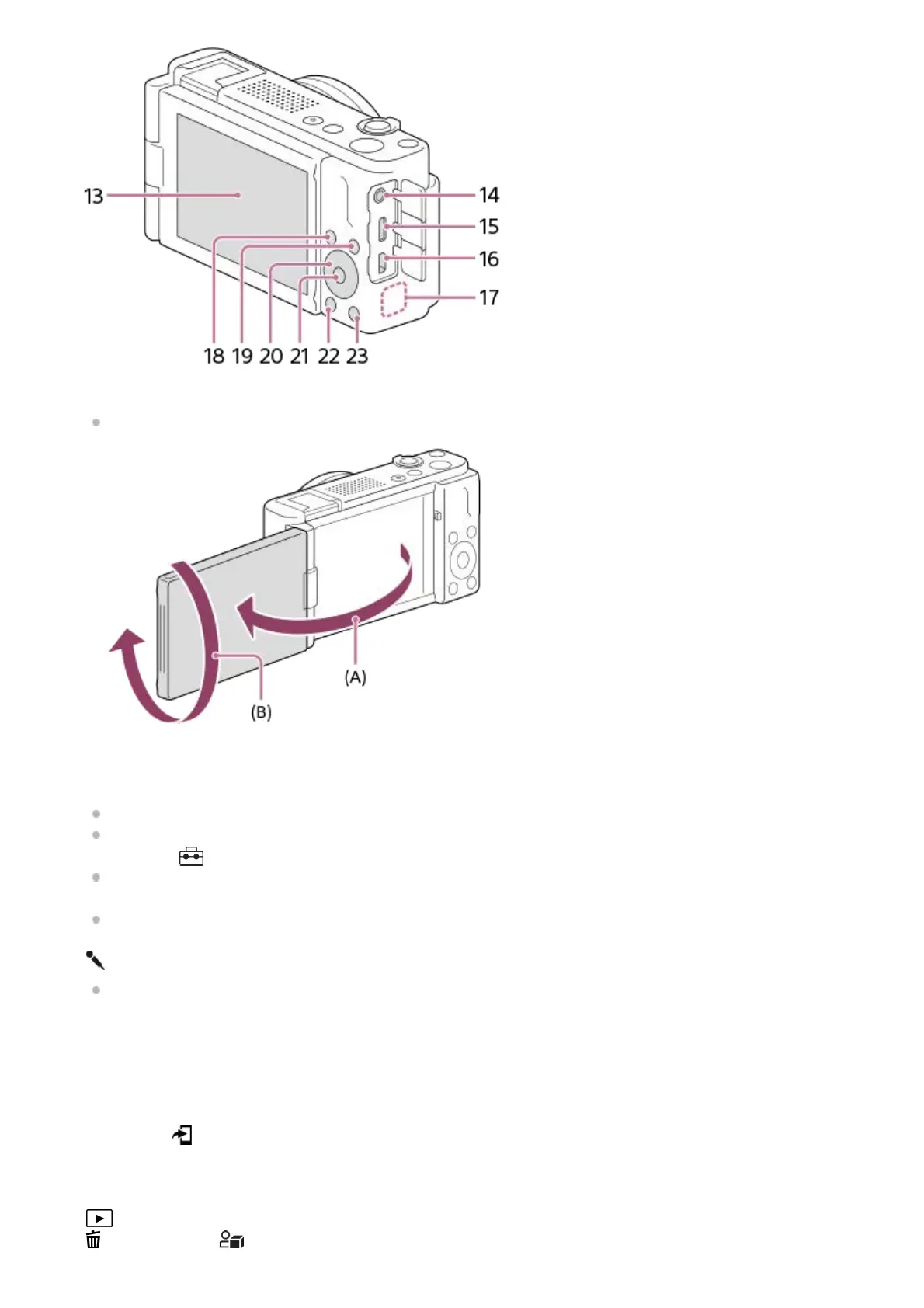
Monitor/Touch panel
You can adjust the monitor to an easily viewable angle and shoot from any position.
(A): Approx. 176°
(B): Approx. 270°
If you open the monitor from the closed position with the screen facing inwards, the camera will turn on.
To choose whether or not the camera turns off when the monitor is closed with the screen facing inwards, select
MENU →
(Setup) → [Power Setting Option] → [Power OFF w/ monitor].
You may not be able to adjust the monitor angle depending on the type of a tripod you use. In such a case,
release the tripod screw once to adjust the monitor angle.
Do not apply excessive force when opening, closing, or rotating the monitor. Doing so may cause a malfunction.
13.
(Microphone) jack
When an external microphone is connected, the built-in microphone turns off automatically. When the external
microphone is a plugin-power type, the power of the microphone is supplied by the camera.
14.
USB Type-C terminal15.
HDMI micro jack16.
Wi-Fi/Bluetooth antenna (built-in)17.
For shooting: Fn (Function) button
For viewing: (Send to Smartphone) button
18.
MENU button19.
Control wheel20.
Center button21.
(Playback) button22.
(Delete) button/ (Product Showcase Set) button23.



 To Next Page