Help Guide
Digital Camera
ZV-1F
Focusing on human eyes
The camera can automatically recognize faces and eyes and focus on the eyes.
The following explanation is for cases where the recognition target is human. The faces of up to 8 subjects can be
recognized.
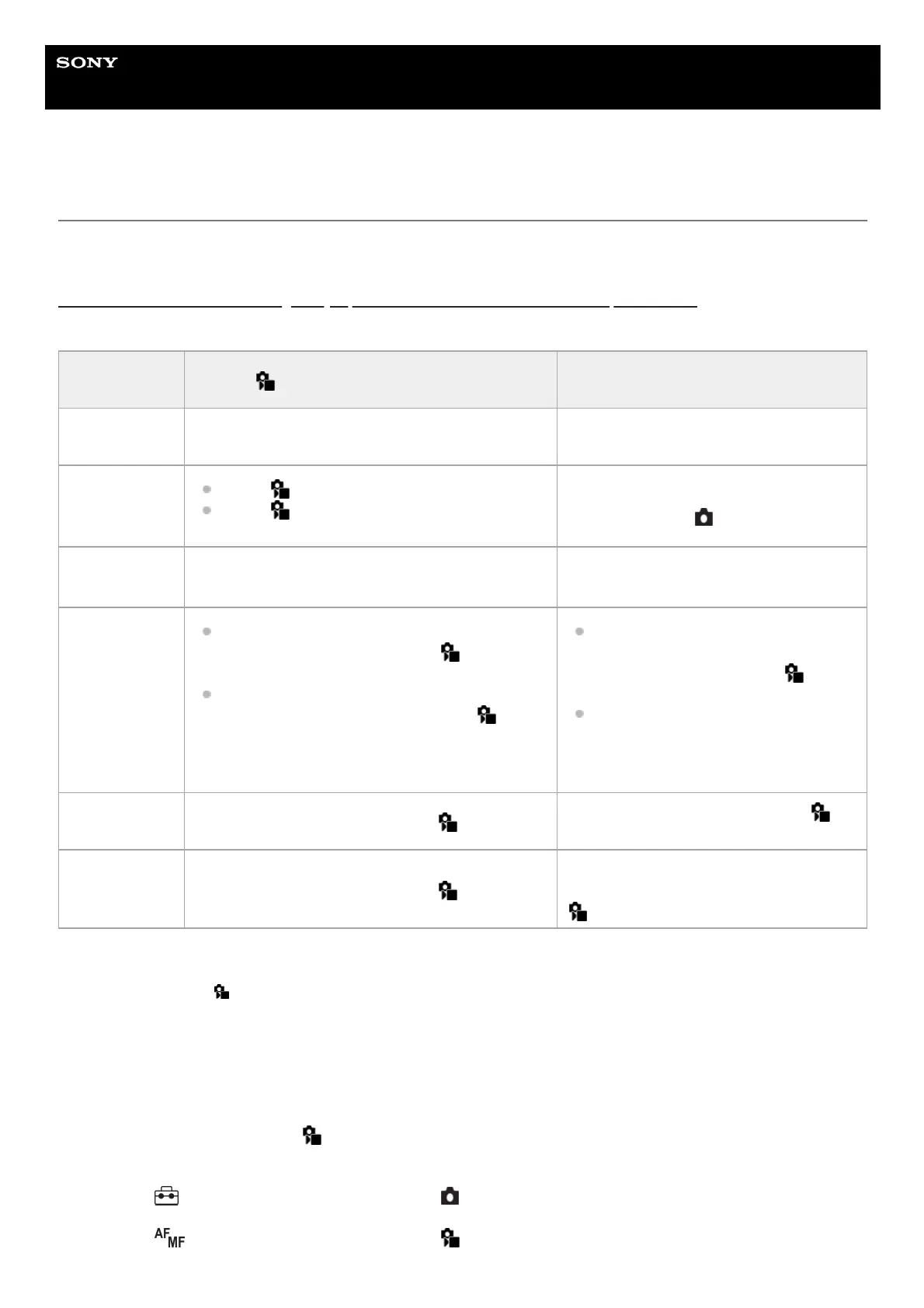
There are two methods of focusing on eyes, with some differences between their specifications. Select the appropriate
method according to your purpose.
[Subject Recognition AF] by custom key
This function can be used by assigning [Subject Recognition AF] to a custom key. The camera can focus on eyes as long
as you are pressing the key. This is useful when you want to temporarily perform auto-focusing anywhere on the entire
screen regardless of the setting for [
Focus Area].
If the camera does not recognize any faces or eyes, auto-focusing will not be performed.
Item [ Subject Recog in AF] function
[Subject Recognition AF] via a custom
key
Characteristics
The camera will recognize faces/eyes with greater
priority.
The camera will recognize faces/eyes
exclusively.
Advance
preparation
Select [
Subject Recog in AF] → [On].
Select [
Recognition Target] → [Human].
Assign [Subject Recognition AF] to the
desired key using [
Custom Key Setting].
How to focus Press the shutter button halfway down.
Press the key to which you have assigned
the [Subject Recognition AF] function.
*
Function
details
When the camera recognizes a face or eye
inside or around the designated [
Focus Area],
it focuses on the face or eye with greater priority.
If the camera does not recognize any faces or
eyes inside or around the designated [
Focus
Area], it will focus on another recognizable
subject.
The camera focuses exclusively on
faces or eyes anywhere on the screen,
regardless of the setting for [
Focus
Area].
The camera will not automatically focus
on another subject if no face or eye is
recognized anywhere on the screen.
Focus mode Follows the setting designated with [
Focus Mode]
Follows the setting designated with [
Focus Mode]
Focus area Follows the setting designated with [
Focus Area]
The focus area temporarily becomes the
entire screen, regardless of the setting for [
Focus Area].
Regardless of whether [
Subject Recog in AF] is set to [On] or [Off], you have assigned [Subject Recognition AF] to a custom key, you can
use [Subject Recognition AF] while you are pressing that custom key.
*
MENU →
(Setup) → [Operation Customize] → [ Custom Key Setting] → desired key, then assign the
[Subject Recognition AF] function to the key.
1.
MENU →
(Focus) → [Subject Recognition] → [ Recognition Target] → [Human].2.



 To Next Page