Technical specifications
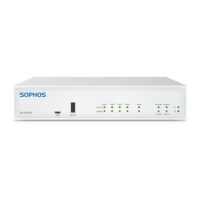
Sophos RED 50
Chassis Heavy-duty steel (painted white)
Mounting Desktop/wall/rack (optional)
Dimensions
(W x H x D)
216 x 44 x 189 mm
Weight 1,1 kg
Power supply Input: 100-240 V, 50-60Hz, 1.3 A Output: 12V
3.33A
Power
consumption
38.2 W (max.)
Temperature 0-40° C (operating), -20-70° C (storage)
Humidity 5-90% (operating), 5-95% (storage), non-condensing
Regulatory
compliance
Safety
CE EN 60950-1:2006+A11:2009+ A1:2010+A12:2011
CB IEC 60950-1 (ed.2), IEC 60950-1 (ed.2); am1
UL UL 60950-1, CSA C22.2 No. 60950-1-07
EMC
CE EN 55022:2010 Class A
EN 61000-3-2:2006+A1:2009+A2:2009
EN 61000-3-3:2008
EN 55024:2010
FCC CFR 47, Part 15 Subpart B, Class A
C-Tick AS/NZS CISPR 22:2009 Class A
VCCI V-3/2012.04, Class A ITE
Rack-Mount Instructions
To mount the appliance to a rack (1U), you need the special RED 50 rack-
mount ears, which is a separate item to be ordered. Make sure you only use
the screws supplied with the rack-mount ears. Using the wrong screws could
damage the hardware appliance and would invalidate your warranty.
1. Attach the rack-mount ears to the appliance
Place the appliance on a hard, flat surface with the front panel facing you.
Attach the rack–mount ears to the left and right side of the appliance with the
supplied screws. Make sure the ears are properly attached to the appliance.
2. Choose the rack location
For general warnings on rack-mount installations, see below.
3. Attach the brackets to the rack with appropriate screws (not included).


 To Next Page
 Loading...