EN 02
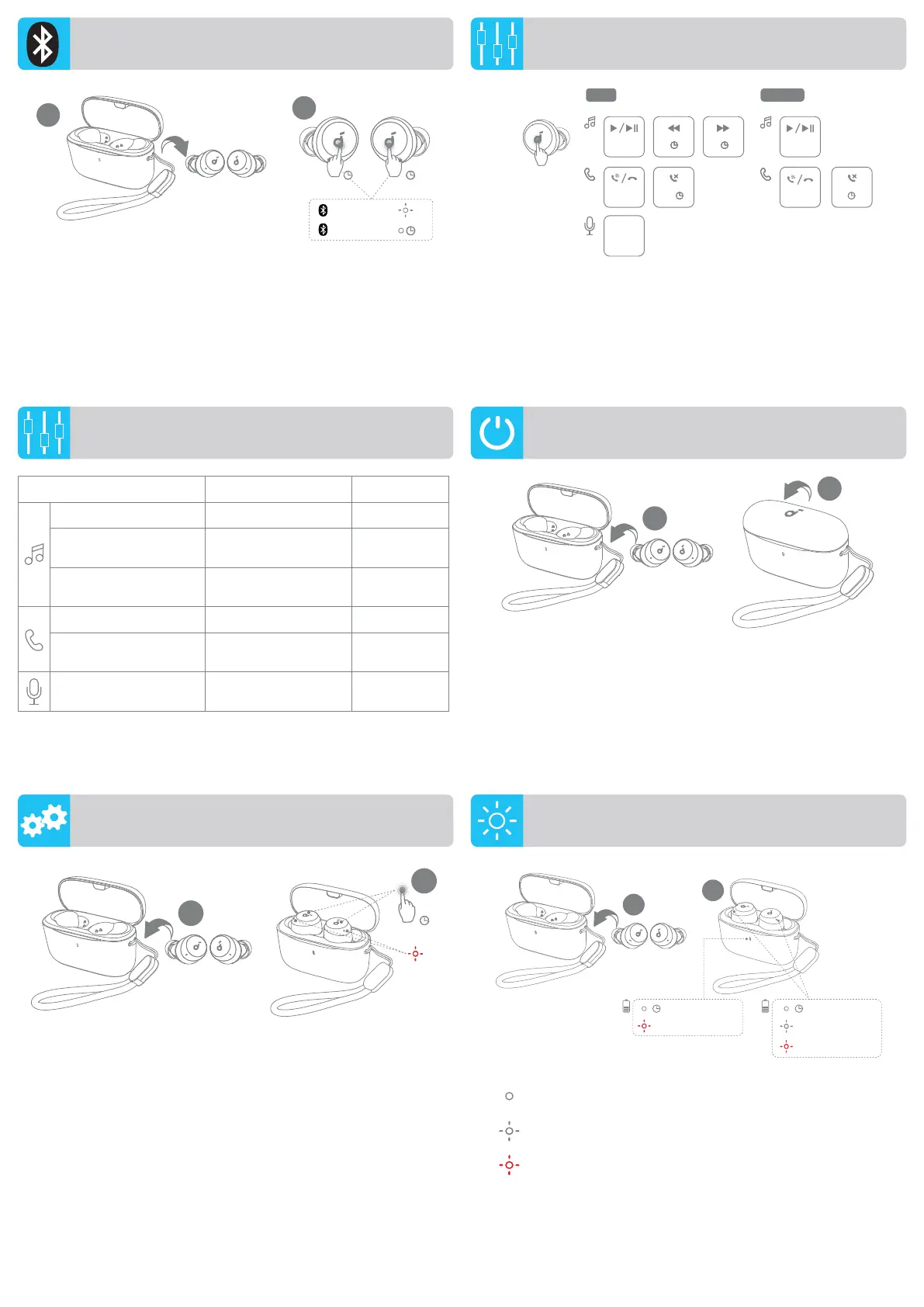
TomanuallyenterBluetoothpairingmode,taketheearbudsoutof
thecase,thentapandholdthetouchpadsonbothearbudsfor3
secondsuntiltheearbuds'LEDindicatorsflashwhiterapidly.
1
2
3s
PAIRING
CONNECTED
1s
3s
Youcanalsocustomizecontrolsinthesoundcoreapp.
Voice
Assistant
R
×2 ×2
L/R
×2
L
×2
L/R
2s2s2s2s
L
2s2s2s2s
×2
2s2s
R
2s2s2s2s
MANUAL PAIRING
CONTROLS
CONTROLS
TWSmode Monomode
Play/Pause Taptwice(R) Taptwice
Previoustrack
Tapandholdfor2
seconds(L)
/
Nexttrack
Tapandholdfor2
seconds(R)
/
Answer/Endacall Taptwice(L/R) Taptwice
Rejectacall
Tapandholdfor2
seconds(L/R)
Tapandhold
for2seconds
Activatevoiceassistant
software
Taptwice(L) /
POWERING OFF
Topoweroff,returntheearbudstothechargingcaseandcloseit.
Theearbudswillautomaticallypoweroffafter30minutesiftheyarenot
connected.
1
1
×3
8s
Resetiftheearbudshaveissuespairingwitheachotherorwith
otherdevices.Placetheearbudsinthechargingcaseandleavethe
caseopen,thentapandholdthetouchpadsonbothearbudsfor
8secondsuntiltheearbuds'LEDindicatorsflashredrapidlythree
times.
RESET LED LIGHT GUIDE
60% - 100%
10% - 60%
0% - 10%
×2
×2
×4
25% - 100%
0% - 25%
0.5s3s
1
2
Steadywhite
Flashingwhite
Flashingred




 To Next Page