02 EN
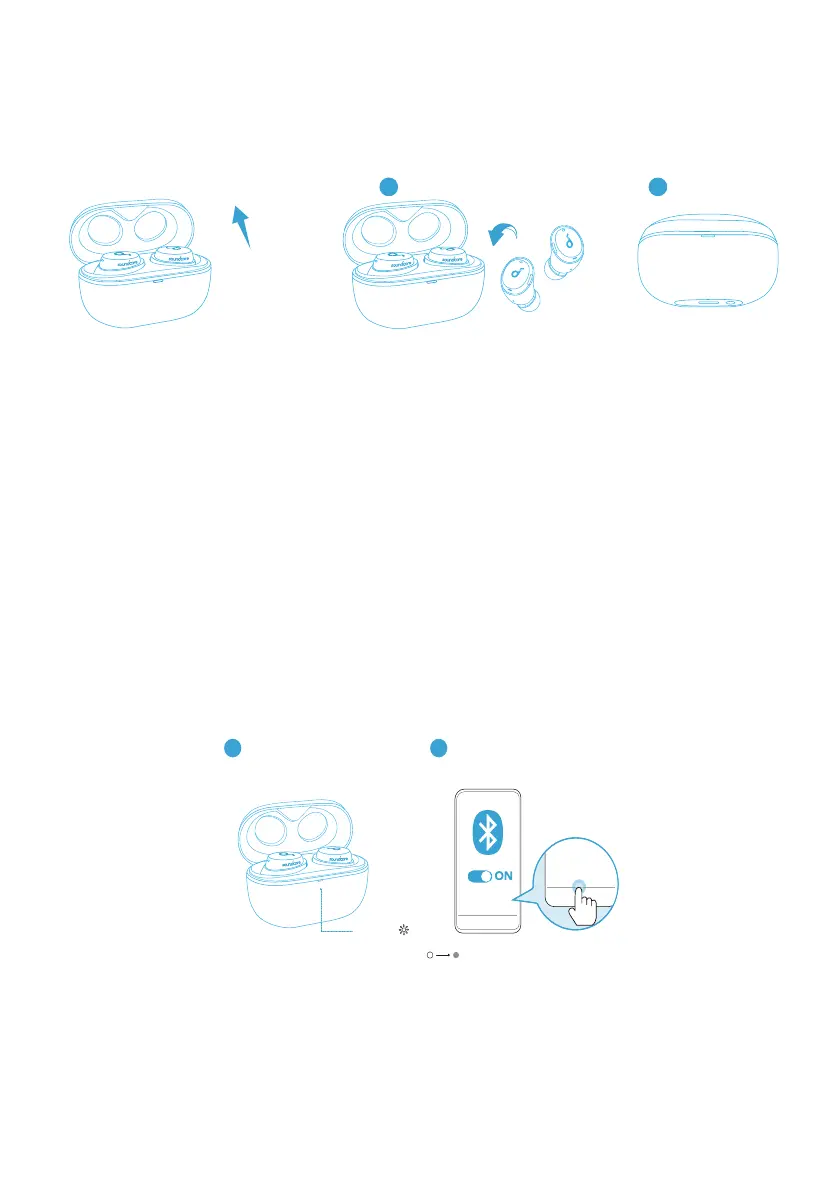
Powering On/Off
• Open the charging case, the earbuds will automatically power on.
• To power off, place the earbuds into the charging case and close it.
ON
2
1
OFF
• The earbuds will automatically power off after 10 minutes if no device is
connected.
• To manually power on, press and hold the multi-function button on both
earbuds for 3 seconds.
Bluetooth Pairing
1. Take the earbuds out of the charging case, the earbuds will automatically enter
Bluetooth pairing mode.
• The LED indicator on the charging case will flash white.
2. Select “Soundcore Dot 3i” on your device’s Bluetooth list to connect.
• When successfully connected, the LED indicator on the charging case will
turn off.
2
Soundcore
Dot 3i
Dot 3i
Soundcore
PAIRING
CONNECTED
1
• Pairing with another device: Place the earbuds in the charging case and leave
the case open. To enter pairing mode, press and hold the button on the case
for 3 seconds until the LED indicator on the charging case flashes white.
• When earbuds are out of the charging case and powered off, to manually
enter Bluetooth pairing mode, press and hold the multi-function button on
both earbuds for 3 seconds.





 To Next Page