EasyManua.ls Logo

Soundcore Space NC A3021 - Page 4

Soundcore Space NC A3021
36 pages
Print Icon
To Next Page IconTo Next Page
To Previous Page IconTo Previous Page
Loading...
02 English English 03
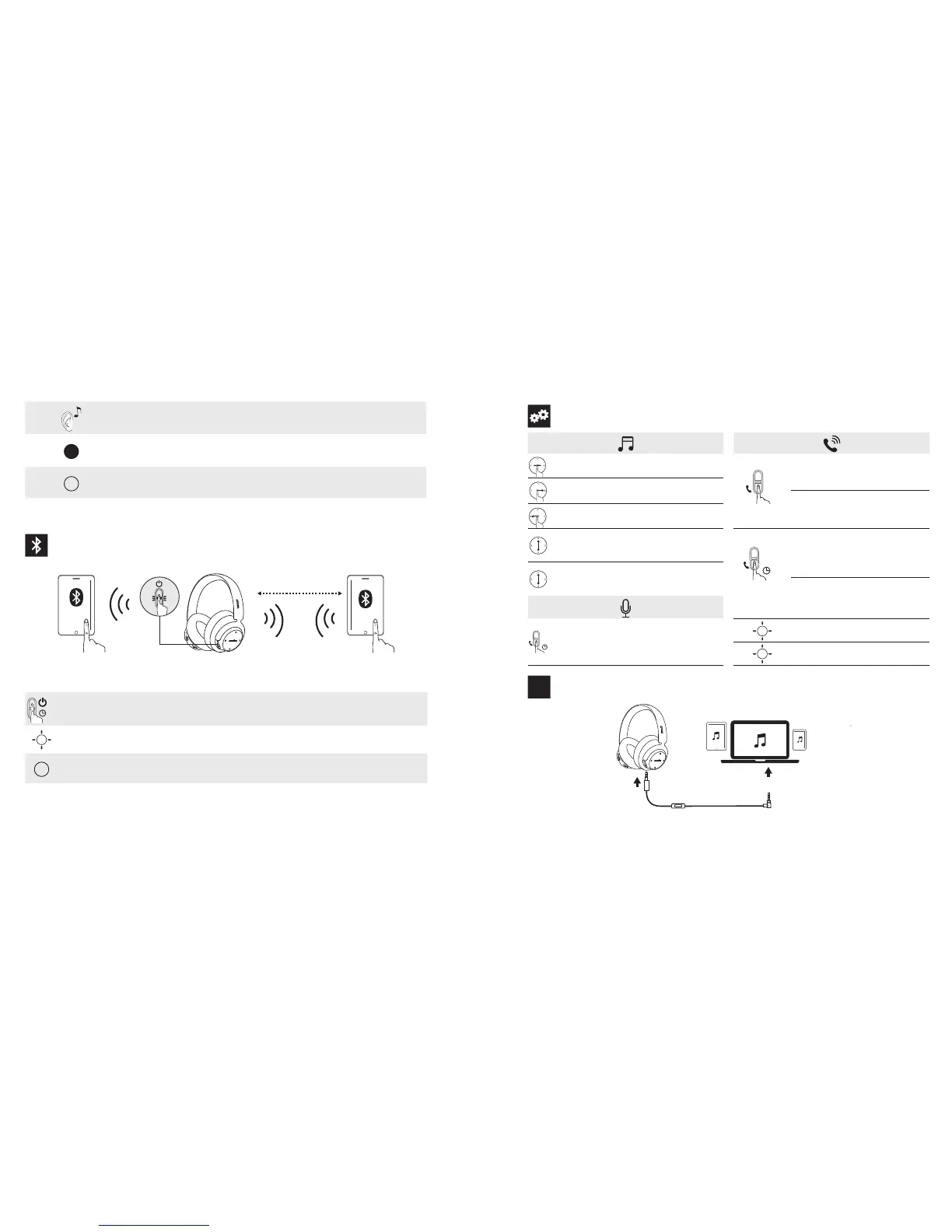
Controls
X1
Tap Once Play / pause
X1
Press
Answer / End call
Slide Forward Next track
Put current call on hold and answer
incoming call
Slide Backward Previous track
Slide Up / Down
and hold
Volume up / down (Volume
increase continuously /
decrease continuously)
1”
Press and hold
for 1 second
Reject call
Slide Up / Down
Volume up / down (volume
increase or decrease by
one level)
Switch between held call and
active call
1”
Press and hold
for 1 second
Activate Siri / other voice
control software
Rapid flashing blue On a call
Slow flashing blue Incoming call
AUX
Aux-in
AUX
R
L
Notification sound (Tone)
Flashing Red
Low Battery
Solid Red Charging
Solid blue Fully Charged
Pairing
ON
1m
Soundcore
Space NC
3”
Press and hold for 3 seconds Enter Bluetooth pairing mode
Rapidly Flashing Blue Pairing mode
Solid Blue (For 1.5 seconds) Connected to a device

Related product manuals