4
Turn the speaker to Bluetooth pairing mode -
1. Turn ON the speaker.
2. Long press the Mode button repeatedly until you see “bt” on the LCD Display
panel.
3. You would hear the beep tone; the speaker is now in pairing mode.
(Note: Speaker automatically pairs with the previously paired devices)
Pairing your device with Bluetooth Speaker –
Your Bluetooth Speaker can wirelessly stream audio from any Bluetooth
enabled device within the distance of 27-33 Feet. Simply follow the below steps.
1. Turn ON the speaker.
2. Select Bluetooth mode.
3. You would hear the beep tone; speaker is now in pairing mode.
4. Turn on the Bluetooth on your Mobile Phone or Tablet or Computer.
5. It will search for various devices.
6. The pairing name of our Bluetooth Speaker is “DPS-8/6093”, pair it with
this device.
7. If required, enter the password ‘0000’ to confirm to finalize pairing.
8. Once paired successfully, you would hear a beep tone.
9. If you fail to pair it within the time frame or you want to pair it with a new
device please follows the steps outlined above.
Select your favorite song at the Bluetooth device and music would now stream
through bluetooth speaker.
Listening to Music Wirelessly
Please ensure that your device (iPhone, Tablet or Other Smart Phone) is paired
with the Bluetooth Speaker to stream music wirelessly. Once it is paired, play
music from your device.
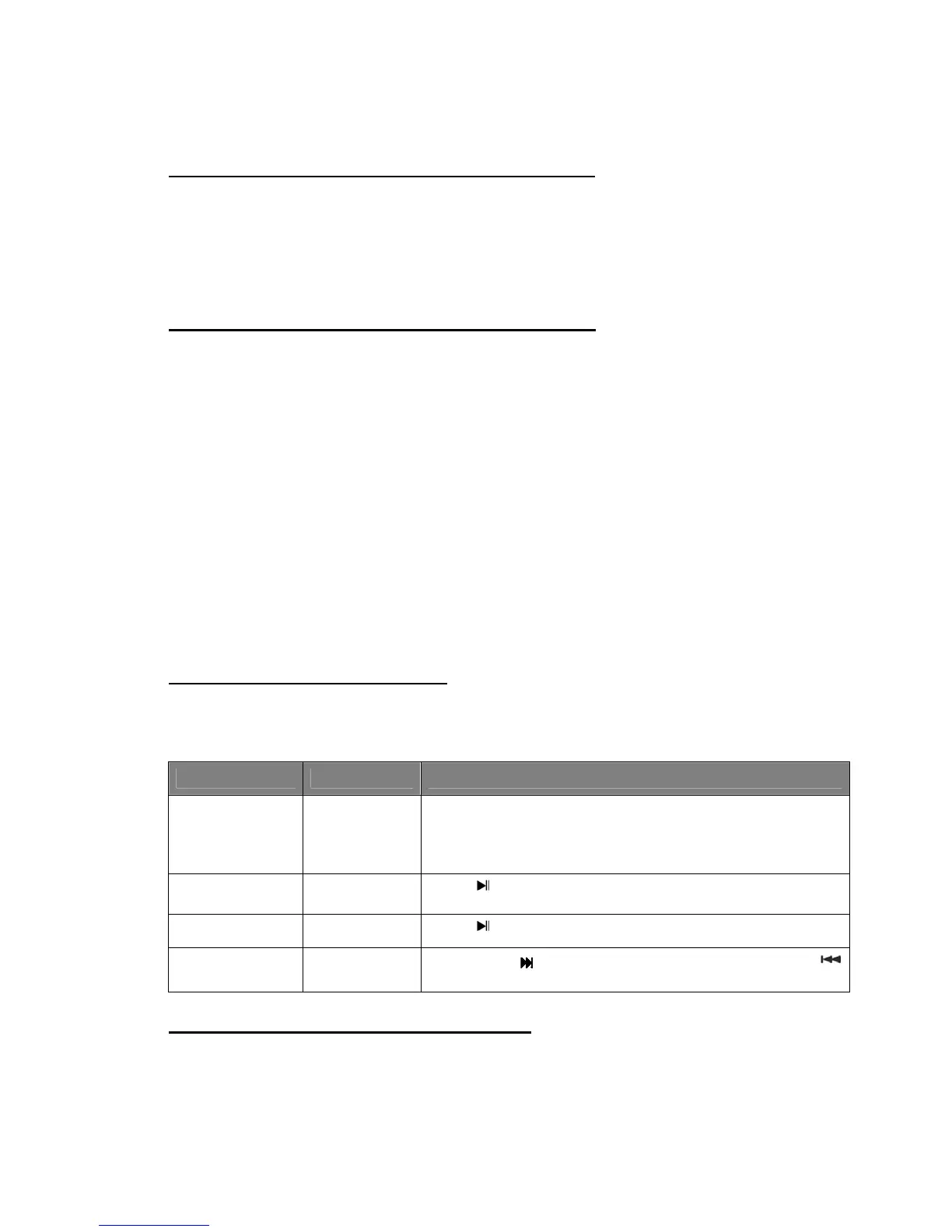
Function Operation Button
Increase /
Decrease
Volume
Playing
music
Use the Volume Controller located on the control
panel to adjust the volume to your desired level; long
press V+ to increase the volume or long press V- to
decrease the volume
Pause Playing
music
Press once to pause the music
Play Pause Press once resume the music
Skip Forward /
Skip Backward
Playing
music
Short press
to skip forward the track. Short press
to skip backward the track.
Listening to Music using AUX-In Mode
1. Turn on the speaker.


 To Next Page