ICD2080 / English Instruction Manual
2
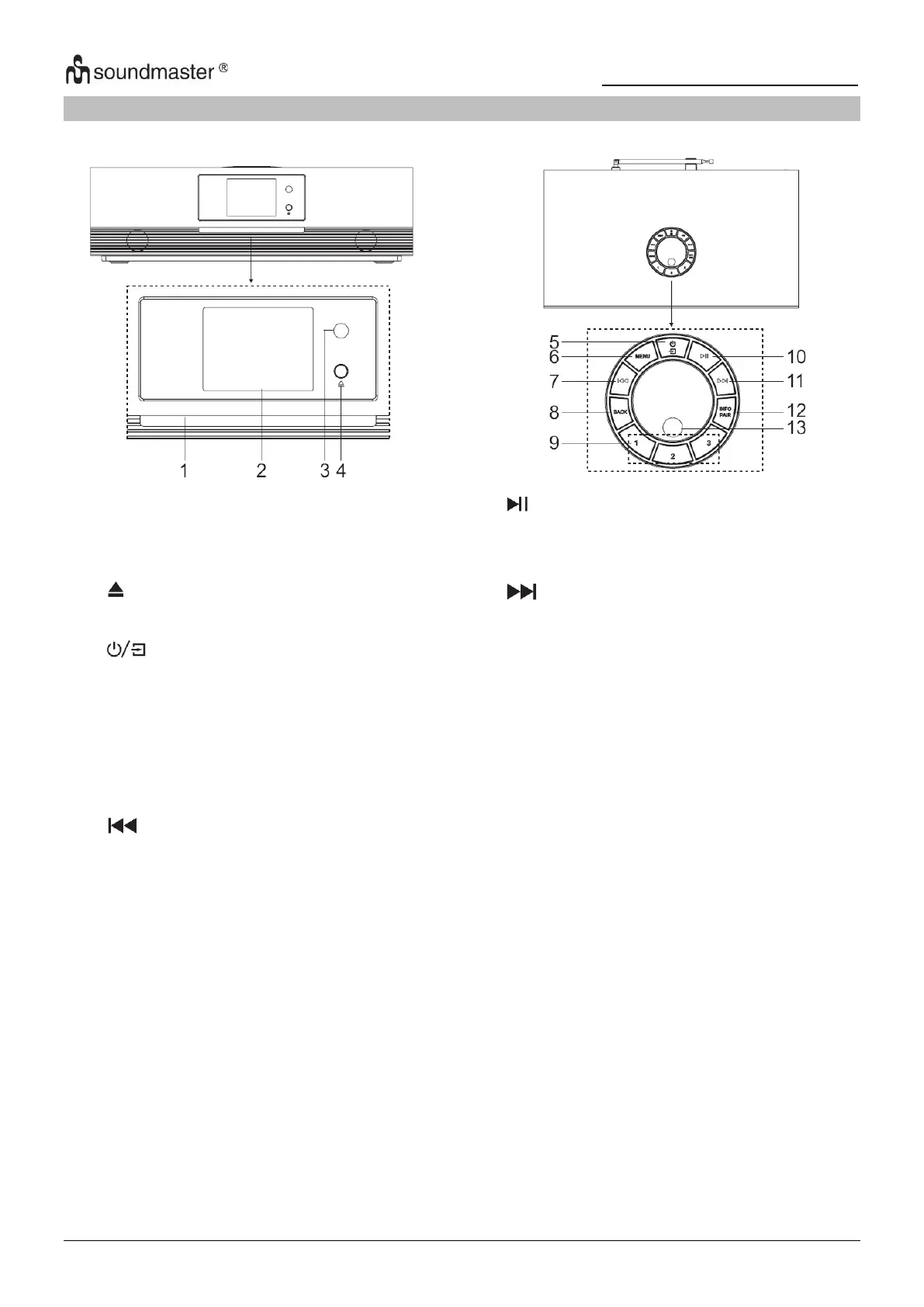
LOCATIONS OF CONTROLS
FRONT VIEW TOP VIEW
Disc door
Display
Remote sensor
* Press to open the CD-door
* Press and hold for power on and
power off
* Press to change the source
MENU
* Press to display the Menu
* Press to select previous track in CD/
USB/FM/BT/Internet Radio mode
BACK
* Press to return previous menu
1/2/3
* IN DAB/FM mode, press to select
preset favorite stations
* IN DAB/FM mode, long press to set
current station to favorite station
* In CD mode, short press to select
number 1/2/3
* Press to play and pause in CD, USB,
BT and Internet radio
* Press to select next track in CD/USB/
DAB/FM/BT/Internet radio mode
INFO/PAIR
* Press to show the information in CD/
USB/DAB/FM and Internet radio mode
* Press and hold to activate the pairing
function in BT or disconnect the existing
paired BT device
OK
* Press to select or skip selection
VOL+/VOL-
* Rotate to increase or decrease the
volume level
NAVIGATE
* Rotate to move down or move up on the
menu screen














 To Next Page