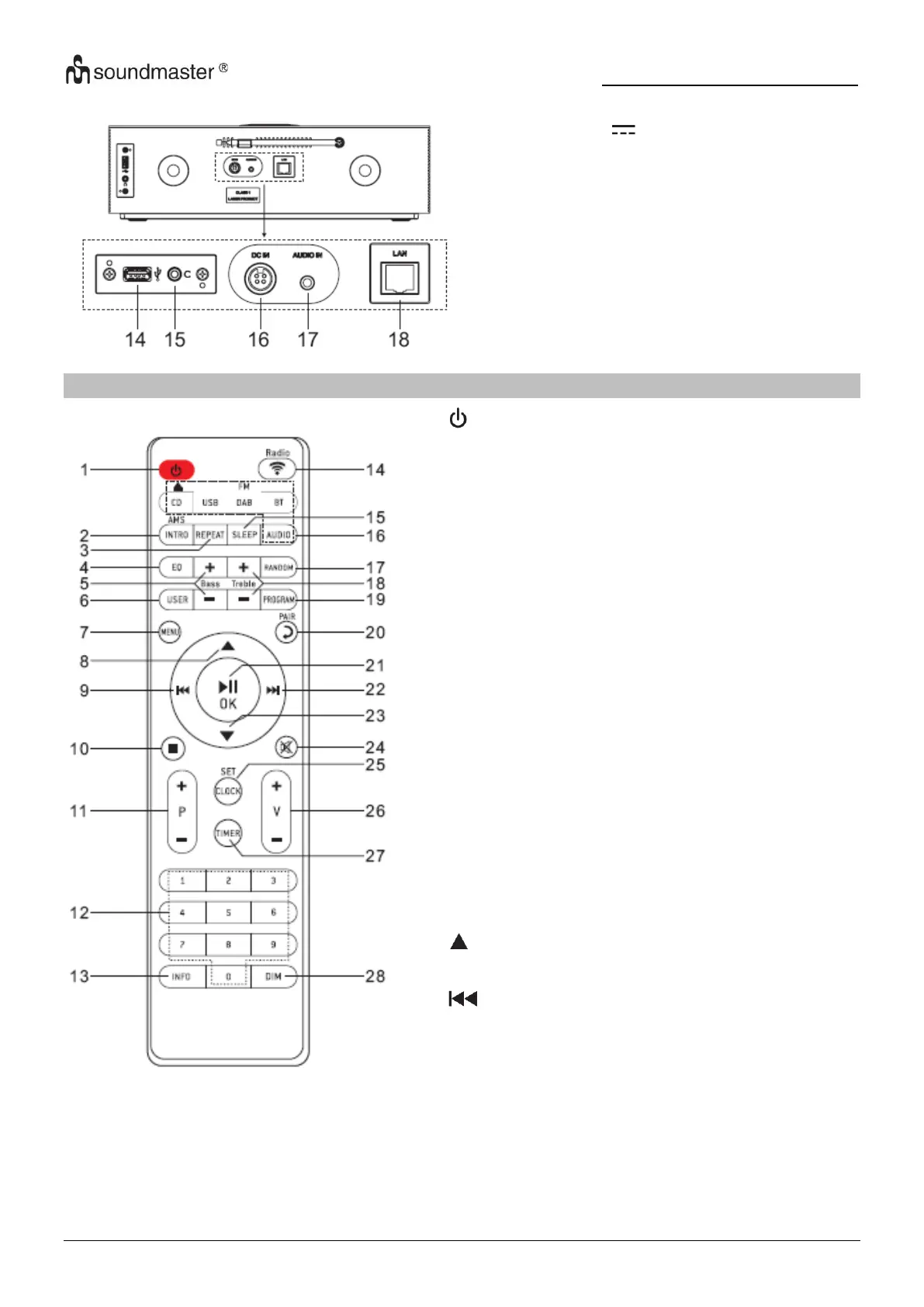
* Turn the unit ON or in STANDBY mode
INTRO/AMS
* Press to start browsing of all tracks in CD
* Press to automatically search for channel in
DAB and FM; when in searching, press again
can stop it.
REPEAT
* Press to select a repeat playback mode in CD
EQ
* Press to select sound characteristics:
Normal/Jazz/Rock/Classic/Pop/My EQ
BASS+/-
* Press to adjust the BASS in USER mode
USER
* Press to allow you to adjust the Bass and
Treble in USER mode
MENU
* Press to display the Menu
* Press to move up on the menu screen
* Press and hold for fast backward in CD and
USB
* Press to select previous track in CD and USB
* Press to display the channel list in DAB, FM and
internet radio
* Press for fine tuning in FM
* Press and hold for manual tuning in FM














 To Next Page