EasyManua.ls Logo

SOUNDMASTER IR1500 - User Manual

SOUNDMASTER IR1500
115 pages
Go to English
Print Icon
To Next Page IconTo Next Page
Loading...
DEUTSCH
ITALIANO
ENGLISH
ČEŠTINA
FRANÇAIS
SLOVENSKÝ
NEDERLANDS
IR1500
Hersteller
Wörlein GmbH Tel.: +49 9103/71670
Gewerbestrasse 12 Fax.: +49 9103/716712
D 90556 Cadolzburg Email. info@soundmaster.de
GERMANY Web: www.soundmaster.de

Questions and Answers

  • K
    Kyle MackAug 16, 2025
    What to do if SOUNDMASTER IR1500 Radio has no sound?
    • T
      thomasmartinAug 16, 2025
      If your SOUNDMASTER Radio has no sound, first adjust the volume using the Tune/Select knob. Also, verify that the mains power lead is properly connected to the back of the radio and that the wall power socket is switched on.
  • C
    Cassandra BrownAug 22, 2025
    Why SOUNDMASTER IR1500 Radio can connect to the network but not play stations?
    • D
      danieljohnsonAug 22, 2025
      Your SOUNDMASTER Radio might be unable to play certain stations for a few reasons: the station might not be broadcasting at the current time (it could be in a different time zone), the station's server might be overloaded with too many listeners, or the station might have reached its maximum allowed number of simultaneous listeners. Also, the link on the radio might be outdated; this updates automatically every day.
  • M
    Mr. Jordan Mckinney DVMAug 27, 2025
    How to improve poor DAB/FM Radio reception on SOUNDMASTER?
    • M
      Michael LopezAug 27, 2025
      To improve poor DAB/FM radio reception on your SOUNDMASTER device, ensure the aerial is fully extended for maximum signal strength. Additionally, check that no other electrical equipment is too close to the radio, as this can cause interference.
  • D
    Danielle CharlesSep 3, 2025
    What to do if there is no DAB/FM reception on SOUNDMASTER IR1500 Radio?
    • S
      Stephanie PriceSep 3, 2025
      If your SOUNDMASTER Radio has no DAB/FM reception, perform a "Factory Reset" on the radio, extend the antenna, and move the radio closer to a window.
  • C
    Carlos BurnettNov 9, 2025
    How to fix SOUNDMASTER IR1500 when it cannot connect to Wi-Fi network?
    • K
      Kristy MasonNov 9, 2025
      If your SOUNDMASTER Radio isn't connecting to Wi-Fi, here are some things to try: * First, ensure your internet is working by checking if a computer on the same network can access the internet. * Verify that a DHCP server is available or that you've set up a static IP address on the radio. * Make sure your firewall isn't blocking ports 80, 443, 8008 (TCP and UDP), and 53 (DNS). * If your router restricts access by MAC address, find the radio's MAC address under Configuration > Information > Network > Wi-Fi MAC and add it to your router's allowed list. Remember that wired and wireless connections have different MAC addresses. * Check the distance between your radio and the router, and optimize the router's location. Also, ensure that the Wi-Fi signal strength is sufficient. *...

Summary

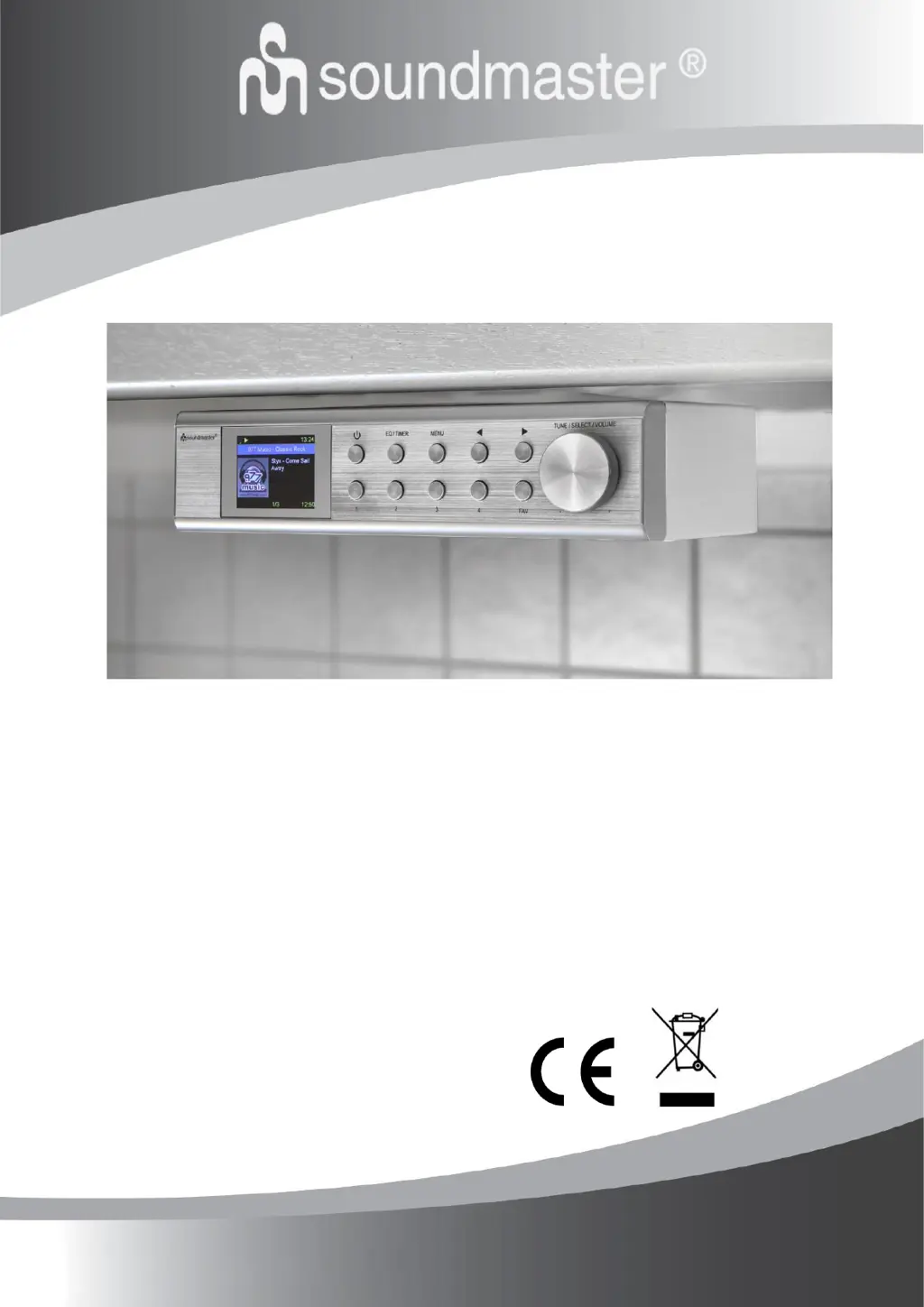
Location of Controls

Front Panel Controls

Identifies and describes buttons, display, and knobs on the front of the unit.

Installation and Basic Operations

Core Operations

Guides for turning on/off, changing modes, and controlling volume.

Getting Started Guide

Connecting to Wireless LAN

Step-by-step guide to connect the device to a Wi-Fi network.

Features and Functions Overview

Internet Radio Functionality

Explore worldwide radio stations and music via the internet.

Digital and FM Radio Reception

Tune into DAB/DAB+ and FM radio stations.

Media Centre Functionality

Music Streaming via UPnP;DLNA

Stream music from network servers using UPnP/DLNA.

DAB Radio

DAB Reception Guide

Instructions for scanning and tuning DAB/DAB+ radio stations.

FM Radio

FM Reception Guide

Instructions for scanning and tuning FM radio stations.

Bluetooth Operations

Pairing and Connecting Devices

Steps to connect Bluetooth devices for audio streaming.

Configuration Settings

Wi-Fi Network Management

Add, remove, and switch between Wi-Fi networks.

Network and System Configuration

Software and Station Management

Managing Favorite URLs via PC

Add and manage favorite radio stations using a PC web interface.

Troubleshooting Wi-Fi and Network

Wi-Fi Connection Issues

Solutions for problems connecting to the Wi-Fi network.

DAB;FM Reception Problems

Solutions for poor or no DAB/FM radio reception.

SOUNDMASTER IR1500 Specifications

General IconGeneral
TypeInternet Radio
DAB+Yes
FMYes
Internet RadioYes
BluetoothNo
USBYes
Headphone JackYes
PresetsYes
Alarm ClockYes
Remote ControlYes
Frequency RangeFM 87.5-108 MHz
ModulationFM, DAB+

Related product manuals