EasyManua.ls Logo

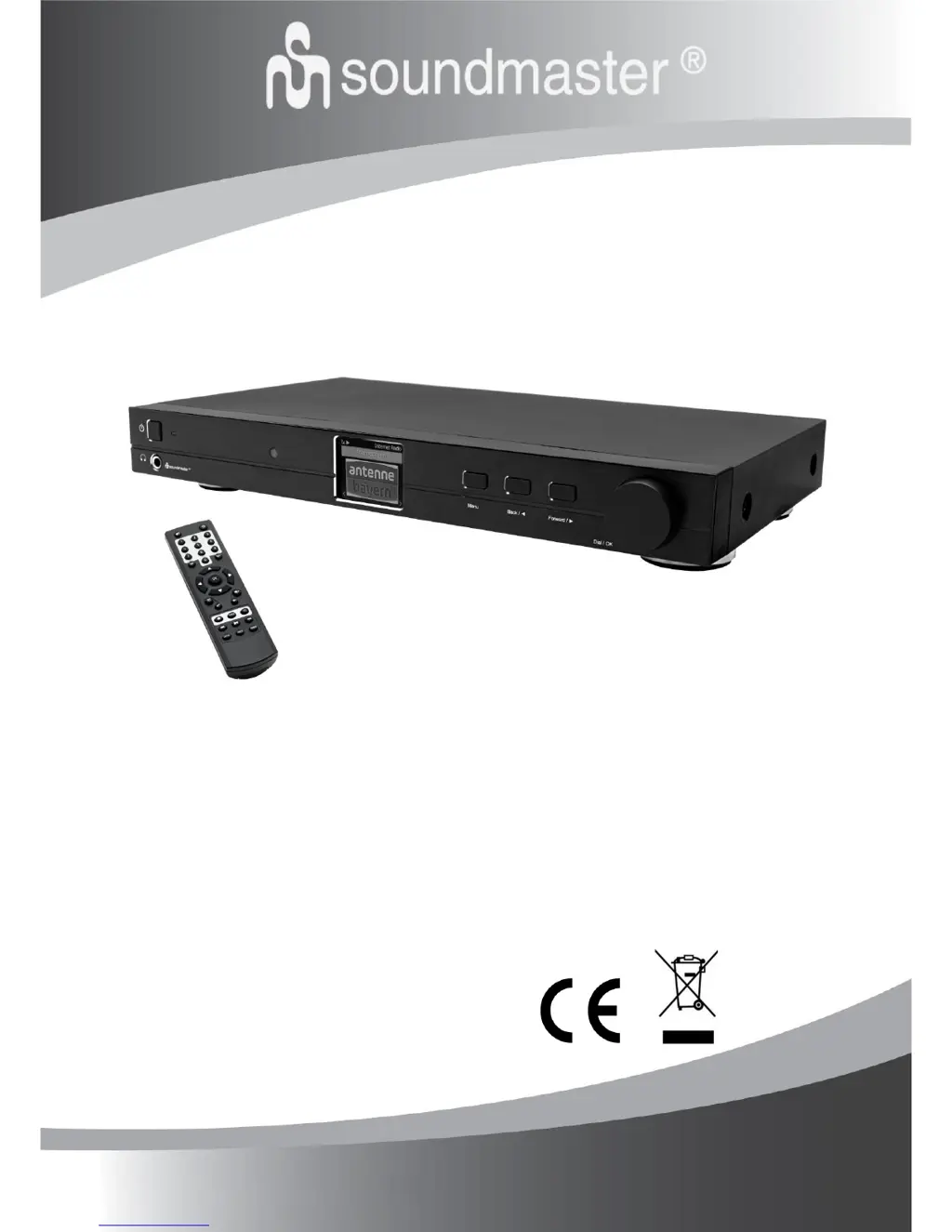
SOUNDMASTER IR45SW - User Manual

SOUNDMASTER IR45SW
19 pages
Print Icon
To Next Page IconTo Next Page
Loading...
DEUTSCH
ITALIANO
ENGLISH
ČEŠTINA
FRANÇAIS
SLOVENSKÝ
NEDERLANDS
IR45SW
Hersteller
Wörlein GmbH Tel.: +49 9103/71670
Gewerbestrasse 12 Fax.: +49 9103/716712
D 90556 Cadolzburg Email. info@woerlein.com
GERMANY Web: www.woerlein.com

Questions and Answers

  • D
    Derrick KramerAug 18, 2025
    What to do if my SOUNDMASTER IR45SW can connect to the network but is unable to play particular stations?
    • K
      Karla PattersonAug 18, 2025
      If your SOUNDMASTER Radio connects to the network but won't play certain stations, it could be due to: * The station might not be broadcasting at this time (consider different time zones). * The station's server might be overloaded with too many listeners. * The station may have reached its maximum listener limit. * The link on the radio might be outdated. This updates automatically daily.
  • J
    jasonparrishAug 21, 2025
    How to improve poor DAB/FM Radio reception on SOUNDMASTER Radio?
    • K
      Kelly WilliamsAug 21, 2025
      If your SOUNDMASTER Radio's DAB/FM reception is poor: * Ensure the aerial is fully extended to maximize signal strength and improve reception. * Check for nearby electrical equipment that might be causing interference.
  • S
    Sylvia PetersenAug 25, 2025
    What to do if there is no DAB/FM reception on SOUNDMASTER IR45SW?
    • E
      Elizabeth MoralesAug 26, 2025
      To address no DAB/FM reception on your SOUNDMASTER Radio: * Perform a “Factory Reset” on the radio. * Extend the antenna. * Move the radio closer to a window.
  • J
    Jack FlynnAug 28, 2025
    How to fix no sound on SOUNDMASTER IR45SW Radio?
    • L
      Lisa OlsonAug 28, 2025
      If there is no sound from your SOUNDMASTER Radio: * Adjust the volume using the Tune/Select knob. * Ensure the mains power lead is connected at the back of the radio and the mains power wall socket is switched on.
  • T
    taylorsuzanneSep 4, 2025
    What to do if SOUNDMASTER IR45SW Radio has no sound?
    • R
      Randall FordSep 4, 2025
      If your SOUNDMASTER Radio has no sound, first adjust the volume using the Tune/Select knob. Also, verify that the mains power lead is properly connected to the back of the radio and that the wall power socket is switched on.
  • R
    Ryan HernandezSep 7, 2025
    Why SOUNDMASTER IR45SW can connect to the network but not play stations?
    • C
      cowanjosephSep 7, 2025
      Your SOUNDMASTER Radio might be unable to play certain stations for a few reasons: the station might not be broadcasting at the current time (it could be in a different time zone), the station's server might be overloaded with too many listeners, or the station might have reached its maximum allowed number of simultaneous listeners. Also, the link on the radio might be outdated; this updates automatically every day.
  • M
    Mark NealSep 12, 2025
    How to improve poor DAB/FM Radio reception on SOUNDMASTER?
    • A
      austinjosephSep 12, 2025
      To improve poor DAB/FM radio reception on your SOUNDMASTER device, ensure the aerial is fully extended for maximum signal strength. Additionally, check that no other electrical equipment is too close to the radio, as this can cause interference.
  • G
    Gabriel RandolphNov 14, 2025
    Why my SOUNDMASTER IR45SW Radio cannot connect to Wi-Fi network?
    • N
      Nathan HallNov 14, 2025
      If your SOUNDMASTER Radio can't connect to Wi-Fi, here's what to check: * **Network Issues:** Ensure your Wi-Fi or Ethernet-connected PC can access the internet on the same network. Verify a DHCP server is available or that you've set up a static IP address on the radio. Make sure your firewall isn't blocking ports (UDP and TCP ports 80, 443, and 8008, plus DNS port 53 are needed). * **MAC Address Restrictions:** Find the MAC address under Configuration > Information > Network > Wi-Fi MAC and add it to your access point's allowed list. Remember there are separate MAC addresses for wired and wireless networks. * **Weak Signal:** Check the distance to the router and see if a computer can connect from the same location. Adjust the router's position to optimize the signal. * **Encrypt...
  • M
    matthewstevensDec 1, 2025
    How to fix SOUNDMASTER IR45SW when it cannot connect to Wi-Fi network?
    • A
      ashleykerrDec 1, 2025
      If your SOUNDMASTER Radio isn't connecting to Wi-Fi, here are some things to try: * First, ensure your internet is working by checking if a computer on the same network can access the internet. * Verify that a DHCP server is available or that you've set up a static IP address on the radio. * Make sure your firewall isn't blocking ports 80, 443, 8008 (TCP and UDP), and 53 (DNS). * If your router restricts access by MAC address, find the radio's MAC address under Configuration > Information > Network > Wi-Fi MAC and add it to your router's allowed list. Remember that wired and wireless connections have different MAC addresses. * Check the distance between your radio and the router, and optimize the router's location. Also, ensure that the Wi-Fi signal strength is sufficient. *...

SOUNDMASTER IR45SW Specifications

General IconGeneral
FM RadioYes
Internet RadioYes
BluetoothYes
USB playbackYes
Headphone jackYes
Alarm clockYes
DisplayLCD
Power supplyAC/DC
ColourBlack
Power SourceAC adapter
DAB+ RadioYes
TypeInternet Radio
Frequency Range87.5-108 MHz (FM), 174-240 MHz (DAB)

Related product manuals