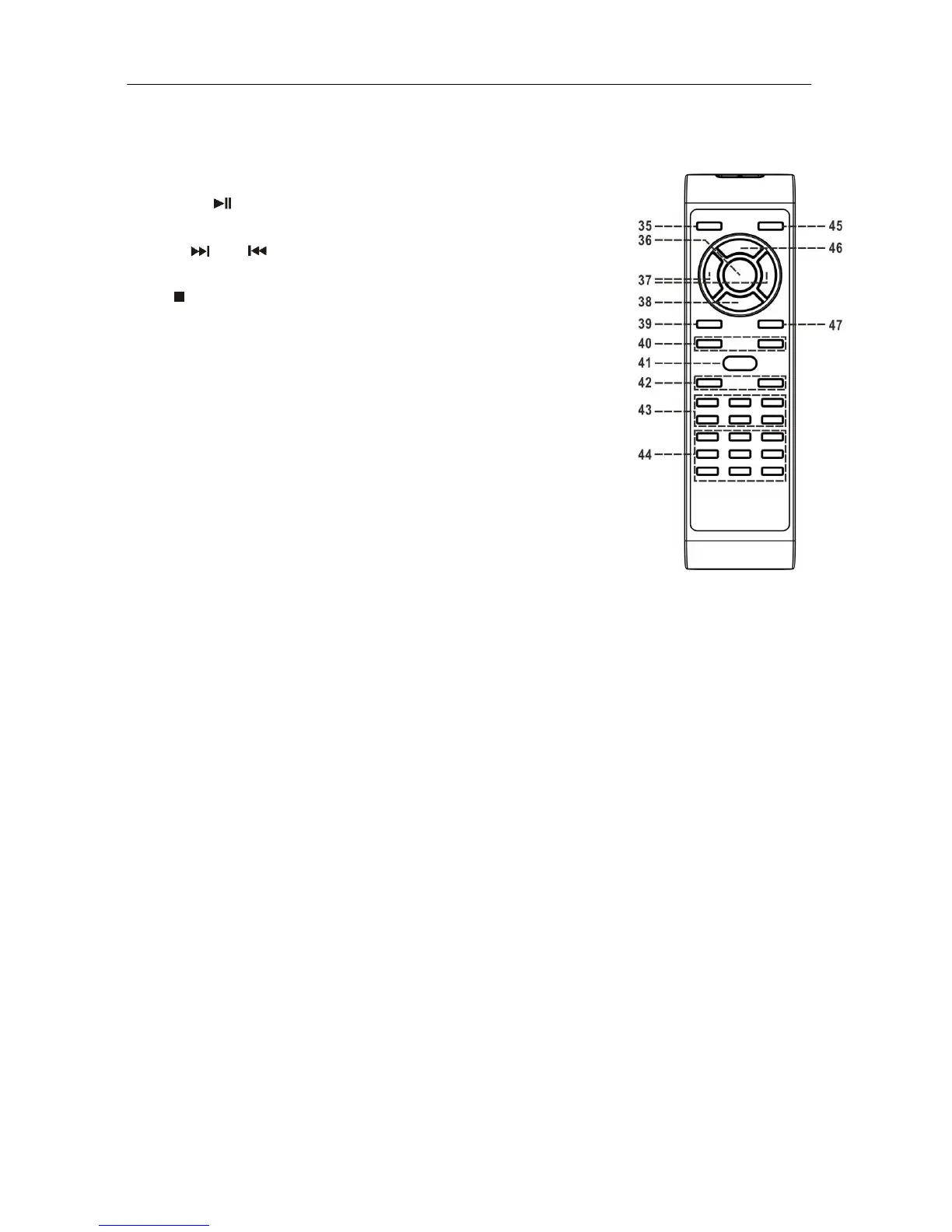
Remote control transmitter
Battery installation (battery not provided)
The infra-red transmitter requires 2 pc AAA size battery for operation
Button description
35) Stnadby/On button Operate the unit to standby or on mode
36) Play/Pause In CD mode, press once to start playback.
Press again to enter pause mode
37) Skip up /down Press to select previous / next tracks in CD
mode
38) Stop In CD mode, press to stop playback
39) Display Press to show different information
40) Rec Level+/- Press to select CD-R record level
41) Preset EQ Press to select different EQ mode
42) Volume +/- Press to adjust the volume level
43) CD-R operation button Press to operate CD-R function such as Record,
TS…etc
44) USB/Tuner operation button Press to operate USB/Tuner function such as
program/play mode preset up…etc
45) Function button Press to change the function mode such as
Tuner, CD, USB…etc
46) Program In CD mode, press to active programming function
47) Repeat button Press to active report function of CD-R











 To Next Page