UR2170 / English Instruction Manual
3
Key List
K I T C H E N C D R A D I O S Y ST E M
K7
K8
USB
Re mote
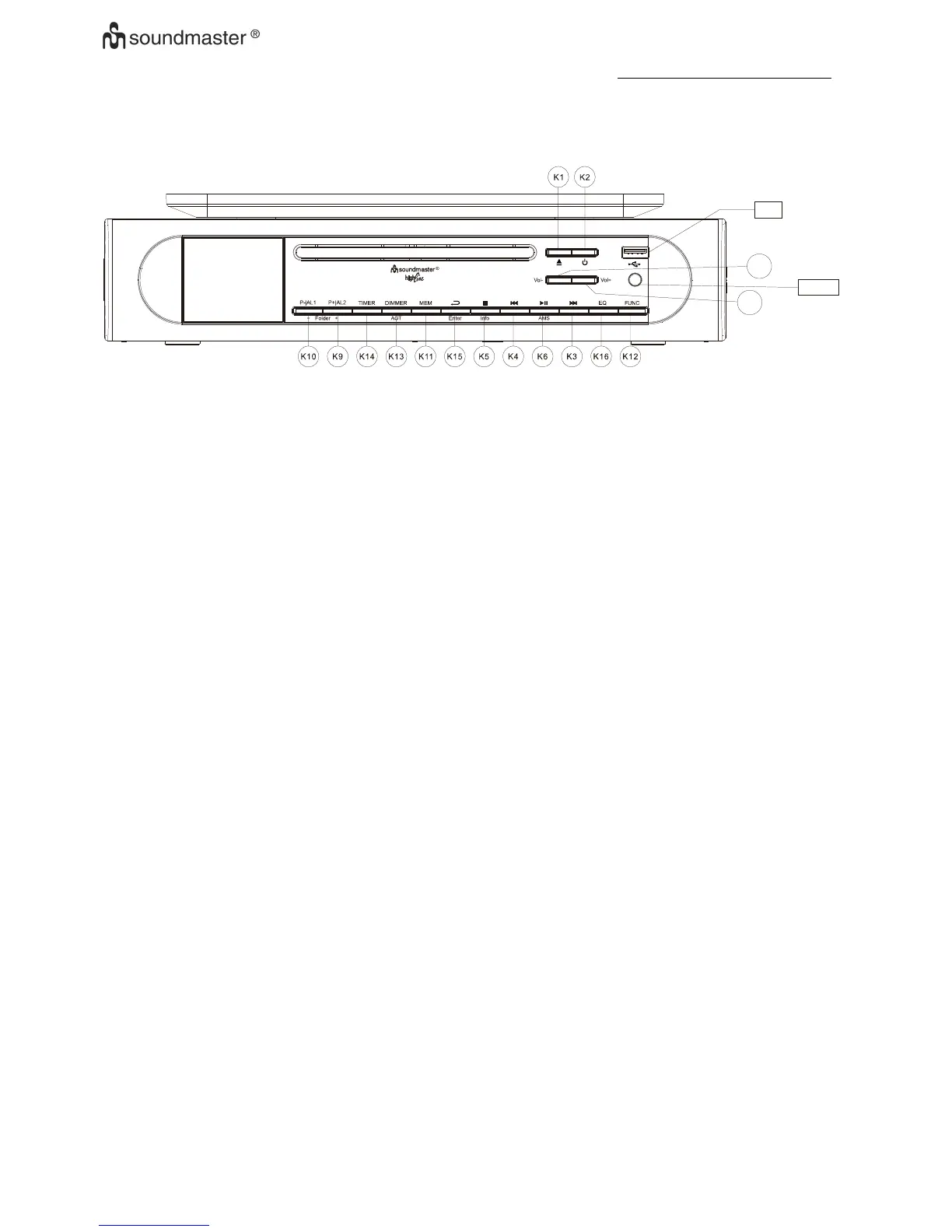
K-1. Power: Device power On | Off
K-2. Open : Control of CD tray to open or close
K-3. UP | FF: Tune up Radio station and forward of CD playback at that mode
K-4. DOWN|RW: Tune down Radio Station and backward of CD play back at that mode
K-5. Stop.| Info Mode set and Stop of CD/USB playback ,
press to show information of station
K-6. AMS| Pause |Play: AMS( Auto Memory Setting for radio station ) , Play & Pause of CD/USB
play back at that mode
K-7. VOL+: Volume increase
K-8. VOL-: Volume decrease
K-9. Preset | Folder+/AL1:Call back preset station for up/Review alarm at standby mode
K-10. Preset | Folder-/AL2: Call back preset station for down/ Review alarm at standby mode
K-11. MEM: Station Memory entry/ Preset Station review
K-12. function: DAB、FM 、CD、USB selector
K-13. Dimmer/AOT: Display backup light level control/ Automatic OFF Timer
K-14. Timer: Operate for timer function
K-15. Enter: Function Setup | Exit Setting, Enter or Confirm
K-16. EQ: EQ(Flat | Rock | Classic | Jazz | Pop)
Getting start
Power Up
o When device connect to power and it’s powered up first time, Automatic update function will
start automatically and scrolling text “Update, Please Wait ” is display on LCD, it’s may need
few minutes depends signal strength and device working environment , when signal was
received, the right time should be display on LCD accordingly. To terminate it, press any key
during the period
o When the automatic system setting had been terminate by user or update un-succeed, the
date and clock are defaulted to 01.01.2014 , 0:00
o The all alarms are defaulted to 0:00
o The unit is switched to clock auto-run mode
o Default back light automatically set to dim from 23:00 to 05:59











 To Next Page