POWER SOURCES
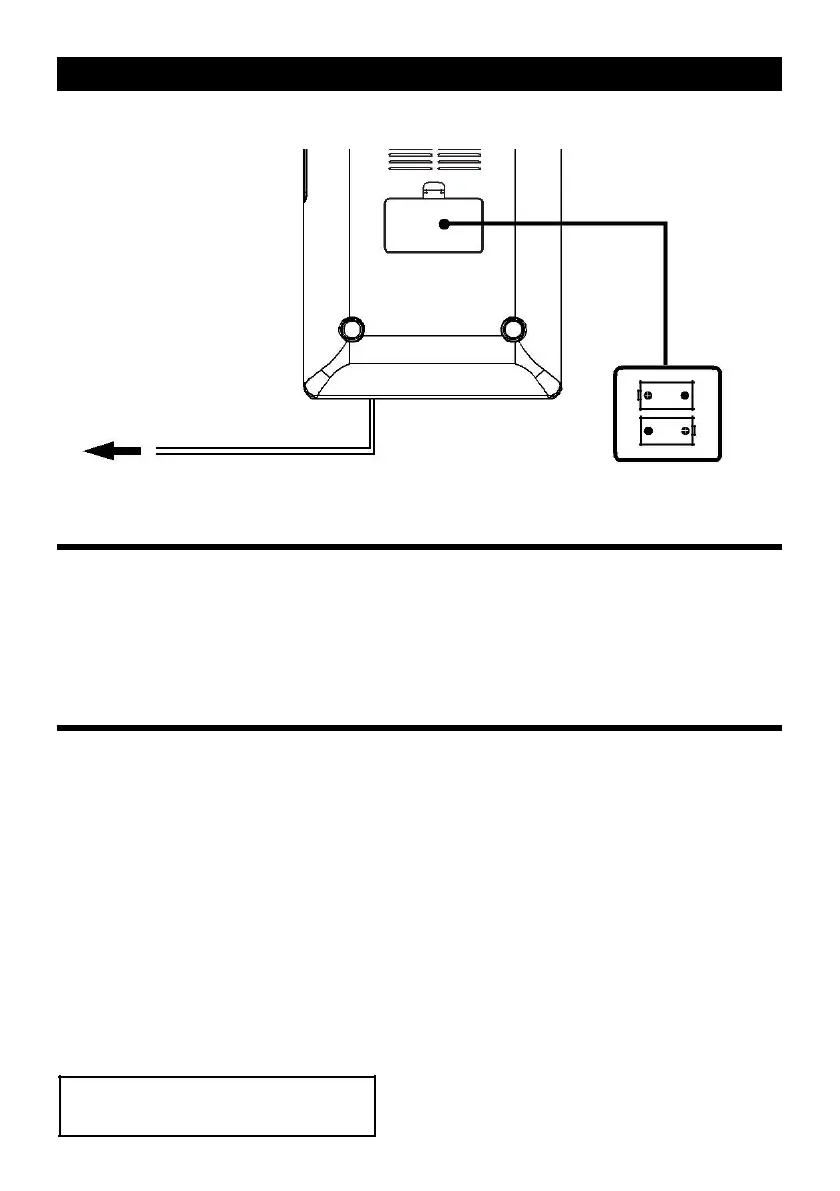
AC POWER cord into a wall AC POWER outlet
Insert 2 x “AA” size batteries
into the battery compartment
AC POWER
You can power your portable system by plugging the AC power cord into the AC inlet at the back of
the unit and into a wall AC power outlet. Check that the rated voltage of your appliance matches your
local voltage. Make sure that the AC power cord is fully inserted into the appliance.
BATTERY BACKUP
The clock and alarm settings can be protected against AC power failure by 2 x 1.5V AA batteries (not
included).
In the event of a power failure, the display will blank, but the clock will continue to operate and the
actual time will be maintained. The Clock LCD display and other functions will resume once electrical
power is restored.
1. Remove the cover of the battery compartment (Located at the bottom of the unit).
2. Connect with battery to the battery terminal inside the compartment.
3. Please connected battery into the compartment and replace the cover.
NOTE:
- Alarm, Radio and Display do not work with battery. Battery is for DATA backup only
- Remove the battery if the unit is not to be used for a long period of time.
- Replace the battery every 6 months, or when the battery has worn out
(Depends on battery life).
CAUTION
Danger of explosion if battery is incorrectly replaced.
Replace only with the same or equivalent type
E-3



 To Next Page