EasyManua.ls Logo

Soundoff Signal 400 Series - User Manual

Soundoff Signal 400 Series
9 pages
To Next Page IconTo Next Page
Loading...
ETCPRSP01 0718
1.800.338.7337 / www.soundoffsignal.com
Pg. 1
ETCPRSP01 - 8 BUTTON CONTROLLER W/ SLIDE SWITCH - KIT
Please see page 3 for
Technical Specications
!
WARNING
Sirens produce loud sounds that
may damage hearing:
- Roll up windows.
- Wear hearing protection.
- Use only for emergency response.
- Avoid exposure to siren sound
outside of vehicle.
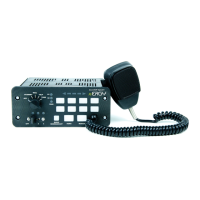
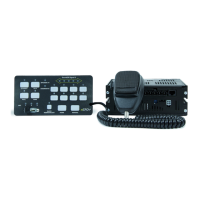
8 Button Control Panel
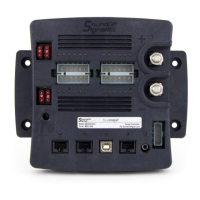
Amplier
Microphone
Introduction
The ETCPRSP01 is Remote Mounted
Controller and amplier with lighting control.
It can drive a variety of programmable
powered control lines capable of up to nine
10A and three 20A circuits.
Notice
Controllers provide an essential function of
an effective visual warning system.
However, this controller is only a short range
secondary device. The use of this controller
does not insure that all drivers can or will
abide by or react to an emergency warning
signal, especially at high rates of speeds or
long distances. The operator of the vehicle
must never take the right of way for granted
and it is the operator’s responsibility to
proceed safely.
The effectiveness of this system is highly
dependant on the correct mounting and
wiring. The installer must read and follow
the manufacturer’s installation instructions
and warnings in the manual. The vehicle
operator should verify the system is securely
fastened to the vehicle and properly
functioning.
This system is intended for use by
authorized personnel only. It is the user’s
responsibility to ensure they understand and
operate the emergency warning devices in
compliance with all applicable city, state,
and federal laws and regulations. SoundOff
Signal assumes no liability for any loss
resulting from the use of this system.
IMPORTANT NOTICE TO INSTALLER:
Make sure to read and understand all
instructions and warnings before proceeding
with the installation of this product. Ensure
the manual and all warning cards are
delivered to the end user of this equipment.
PSRN4ANRI - 100W
PCPRSP01
Package Contents:
1 ea. Amplier Box
1 ea. Microphone Bracket w/ Mounting
Hardware
5 ea. Amplier Wire Harnesses with
Connectors (1-4 pin, 1-12 pin, 1-5
pin 1-14 pin and 1-8 pin)
2 ea. Instruction Manual
1 ea. Operators Warning Card to remain
in vehicle for operator review
1 ea. Sound Pressure Warning Label that
is to be attached in vehicle and in
plain site of operator and occupants
of the vehicle
1 ea. Mounting Bracket with Hardware
1 ea. Label Card for Aux. Switches
1 ea. Remote control panel
D1_Remote Console Panel Assy
MATERIAL:
THIRD ANGLE
PROJECTION
PROPRIETARY AND CONFIDENTIAL
THE INFORMATION CONTAINED IN
THIS DRAWING IS THE SOLE
PROPERTY OF SOUNDOFF SIGNAL.
ANY REPRODUCTION IN PART OR
AS A WHOLE WITHOUT THE
WRITTEN PERMISSION OF
SOUNDOFF SIGNAL IS PROHIBITED.
®
REVISION:
DESCRIPTION:
SHEET
1 OF 1
DRAWING
SIZE:
DO NOT SCALE
TOLERANCES
EXCEPT AS NOTED
.X ± .020
.XX ± .012
.XXX ± .006
ANGLES ± .5°
PRIMARY DIMS:
INCH
DUAL DIMS: [mm]
A
DRAWING NO:
A A
B B
C C
D D
E E
5
5
4
4
3
3
2
2
1
1
GD&T TO FOLLOW
ASME Y14.5M-2009
CAD DIMENSIONS ARE BASIC
UNLESS OTHERWISE SPECIFIED
Question and Answer IconNeed help?

Do you have a question about the Soundoff Signal 400 Series and is the answer not in the manual?

Soundoff Signal 400 Series Specifications

General IconGeneral
BrandSoundoff Signal
Model400 Series
CategoryController
LanguageEnglish

Summary

Introduction to the ETCPRSP01 Controller

Controller Functionality Notice

General information about the controller's role in visual warning systems.

Installer Safety and Delivery Guidelines

Crucial instructions for installers regarding manual and warning card delivery.

ETCPRSP01 Replacement Parts and Accessories

Parts Identification and Diagram

Lists and illustrates all available replacement parts and accessories.

Amplifier Mounting and Wiring Procedures

Amplifier Installation Guide

Step-by-step instructions for mounting the amplifier unit.

Microphone Bracket Mounting

How to install the microphone bracket securely and safely.

Wiring Safety Precautions

Warning about battery wiring, fusing, and wire sizing for safety.

Amplifier Audio Wiring Connections

Input Wiring for System Control

Details connections for Park Kill, Ignition, and Auxiliary inputs.

Radio Rebroadcast Audio Setup

Guide for connecting external radio speaker for rebroadcast.

Speaker and Backlight Wiring

Instructions for connecting the main speaker and control panel backlight.

Amplifier Powered Output Wiring and Fuses

Output Wiring Diagrams

Shows connections for auxiliary push-buttons and slide switch outputs.

Fuse Chart and Locations

Lists fuse ratings and their physical locations on the relay board.

Output Operation Requirements

Notes on using relays for ignition-dependent outputs.

Remote Control Panel Introduction

Programming Legend and Operation Notes

Explains programming symbols and provides operational notes.

Siren Noise Hazard Warning

Important warning regarding potential hearing damage from siren noise.

Remote Control Panel Programming Modes

Slide Switch Programming

Configures auxiliary outputs to respond to slide switch positions.

Setting Public Address (PA) Volume

Procedure to set and store the desired PA system volume.

Auxiliary Button Functionality

Customizes button actions like alternate, momentary, or specific outputs.

Adjusting Backlight Intensity

Steps to set the control panel's backlight brightness level.

Advanced Control Panel Functions

Alternate and Other Mode Settings

Configures device behavior for errors, ignition status, buzzer, and power down.

Slide Switch Mapping

Automates auxiliary output activation based on slide switch position.

Park Kill Input Configuration

Sets park kill polarity and determines which outputs are affected.

Connector Care and Maintenance

Dielectric Grease Application

Detailed guide for applying dielectric grease to Molex connectors.

Connector Plating and Grease Notes

Important notes on terminal plating compatibility and grease application.

Related product manuals