6
Earphone Control
Power On: You can power on your SOUNDPEATS Engine 4 earphones effortlessly using two
methods:
Auto Power-On: Simply open the charging case, and the earphones will turn on
automatically.
Manual Power-On: If you prefer manual control, press and hold the multifunctional button
on the earphones for 1,5 seconds when they are off.
Power Off: To power off your earphones, you have both automatic and manual options:
Auto Power-Off: Place the earphones back into the charging case and close the lid to turn
them off automatically.
Manual Power-Off: If you wish to turn them off manually, press and hold the
multifunctional button for 10 seconds while the earphones are on.
Playback Control: Controlling your music playback is a breeze:
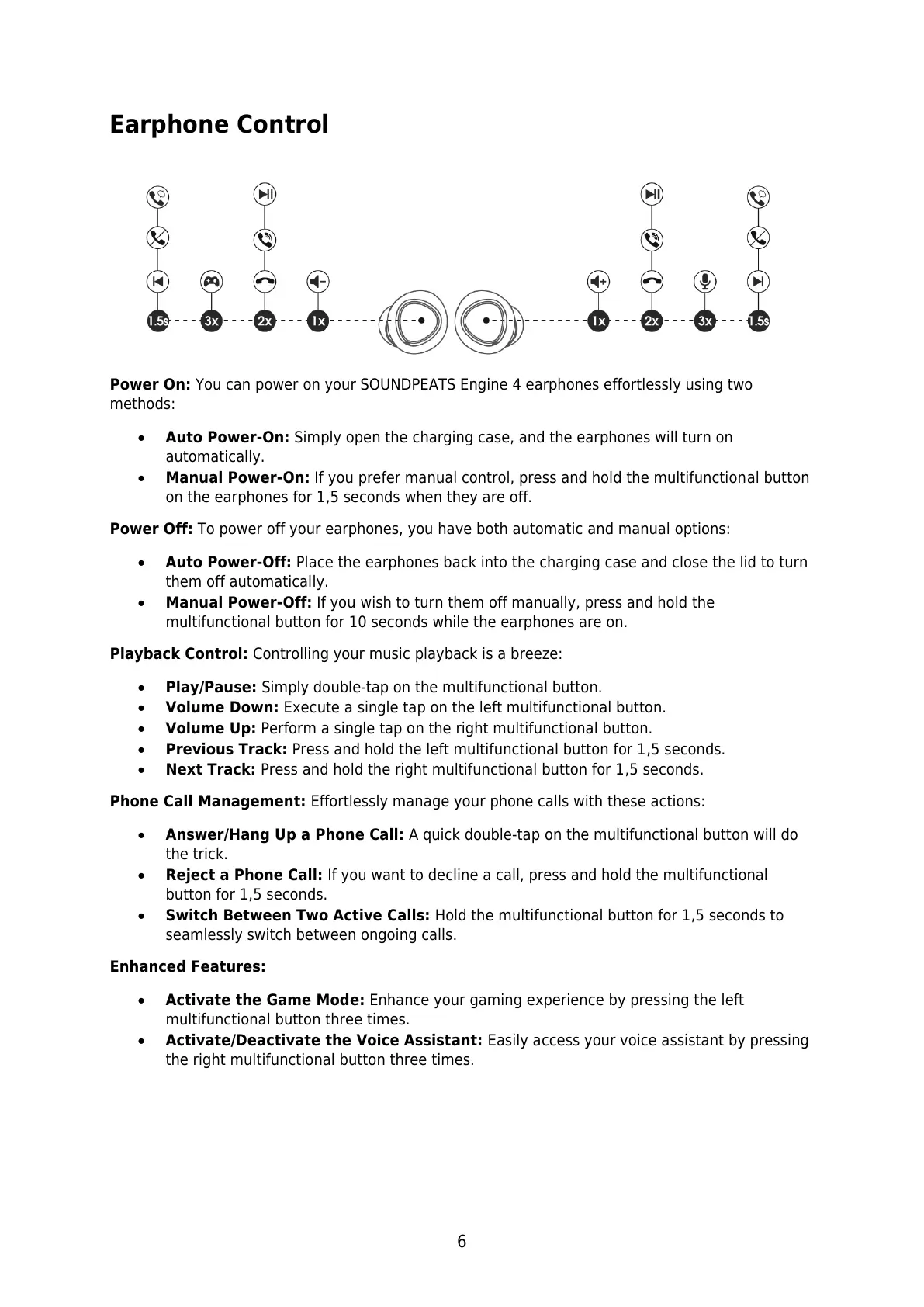
Play/Pause: Simply double-tap on the multifunctional button.
Volume Down: Execute a single tap on the left multifunctional button.
Volume Up: Perform a single tap on the right multifunctional button.
Previous Track: Press and hold the left multifunctional button for 1,5 seconds.
Next Track: Press and hold the right multifunctional button for 1,5 seconds.
Phone Call Management: Effortlessly manage your phone calls with these actions:
Answer/Hang Up a Phone Call: A quick double-tap on the multifunctional button will do
the trick.
Reject a Phone Call: If you want to decline a call, press and hold the multifunctional
button for 1,5 seconds.
Switch Between Two Active Calls: Hold the multifunctional button for 1,5 seconds to
seamlessly switch between ongoing calls.
Enhanced Features:
Activate the Game Mode: Enhance your gaming experience by pressing the left
multifunctional button three times.
Activate/Deactivate the Voice Assistant: Easily access your voice assistant by pressing
the right multifunctional button three times.












 To Next Page