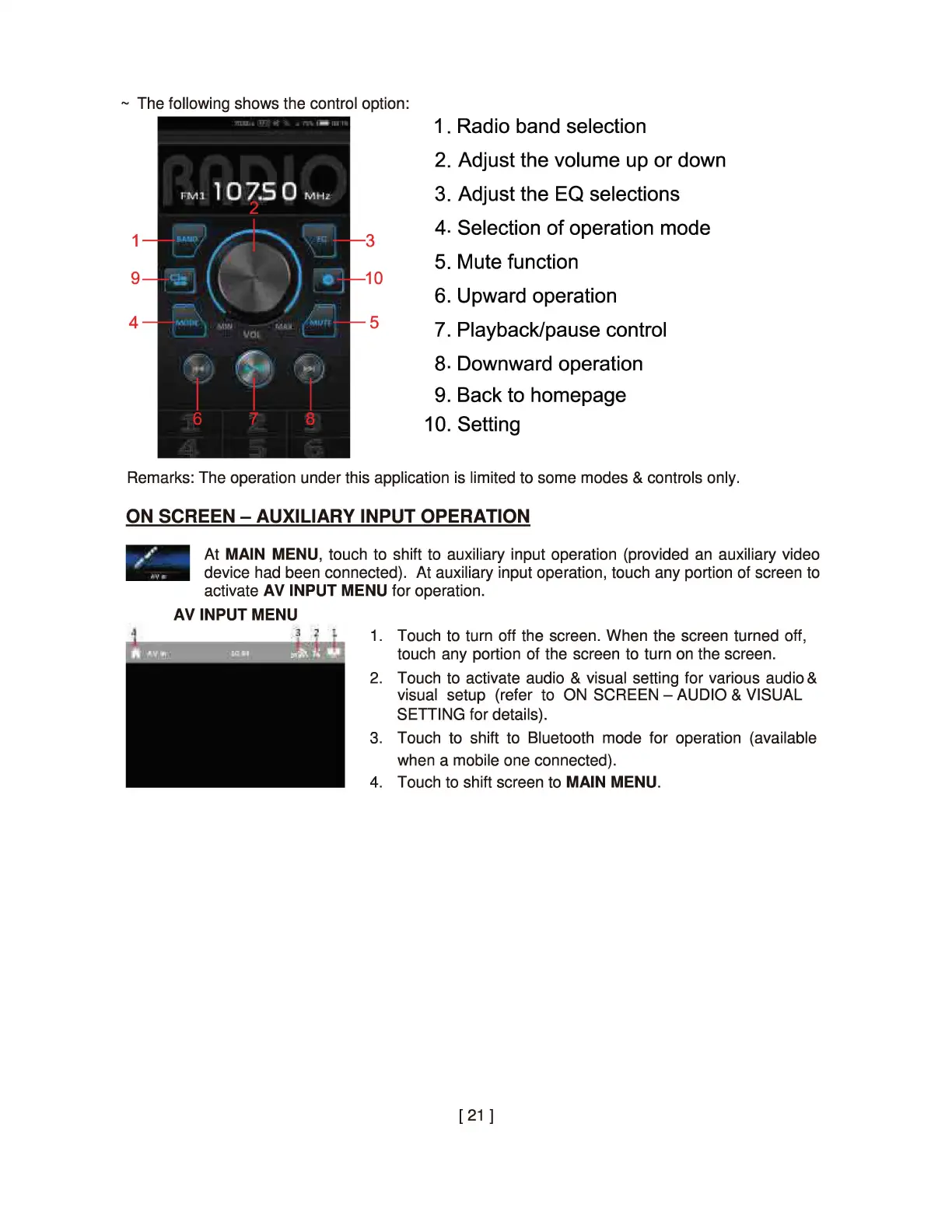
~ The following shows the control option:
1
9
4
3
10
5
1. Radio band selection
2. Adjust the volume up or down
3. Adjust the EQ selections
4. Selection
of
operation mode
5. Mute function
6. Upward operation
7. Playback/pause control
a. Downward operation
9. Back to homepage
10. Setting
Remarks: The operation under this application is limited to some modes & controls only.
ON SCREEN - AUXILIARY INPUT OPERATION
At MAIN MENU, touch to shift to auxiliary input operation (provided
an
auxiliary video
device had been connected). At auxiliary input operation, touch any portion of screen to
activate
AV
INPUT MENU for operation.
AV INPUT MENU
1. Touch to turn off the screen. When the screen turned off,
touch any portion of the screen to turn
on
the screen.
2. Touch to activate audio & visual setting for various audio &
visual setup (refer to ON SCREEN - AUDIO & VISUAL
SETTING for details).
3. Touch to shift to Bluetooth mode for operation (available
when a mobile one connected).
4. Touch to shift screen to MAIN MENU.
[
21
]


 To Next Page