ON
SCREEN-FRONT
CAMERA INPUT OPERATION
At MAIN MENU, touch to shift to front camera viewi
ng
(provided front camera and the
pink/black wires connected). At front camera viewing mode, touch any porti
on
of screen
to activate FRONT CAMERA INPUT MENU for operation.
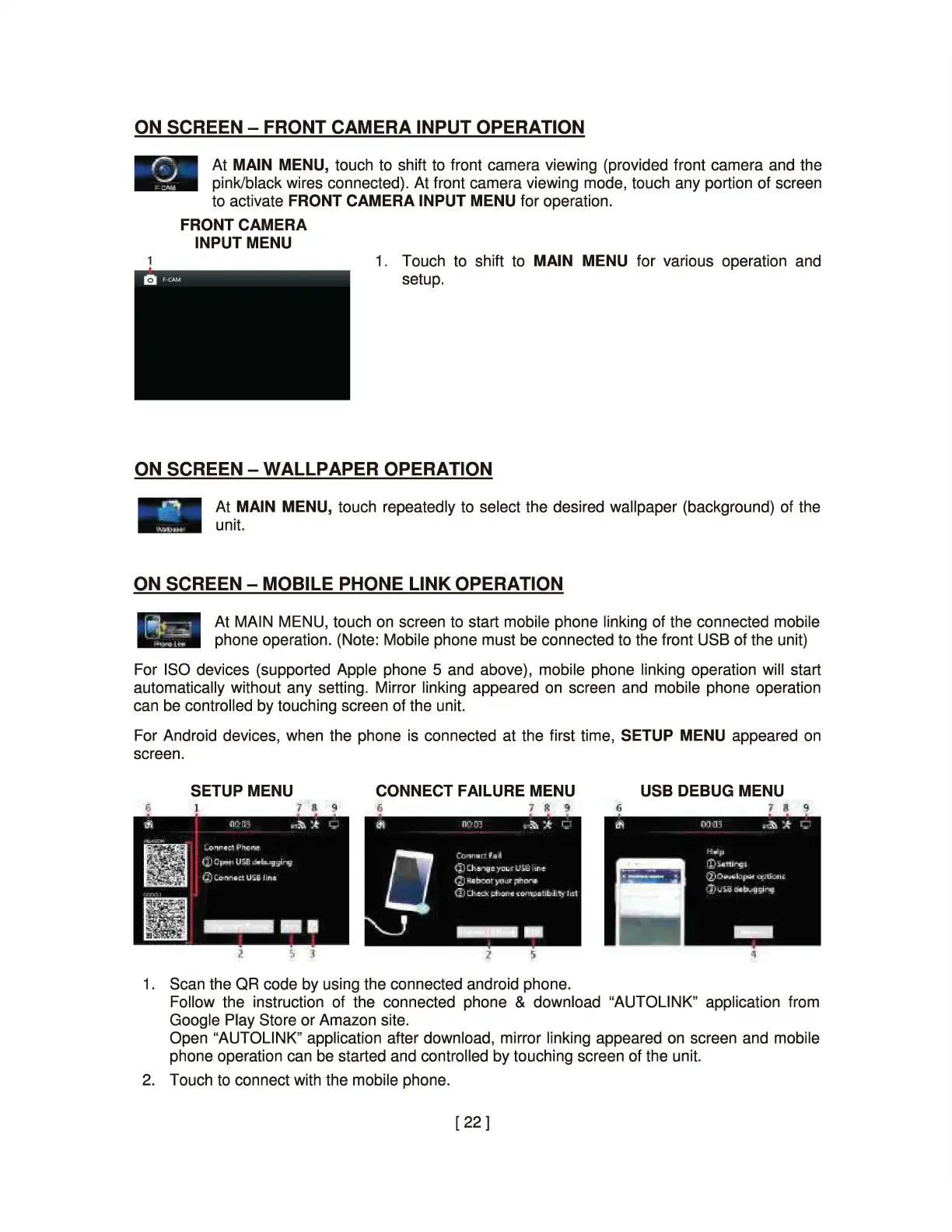
FRONT CAMERA
INPUT MENU
1. Touch to shift to MAIN MENU for various operati
on
and
setup.
ON SCREEN - WALLPAPER OPERATION
At MAIN MENU, touch repeatedly to select the desired wallpaper (background) of the
unit.
ON SCREEN - MOBILE PHONE LINK OPERATION
At MAIN MENU, touch on screen to start mobile phone linking of the connected mobile
phone operation. (Note: Mobile phone must
be
connected to the front USB of the unit)
For ISO devices (supported Apple phone 5 and above), mobile phone linking operation will start
automatically without any setting. Mirror linking appeared
on
screen and mobile phone operation
can
be
controlled by touching screen of the unit.
For Android devices, when the phone is connected at the first time, SETUP MENU appeared
on
screen.
SETUP MENU CONNECT FAILURE MENU USB DEBUG MENU
{;
1'
IL
'l
1.
Scan the QR code by using the connected android phone.
Follow the instruction of the connected phone & download "AUTOLINK" application from
Google Play Store or Amazon site.
Open "AUTOLINK" applicati
on
after download, mirror linking appeared
on
screen and mobile
phone operation can
be
started and controlled by touching screen of the
un
i
t.
2.
Touch to connect with the mobile phone.
[
22]


 To Next Page