Need help?
Do you have a question about the SousVideTools VS520-P and is the answer not in the manual?
Key safety precautions and guidelines for operating the appliance safely.
Starts automatic vacuuming and sealing, or stops ongoing operations.
Allows manual control of vacuuming by pulsing air suction.
Options for dry, moist, and extended sealing based on food moisture.
Choice between normal and gentle vacuum pressure for different food types.
Procedure for vacuuming canisters, jars, and wine stoppers using a hose.
Seals bags without vacuuming or stops motor pump during auto-seal.
Enables food marination through cycles of vacuum and release.
Specifies the required voltage and frequency for the appliance.
Indicates the electrical power the appliance consumes during operation.
The maximum width of the bag that can be sealed.
The physical size of the vacuum sealer unit.
The overall weight of the vacuum sealer.
Step-by-step guide for creating a bag from a roll for vacuum sealing.
Instructions for vacuum sealing food items in pre-made bags.
Using the pulse function for controlled vacuum pressure on delicate items.
Procedure for vacuum packing using canisters or bowls with a hose.
Process for marinating food using the appliance's cycles.
Guidelines for washing and reusing vacuum bags.
Instructions for cleaning vacuum accessories like canisters.
Recommendations for proper storage to maintain functionality.
Steps to resolve issues when the machine fails to operate.
Diagnosing and fixing problems with vacuum suction or sealing.
Troubleshooting why vacuum-sealed bags lose their seal.
Addressing issues where the bag fails to seal properly.
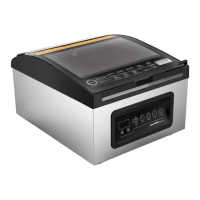
The SousVideTools VS520-P Vacuum Sealer is a versatile appliance designed for preserving food through vacuum packaging, offering a range of functions for both bags and canisters. Its intuitive controls and thoughtful design aim to simplify the food preservation process, making it accessible for various culinary needs.
The core functionality of the VS520-P revolves around its ability to remove air from specially designed bags and canisters, then seal them to create an airtight environment. This process significantly extends the shelf life of food by inhibiting the growth of bacteria and preventing freezer burn.
The device features a "Vac & Seal / Cancel" button, which serves a dual purpose. In standby mode, it initiates an automatic vacuuming and sealing cycle for bags. If the machine is already in operation (vacuuming or sealing), pressing this button will stop the current process. This allows for quick interruption if needed.
For more delicate items, the "Pulse" function provides manual control over the vacuuming process. When pressed, it generates a pulsed vacuum, drawing air out in short bursts. Releasing the button immediately stops the air suction, allowing the user to achieve a desired vacuum pressure without crushing fragile foods. This is particularly useful for items like baked goods or soft fruits.
The "Sealing Time" setting offers three options to optimize the seal based on the moisture content of the food and bag. The "Dry" setting is for dry bags and items without moisture, using a shorter heat sealing time. The "Moist" setting is for wet bags or foods with a small amount of moisture, requiring a moist heat sealing time. The "Extended" setting is for very wet bags or foods with significant moisture, necessitating an extended heat sealing time. The default setting is "Normal" for dry bags and shorter sealing times. This adaptability ensures a strong, consistent seal regardless of the food type.
To further cater to different food types, the "Pressure" function provides two vacuum pressure options. The "Normal" setting is for regular items, applying standard vacuum pressure. The "Gentle" setting is for soft and crushable items, where less vacuum pressure is desired to prevent damage. The default is normal and high vacuum pressure.
The "Canister" button is dedicated to vacuuming external accessories such as canisters, jar lids, and wine stoppers, requiring the use of a hose. This expands the device's utility beyond just bags, allowing for the preservation of liquids and more structured items.
A "Manual Seal" button offers two distinct functions. Firstly, it allows users to seal the open end of a bag without vacuuming, which is ideal for creating custom-sized bags from a roll. Secondly, during an automatic "Vacuum & Seal" operation, pressing this button immediately stops the motor pump and initiates the sealing process. This provides the operator with precise control over the vacuum pressure, preventing delicate items from being crushed.
Finally, the "Marinate" function is designed to accelerate the marinating process for food in a marinator bowl. This feature typically involves multiple cycles of vacuum and release, which helps the marinade penetrate the food more quickly.
The device also includes a "Progress" screen, which displays a numeric indicator. This screen shows the progress of the vacuuming process and indicates when the device is on and the lid is closed. A flashing LED on this screen signals that the user should wait before starting the next operation, ensuring proper function and safety.
The VS520-P is designed for ease of use, from making custom bags to vacuum sealing various food items.
To make a bag from a roll, the user first opens the cover and removes the integrated bag cutter. The bag material is then pulled out to the desired length and cut. One end of the bag is placed on the sealing element, ensuring it does not enter the vacuum chamber. After closing the cover and locking the handle, the "Manual Seal" button is pressed to initiate the sealing process. An indicator light and the progress LED will show the sealing progress. Once the indicator turns off, the seal is complete, and the bag can be removed.
For vacuum packing with a pre-made bag, items are placed inside the bag, ensuring the open end is clean, straight, and free of dust or wrinkles. The open end of the bag is then positioned within the vacuum chamber area, making sure the air intake is not obstructed. After closing the cover and locking the handle, the user checks the LED status of "Vac/Seal" and "Sealing Time" to confirm the appropriate sealing time based on the food's moisture. Pressing the "Vac/Seal" button then initiates the automatic vacuuming and sealing cycle. The device is designed to provide high vacuum pressure, but for delicate items, users are advised to observe the vacuum pressure and use the "Manual Seal" button to stop vacuuming and start sealing once the desired pressure is achieved, preventing crushing. After the indicator turns off, the vacuum packaging is complete, and the packed bags can be removed. For optimal sealing, it is recommended to allow the appliance to cool for 1 minute between uses and to wipe any excess liquid or food residue from the vacuum chamber. The appliance works exclusively with specific vacuum bags provided by the manufacturer.
The pulse vacuum function offers a more controlled approach for bags. The user presses the "Pulse Vacuum" button to start vacuuming, observing the vacuum pressure. Releasing the button stops the suction when the desired pressure is reached. The "Manual Seal" button is then pressed to seal the bag automatically.
Vacuum packing in a canister involves preparing the canister by ensuring its cover and base are clean and dry. Items are placed in the canister, making sure not to overfill it to allow proper contact between the cover and the rim. One end of the hose is inserted into the air intake of the machine, and the other end into the center hole of the canister cover. After checking the "Vac & Seal" LED status is in "Normal" setting, the "Canister" button is pressed to begin vacuuming. To ensure an airtight seal, it's recommended to gently press down on the canister cover at the beginning of the vacuuming process. The machine will stop automatically once sufficient vacuum pressure is achieved. The hose should be removed immediately after the process is complete. If moist foods are vacuumed, any moisture in the adaptor should be cleaned. To open a vacuum-packed canister, the "Release" button on the canister cover must be pressed.
Marinating food with a marinate bowl utilizes the machine's ability to cycle between suction and air release. The container is filled and connected to the machine via the hose. The machine's vacuum power can be set according to the food being marinated. The lid is hooked onto the machine's base by lowering the lock handle. Pressing the "Marinate" key starts the process, with the "PROGRESS" display showing the cycle progress. The process is complete when the display reads "O" and the light turns off. The tube is then removed. The marinate process can be stopped at any time by pressing "Automatic/stop." If repeated marination is needed, the air must be released from the container before reconnecting it. During canister or bowl vacuuming, it's important to slightly press down on the cover or hose adaptor initially to prevent air leaks. To check the vacuum, a gentle tug on the cover should confirm it doesn't move.
Proper cleaning and maintenance are crucial for the longevity and optimal performance of the VS520-P Vacuum Sealer.
Before any cleaning, the unit must always be unplugged. The appliance should never be immersed in water or any other liquid. Abrasive products or materials should be avoided as they can scratch the surface. Instead, a mild dishwashing soap and a warm, damp cloth should be used to wipe away food residue and clean components. After cleaning, the unit must be thoroughly dried before being used again.
The foam gaskets around the vacuum chamber require special attention. They should be dried thoroughly before re-assembly. When re-assembling, care must be taken to prevent any damage and to ensure they are placed in their original position to maintain an effective vacuum seal.
Vacuum bags can be washed in warm water with mild dishwashing soap. If using a dishwasher, turn the bags inside out and spread them over the top rack to ensure all surfaces are exposed to the washing water. Bags must be thoroughly dried before reuse. It is important not to reuse bags that have stored raw meats, raw fish, or greasy foods, or bags that have been microwaved or boiled, to avoid potential illness.
All vacuum accessories should be washed in warm water with mild dishwashing soap, but their covers should not be immersed in water. Canister bases (not lids) are top-rack dishwasher safe. Canister covers should be wiped down with a damp cloth. All accessories must be thoroughly dried before reuse. Canisters and covers should not be used in the microwave or freezer.
For storage, the unit should be kept in a flat, safe place, out of reach of children. It is essential to ensure the appliance's lid is unlocked when not in use and during storage. Keeping the cover locked can distort the foam gaskets, potentially leading to leaks.
Troubleshooting tips are provided for common issues. If the machine is not working, users should ensure it is plugged in and check the power cord for damage. If the vacuum sealer does not pull a complete vacuum or seal automatically, checks include ensuring the bag mouth is fully inside the chamber, the gasket is not loose or has particles, the seal foam is properly assembled, the lid is locked, and checking the bag for leaks. If a vacuum bag loses vacuum after being sealed, it could be due to wrinkles, grease, liquid, or other particles on the seal, or moisture/liquid on the food. In such cases, cleaning the bag mouth, re-vacuuming, or changing to a new bag is recommended. For juicy foods, freezing before vacuuming is suggested. If sealing fails, the machine might have overheated, requiring a 20-second rest between seals. Again, wrinkles, grease, liquid, or debris on the bag end or sealing bar can cause issues, necessitating a clean bag and a clean sealing bar.
 General
| Control Type | Digital |
|---|---|
| Material | Stainless Steel |
| Temperature Range | 5°C - 99°C |
| Frequency | 50-60 Hz |
| Temperature Accuracy | ±0.1°C |

 To Next Page