3
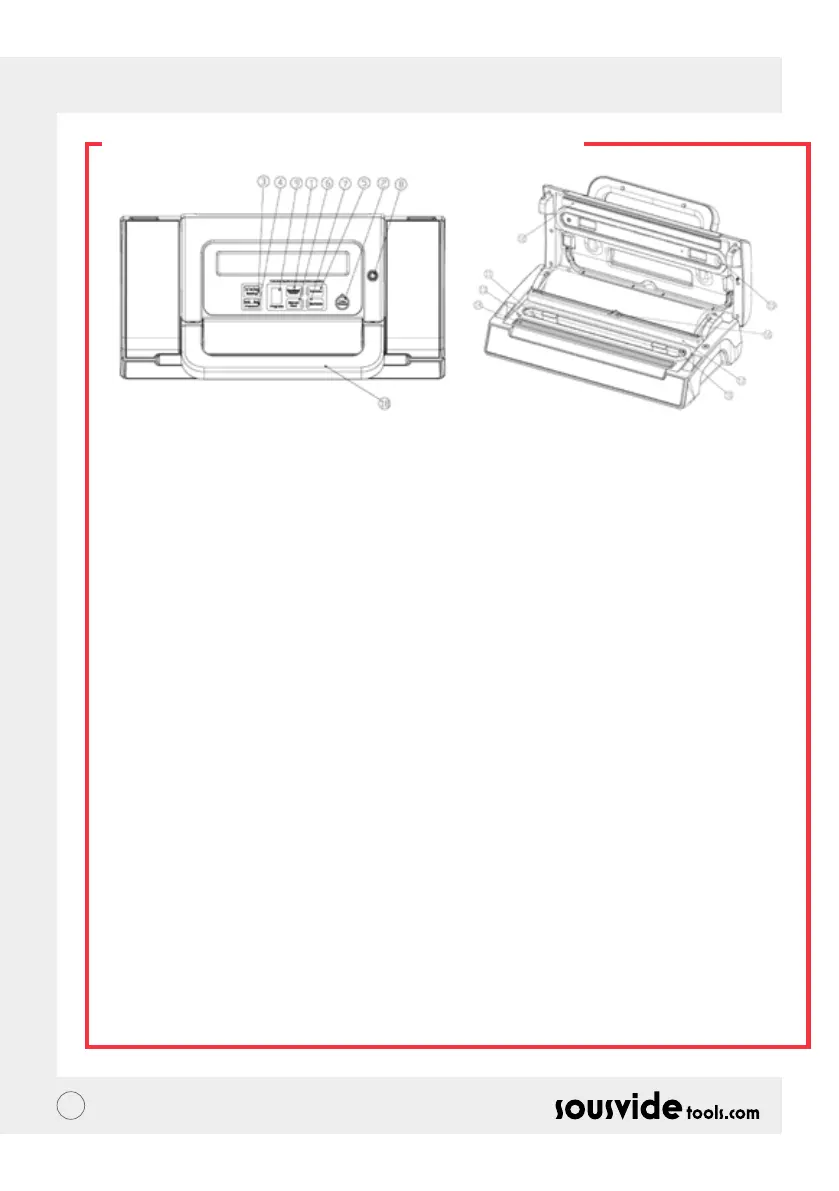
PRODUCT FUNCTIONS
1 Vac & Seal / Cancel
This button has two functions depending on the machine status:
• On stand-by, it starts the automatic operation of vacuuming the bag and then automatically seals the bag
when vacuum is complete;
• In working mode (vacuuming or sealing operations), it stops the machine.
2 Pulse
When pressed, a vacuum is generated by pulsation and air suction begins. When released, the air suction will
stop.
3 Sealing Time
Choose from three settings for the best sealing time:
• Dry button : for dry bags and items without moisture, with a shorter heat sealing time;
• Moist button: for wet bags or foods with little moisture, with a moist heat sealing time.
• Extended button: for wet bags or foods with lots of moisture, with an extended heat sealing time.
• Default setting is Normal setting for dry bags and shorter sealing time.
4 Pressure
Two buttons for a choice of vacuum pressure:
• Normal button: for regular items, use normal vacuum pressure
• Gentle button: for some soft & crushable items where less vacuum pressure is desired.
• Default setting is normal and high vacuum pressure.
5 Canister
To start vacuuming for canisters, jar lids, wine stoppers or other accessories through a hose.
6 Manual Seal
This button provides two functions:
• To seal the open end of a bag without vacuuming air suction, used to make a bag from a bag roll;
• When the automatic “Vacuum & Seal” function is in operation, this button stops the motor pump and
immediately starts to seal the bag so that less vacuum pressure inside the bag can be controlled by the
operator to avoid crushing for delicate items.
7 Marinate
Press to marinate food in a marinator bowl.


 To Next Page