EasyManua.ls Logo

Southwire 10031S - Meter Description; Front View Overview; Rear View Overview; Maintenance

Southwire 10031S
12 pages
Print Icon
To Next Page IconTo Next Page
To Previous Page IconTo Previous Page
Loading...
General Specifications cont.
Maintenance
This
Multimeter
is
designed
to
provide
years
of
dependable
service
if
the
following
care
instructions
are
performed
:
KEEP
THE
METER
DRY
.
If
it
gets
wet,
wipe
it
off
.
USE
AND
STORE
THE
METER
IN
NORMAL
TEMPERATURES
.
Temperature
extremes
can
shorten
the
life
of
the
electronic
parts
and
distort
or
melt
plastic
parts.
HANDLE
THE
METER
GENTLY
AND
CAREFULLY
.
Dropping
it
can
damage
the
electronic
parts
or
the
case.
KEEP
THE
METER
CLEAN
.
Wipe
the
case
occasionally
with
a
damp
cloth
.
DO
NOT
use
chemicals,
cleaning
solvents,
or
detergents.
USE
ONLY
FRESH
BATTERIES
OF
THE
RECOMMENDED
SIZE
AND
TYPE
.
Remove
old
or
weak
batteries
so
they
do
not
leak
and
damage
the
unit.
IF
THE
METER
IS
TO
BE
STORED
FOR
A
LONG
PERIOD
OF
TIME,
the
batteries
should
be
removed
to
prevent
damage
to
the
unit.
5
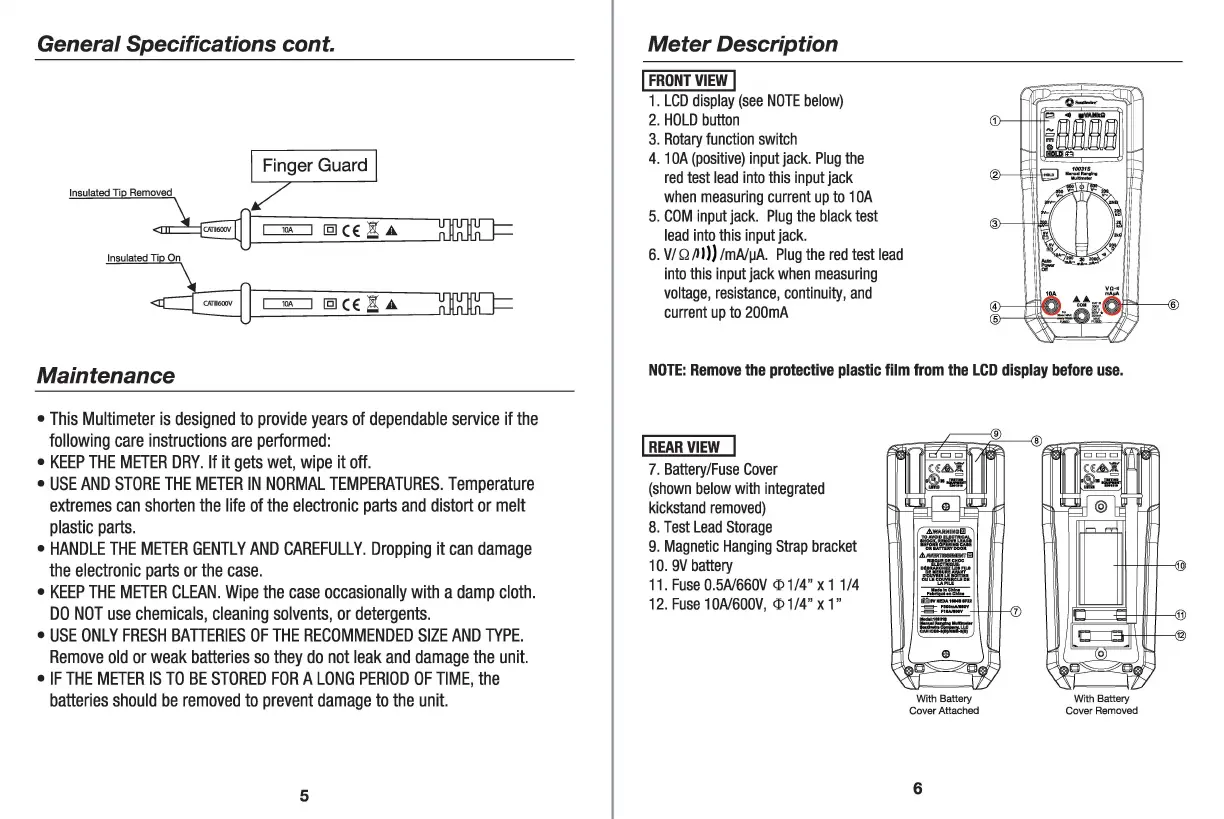
Meter
Description
I
FRONT
VIEW
I
1.
LCD
display
(see
NOTE
below)
2.
HOLD
button
3.
Rotary
function
switch
4. 1
QA
(positive)
input
jack
.
Plug
the
red
test
lead
into
this
input
jack
when
measuring
current
up
to
1
QA
5.
COM
input
jack
.
Plug
the
black
test
lead
into
this
input
jack
.
6.
V/Q/11
))
/mA/µA
.
Plug
the
red
test
lead
into
this
input
jack
when
measuring
voltage
,
resistance
,
continuity,
and
current
up
to
2QQmA
NOTE
:
Remove
the
protective
plastic
film
from
the
LCD
display
before
use.
!REAR
VIEW
7.
Battery/Fuse
Cover
(shown
below
with
integrated
kickstand
removed)
8.
Test
Lead
Storage
9.
Magnetic
Hanging
Strap
bracket
10
.
9V
battery
11
.
Fuse
Q.
5A/66QV
<I>
1/4"
x 11/4
12
.
Fuse
10A/6QQV
,
<I>
1
/4"
x
1"
With Battery
Cover Attached
6
With Battery
Cover Removed

Related product manuals