EasyManua.ls Logo

Southwire 10031S - LCD Display Symbols; Operation Modes; Auto Power Off; Hold Function

Southwire 10031S
12 pages
Print Icon
To Next Page IconTo Next Page
To Previous Page IconTo Previous Page
Loading...
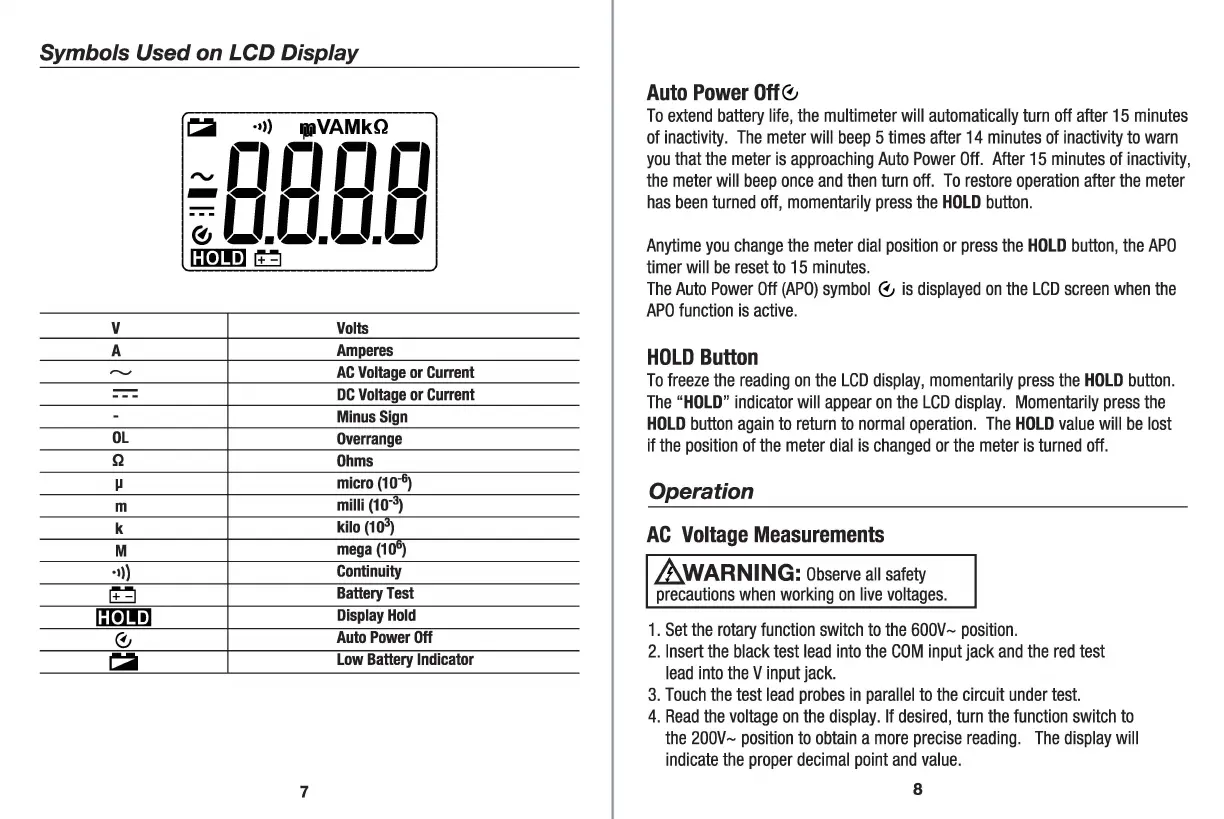
Symbols
Used
on
LCD
Display
V
A
"'J
-
--
-
-
OL
Q
µ
m
k
M
·•>)
LI
c::[!]!!]
0
i:a
!:a
·•>)
1111VAMkQ
~c1c1c1
c,
i
LI.LI.LI.LI
c::[!]!!]
LI
Volts
Amperes
AC
Voltage
or
Current
DC
Voltage
or
Current
Minus
Sign
Overrange
Ohms
micro(10~
milli
(10-~)
kilo
(1~)
mega
(111")
Continuity
Battery
Test
Display
Hold
Auto
Power
Off
Low
Battery
Indicator
7
Auto
Power
Off
0
To
extend
battery
life,
the
multimeter
will
automatically
turn
off
after
15
minutes
of
inactivity
.
The
meter
will
beep
5
times
after
14
minutes
of
inactivity
to
warn
you
that
the
meter
is
approaching
Auto
Power
Off
.
After
15
minutes
of
inactivity,
the
meter
will
beep
once
and
then
turn
off
.
To
restore
operation
after
the
meter
has
been
turned
off,
momentarily
press
the
HOLD
button
.
Anytime
you
change
the
meter
dial
position
or
press
the
HOLD
button,
the
APO
timer
will
be
reset
to
15
minutes
.
The
Auto
Power
Off
(APO)
symbol
0
is
displayed
on
the
LCD
screen
when
the
APO
function
is
active.
HOLD
Button
To
freeze
the
reading
on
the
LCD
display,
momentarily
press
the
HOLD
button.
The
"HOLD"
indicator
will
appear
on
the
LCD
display.
Momentarily
press
the
HOLD
button
again
to
return
to
normal
operation
.
The
HOLD
value
will
be
lost
if
the
position
of
the
meter
dial
is
changed
or
the
meter
is
turned
off.
Operation
AC
Voltage
Measurements
.&_WARNING:
Observe
all
safety
precautions
when
working
on
live
voltages.
1.
Set
the
rotary
function
switch
to
the
6OOV~
position.
2.
Insert
the
black
test
lead
into
the
COM
input
jack
and
the
red
test
lead
into
the
V
input
jack
.
3.
Touch
the
test
lead
probes
in
parallel
to
the
circuit
under
test.
4.
Read
the
voltage
on
the
display.
If
desired,
turn
the
function
switch
to
the
20OV~
position
to
obtain
a
more
precise
reading
.
The
display
will
indicate
the
proper
decimal
point
and
value
.
8

Related product manuals