M300P
CYCLE
MODE
Open
FailPass
Rev
Shield
Split ID 1
Test
Short
Tone
Data
Voice
Video
12345678
12345678
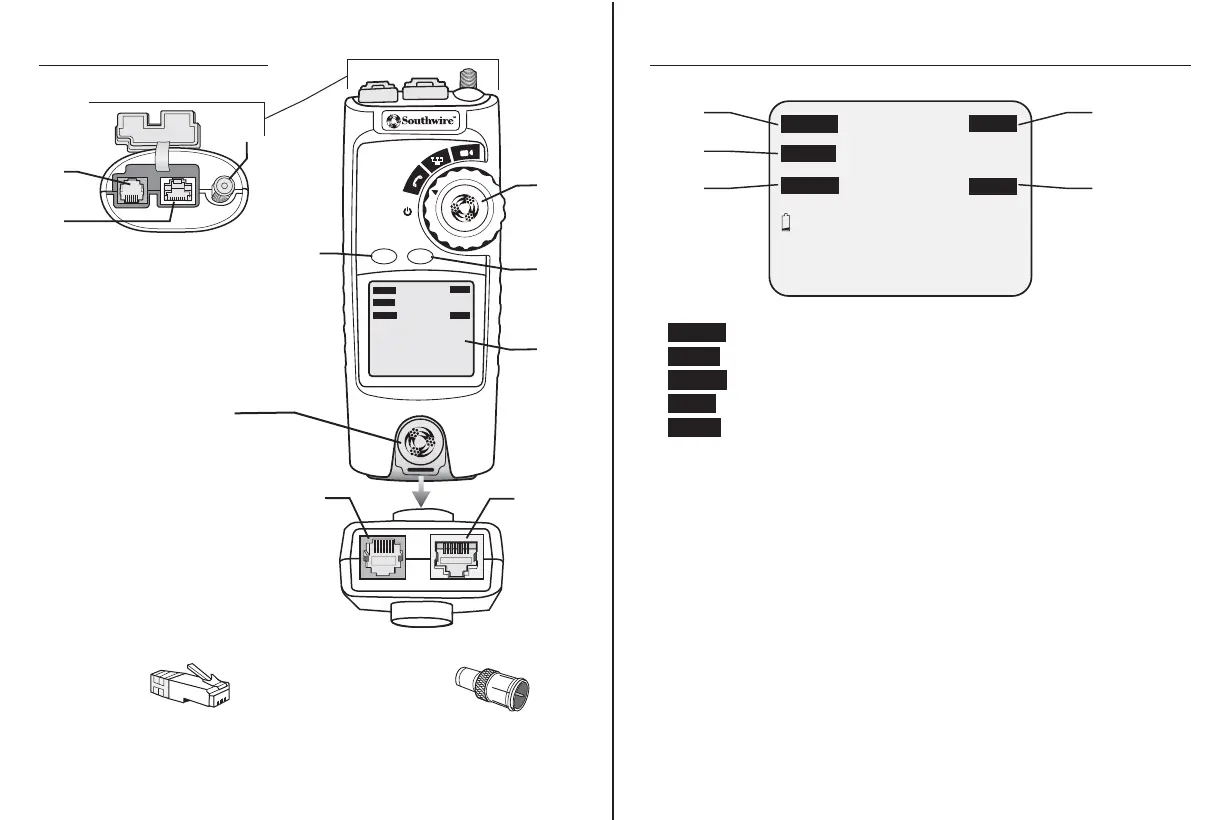
Tester Description
Cable Tester Top View
1. Voice - RJ11/RJ12 Jack
2. Data - RJ45 Jack
3. Video - F connector
Symbols Used on LCD Display
3 4
4. CYCLE button
5. MODE button
6. LCD display
7. Detachable Remote
8. Rotary Function Switch
1.
2.
3.
4.
5.
6.
8.
RJ45
Remote
ID’s:
5 numbered Remote ID’s
permit mapping 5 remote locations.
An Expansion Kit is available for a
maximum of 16 remote locations.
F-Connector
Remote
ID’s:
5 numbered Remote ID’s
permit mapping 5 remote locations.
An Expansion Kit is available for a
maximum of 16 remote locations.
A.
B.
1.
2.
3.
4.
5.
12345678
Open
FailPass
Rev
Shield
Volt! X-over Split ID 1
Test
Short
Tone
Data
Voice
Video
12345678
Detachable Remote
Bottom View (7.)
(A). Voice - RJ11/RJ12
(B.) Data - RJ45 Jack
Included:
- Pass: Indicates proper wiring on cable being tested.
- Fail: Indicates wiring error on cable being tested.
- Rev: Indicates the connections on one or more pairs
is reversed at one of the cable.
- Short: Indicates that two or more wires are shorted to each other.
- Shield: Appears when the cable being tested has a shield that
is connected at both ends. The Shield indicator will flash
if there is a short between the shield and any wire within
the cable.
- Open: Appears when one or more pairs are open.
Voice: Appears when testing or toning a phone cable.
Data: Appears when testing or toning a network cable.
Video: Appears when testing or toning a coax cable.
Tes t: Indicates cable test is in process.
Ton e: Appears when the tone generator is activated.
1.
2.
3
4.
5.



 To Next Page