
 Need help?
Do you have a question about the SP tools SP61155 and is the answer not in the manual?
Essential safety guidelines for operating the scan tool and working on vehicles to prevent injury or damage.
Provides background context on On-Board Diagnostics (OBD) II systems and their evolution.
Explains the structure and meaning of five-digit alphanumeric Diagnostic Trouble Codes (DTCs).
Details the typical location of the 16-cavity Data Link Connector (DLC) on vehicles.
Describes the function of Readiness Monitors in the OBD II system, indicating system test completion.
Explains how OBD II systems report component testing status as "Ready" or "Not Complete".
Defines key OBD II terms like PCM (Powertrain Control Module) and MIL (Malfunction Indicator Light).
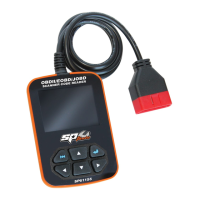
Identifies and describes the physical components and buttons of the SP61155 scan tool.
Lists technical specifications of the scan tool, including display, voltage, and dimensions.
Details the items included with the scan tool, such as the user manual and cables.
Explains how the scan tool receives power directly from the vehicle's Data Link Connector (DLC).
Outlines the initial setup procedures for the scan tool, accessed via the Main Menu.
Describes how to select the desired language and measurement units for the tool's interface.
Explains how to enable or disable the audible beep notification feature on the scan tool.
Details the process for setting the current time and date on the scan tool.
Explains how to enable or disable the recording of data-stream and freeze-frame information.
Specifies the range of OBD II compliant vehicles that the scan tool is designed to work with.
Step-by-step guide on how to connect the scan tool to the vehicle's OBD II port.
Introduces the OBDII Diagnose function and displays the initial Monitor Status screen.
Explains how to access and view current, pending, and permanent DTCs from the vehicle.
Guides users on how to clear emission-related diagnostic information and DTCs from the vehicle.
Shows the status of various emissions-related monitors for Inspection and Maintenance (I/M) testing.
Details how to view live vehicle data streams, including selecting specific items or viewing all data.
Explains how to access snapshots of vehicle operating conditions recorded when a fault occurred.
Describes how to perform O2 sensor tests and view their results, including voltage and status.
Allows users to read the results of on-board diagnostic monitoring tests for specific components.
Explains the function for initiating an EVAP system leak test, though the tool signals the vehicle.
Shows how to retrieve vehicle identification numbers (VIN), calibration IDs (CID), and CVNs.
Guides on reading trouble codes for vehicles supporting the JOBD standard, by brand.
Details the process for erasing fault codes in JOBD compliant vehicles.
Explains how to access and view live data streams for JOBD vehicles.
Allows users to input a DTC and view its definition and meaning.
Displays a log of previously read Diagnostic Trouble Codes (DTCs) with date, time, and type.
Allows reviewing previously recorded live data streams from vehicle diagnostics.
Enables viewing of previously captured freeze frame data snapshots.
Provides instructions on how to delete recorded DTC data from the tool's memory.
Accesses information about the scan tool, including software/hardware versions and serial number.
Provides relevant introductions and information regarding the On-Board Diagnostics (OBD) standard.
Explains individual data stream items that can be monitored and their status.
Lists conditions under which the limited warranty will not apply, such as misuse or accidents.
Details the steps required for a customer to make a claim under the limited warranty.
 General
| Model | SP61155 |
|---|---|
| Display | LCD |
| Diode Test | Yes |
| Continuity Test | Yes |
| Power Supply | 9V battery |
| Type | Multimeter |
| DC Current Range | 0-10A |

 To Next Page