Home
Spacetalk
Watch
Life
Page 39 (Fitness Tracker Usage)
Spacetalk Life - Fitness Tracker Usage
59 pages
Manual
Save Page as PDF
To Next Page
To Next Page
To Previous Page
To Previous Page
Loading...
39
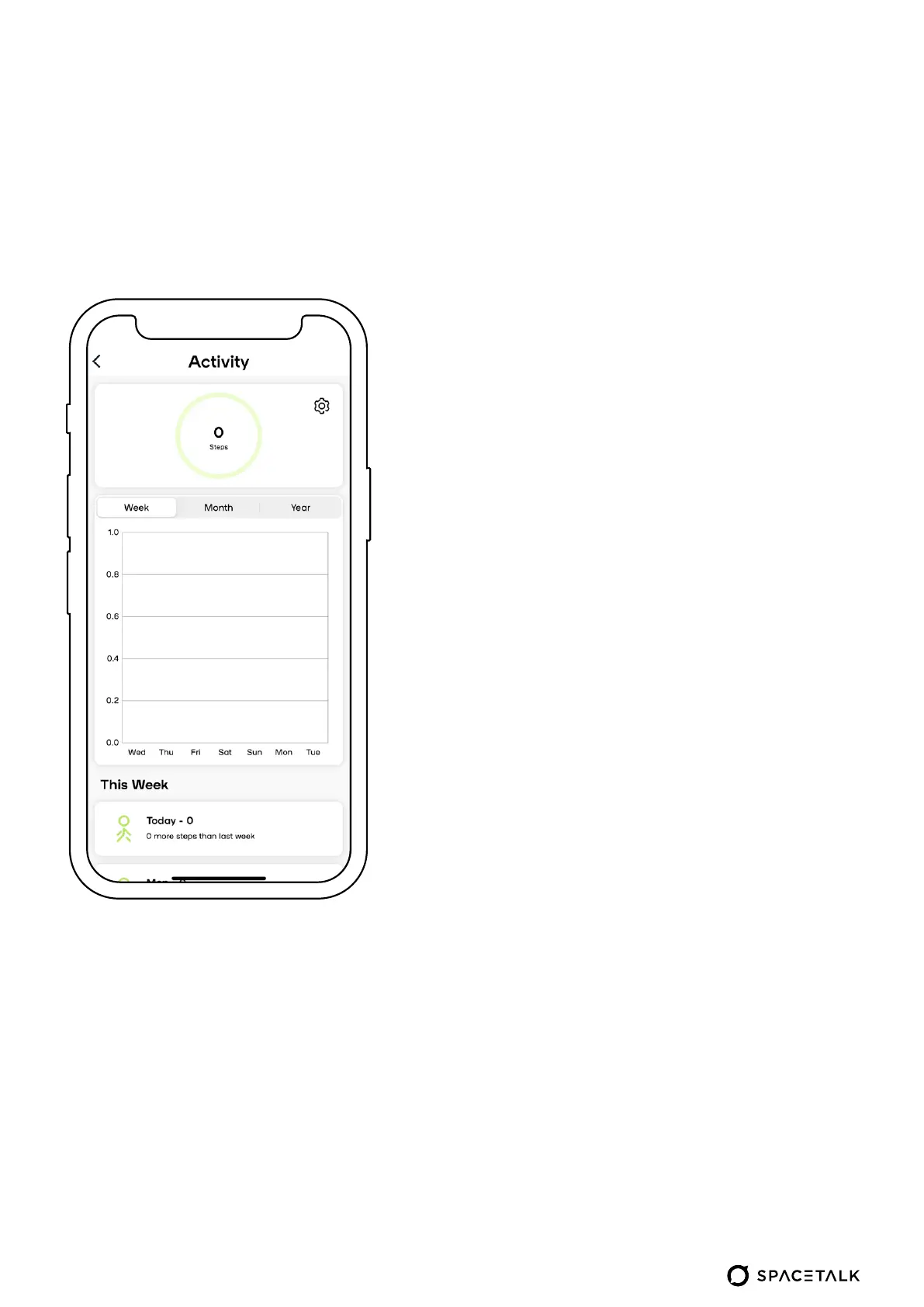
Check your daily
, monthly and
yearly step count average
Y
ou can also change your step
count goal from the settings menu
(the cog in the top right corner of
the screen)
Using the fitnes
s tr
ack
er
38
40
Table of Contents
Main Page
Default Chapter
2
Table of Contents
2
Legend
3
What's in the Box
4
Getting to Know Your Device - Front
5
Getting to Know Your Device - Back
6
Installing Your SIM Card
7
Charging Your Watch
8
How to Adjust the Strap
9
Powering up Your Watch
10
How to Access the Main Menu
11
How to Access the Drop-Down Menu
11
Drop-Down Options
13
Making Calls
14
Sending Messages
15
Checking the Weather
16
Sending Your Location
17
Using the Step Tracker
18
How to Set Alarms
19
Changing Wallpaper
22
System Settings
23
Settings
27
Fall Detection and Medical ID
28
Using Spacetalk App with Your Life Device
29
With YourLife Device 29
30
Using the Spacetalk App
30
Getting Started with the Spacetalk App
31
Locating Your Device
32
View Your Location History
33
Navigate to Device
34
Using Safe Zones
35
Set up Safety Callback
36
Settings
37
Manage Your Account
38
Using the Fitness Tracker
39
Managing Contacts
40
Preset Messages
41
Location Updates
42
Safe Zone Alerts
43
Safety Settings
44
Set up Device Sharing
48
Set up Reminders
49
Find My Spacetalk
50
Advanced Settings
51
Quick Guide for Carers and Loved Ones
52
And Loved Ones 52
53
Pairing Your Spacetalk Life
53
Support
59
Related product manuals
Spacetalk Adventurer
3 pages
Spacetalk Adventurer 2
3 pages
Spacetalk IF-W515C
3 pages


 To Next Page