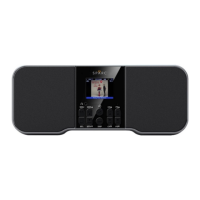
Controlling the Radio with the Buttons
Various buttons are available for controlling the Radio’s array of
functions.
TUNE+ and TUNE−
Press to tune up and to tune down the broadcast band: stops at
each station possibility.
SEEK DOWN and SEEK UP
Press to find the previous or next “strong signal” station.
(for SEEK DOWN) and (for SEEK UP)
While navigating the options in one of the menus/screens, press to
move the highlight to another option.
PRE+ and PRE− (Preset Stations)
Press-and-hold PRE+ to save the current station as a preset.
Press-and-hold PRE− to delete a previously stored preset.
Quick-press PRE+ or PRE− to scroll to the next or previous preset.
In Bluetooth Mode, quick-press PRE+ or PRE- to scroll through the
EQ presets.
VOL+ and VOL−
Quick-press to adjust the volume in increments.
Press-and-hold to adjust the volume continuously.
While considering a highlighted option in one of the
menus/screens, press to change the setting/value for the
highlighted option.
Tune your radio to more local stations!


 To Next Page