Need help?
Do you have a question about the sparkfun Qwiic and is the answer not in the manual?
Example code for taking basic serial readings from the Human Presence Sensor via serial output.
Code to display sensor derivative on serial plotter, adjust sensitivity.
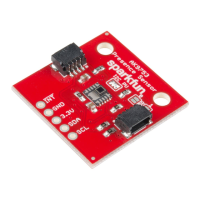
The SparkFun Qwiic Human Presence Sensor (AK9753) is a sophisticated device designed to detect human presence and movement using a 4-channel Nondispersive Infrared (NDIR) sensor. This Qwiic-enabled breakout board offers a convenient and efficient way to integrate human detection capabilities into various projects. Its primary function is to sense the infrared radiation emitted by humans, and with its multiple channels, it can even determine the direction of movement.
The core functionality of the AK9753 revolves around its four NDIR sensor channels. Each channel possesses a distinct field of view, allowing the sensor to not only confirm the presence of a human but also to infer their direction of movement. When a human enters the sensor's field of view, the NDIR channels detect changes in infrared radiation, which are then processed to provide readings. The sensor is designed to be highly sensitive to the infrared spectrum emitted by the human body, making it effective for presence detection.
The device operates on a 3.3V power supply and has a wide operating temperature range from -30°C to 85°C, making it suitable for various environments. Its spectral sensitivity is optimized for 5-7 µm (at 5V), which corresponds to the typical infrared emissions of humans. The detection range extends up to 3 meters (at 5V), providing a reasonable area for monitoring. Additionally, the sensor includes a temperature sensor with a range of -10°C to 60°C, which can be useful for environmental monitoring or for compensating sensor readings based on ambient temperature.
The AK9753 communicates via the I2C protocol, a common embedded communication standard. This allows for easy integration with microcontrollers, enabling users to read sensor data and configure its settings. The board includes dedicated pins for Ground (GND), Power (3.3V), Serial Data (SDA), and Serial Clock (SCL) for I2C communication. An additional Interrupt (INT) pin is available, which goes high when new data is ready and pulls low after the data has been read. This interrupt feature can be used to efficiently trigger data acquisition without constant polling, conserving microcontroller resources.
The device can operate in a continuous read mode (Mode 0), where it constantly provides updated sensor readings. Users can also configure the cutoff frequency for filtering, with 8Hz being the fastest and least filtered option, allowing for customization based on application requirements. The library provides functions to retrieve individual channel readings (getIR1(), getIR2(), getIR3(), getIR4()), as well as the sensor's temperature in both Celsius and Fahrenheit.
The SparkFun Qwiic Human Presence Sensor is designed for ease of use, particularly within the Qwiic ecosystem. The Qwiic system simplifies connections by using standardized 4-pin JST connectors, eliminating the need for soldering. To get started, users typically connect the AK9753 breakout board to a Qwiic-enabled microcontroller (such as a SparkFun RedBoard, ESP32 Thing, Raspberry Pi 3, or Particle Photon) using a Qwiic cable of appropriate length. This plug-and-play approach significantly reduces setup time and complexity.
The provided Arduino library for the SparkFun AK975X simplifies software development. It offers a comprehensive set of functions to interact with the sensor, including:
getIRX(): Functions to retrieve the infrared readings from each of the four channels.refresh(): Reads a dummy register to prompt the sensor to calculate the next reading.available(): Checks if new data is ready from the sensor.overrun(): Indicates if an overrun bit is set, suggesting data might have been missed.softReset(): Resets the sensor's internal IC via software.setMode(): Configures the sensor's operating mode, with Mode 0 being continuous read.setCutoffFrequency(): Adjusts the filtering frequency for sensor readings.getTemperature() / getTemperatureF(): Retrieves the sensor's internal temperature.enableDebugging() / disableDebugging(): Toggles verbose debug messages for troubleshooting.readRegister() / writeRegister() / readRegister16(): Low-level functions for direct I2C register access.These functions allow users to easily acquire raw sensor data, temperature readings, and manage the sensor's operational parameters. The library also includes example sketches to demonstrate basic serial readings and how to graph the derivative of a single channel's data, which can be used to visualize movement and presence. The graphing example introduces a sensitivity parameter, which can be adjusted to fine-tune the detection threshold for touch or release events, with lower values yielding higher sensitivity.
The board also offers optional features through onboard jumpers:
The "Field of View" text and box on the back of the board visually indicate the orientation of each of the four sensors: channel 1 is on top, 2 on the left, 3 on the bottom, and 4 on the right, from the sensor's perspective. This information is crucial for interpreting directional movement data.
The sensor also supports a "Switch Mode," which can be used to avoid I2C communication altogether. In this mode, data is written to the interrupt pin. The pin pulls high when the difference between two outputs (e.g., IR1-IR3 or IR2-IR4) exceeds predefined upper or lower thresholds set in the EEPROM by the manufacturer. This mode is suitable for projects that do not require high accuracy but need a simple indication of presence or movement.
The SparkFun Qwiic Human Presence Sensor is designed for robust operation and generally requires minimal maintenance. As an embedded sensor, its primary maintenance considerations revolve around proper handling and environmental conditions.
enableDebugging() function in the library can be invaluable. It outputs extra messages to the serial monitor, providing insights into the sensor's operation and helping to diagnose problems such as device not found errors or unexpected readings. The serial output examples provided in the hookup guide are excellent starting points for verifying sensor functionality.sensitivity parameter in the graphing example is a good illustration of how users can adjust the sensor's responsiveness.Overall, the SparkFun Qwiic Human Presence Sensor (AK9753) is a versatile and user-friendly device for human presence and movement detection. Its Qwiic compatibility, comprehensive Arduino library, and configurable features make it an excellent choice for a wide range of projects, from simple occupancy sensors to more complex interactive systems.
 General
| Interface | I2C |
|---|---|
| Connector | JST |
| Voltage | 3.3V |
| Compatibility | Qwiic-enabled devices |
| Cable Length | Varies by cable |

 To Next Page