22
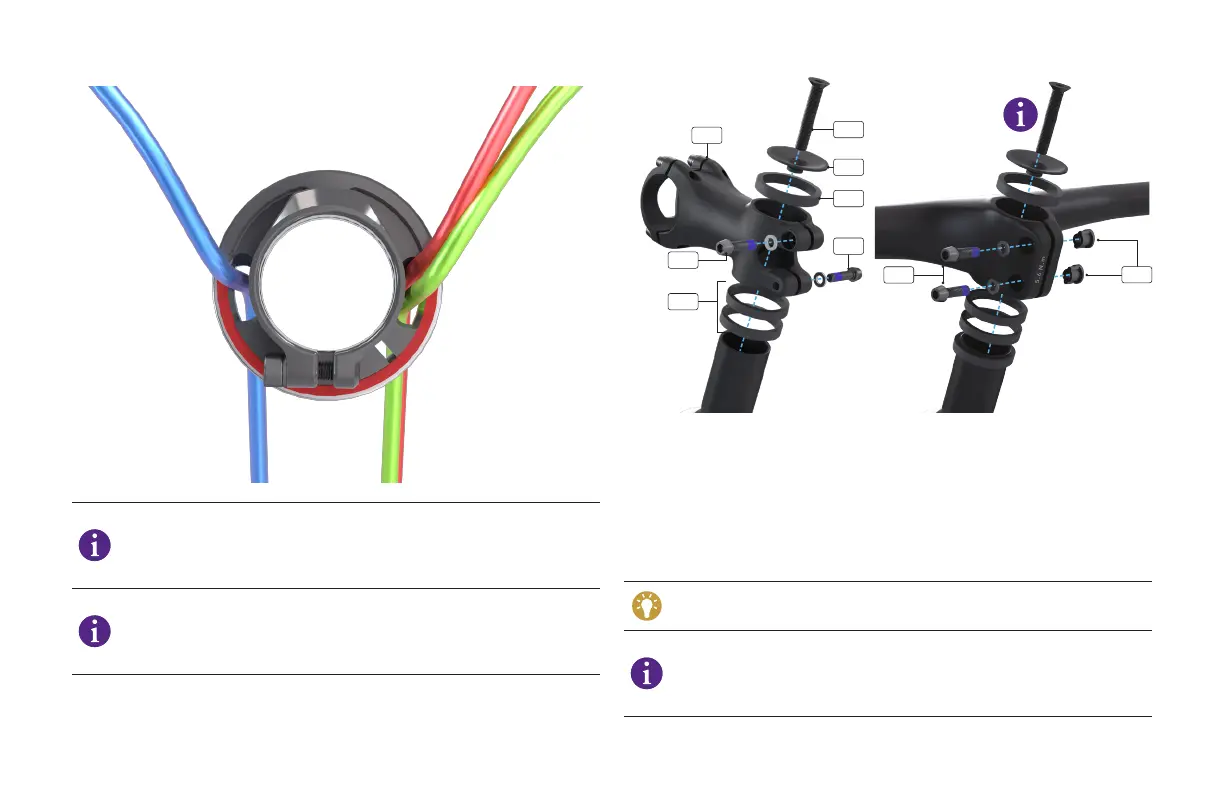
The Epic WC comes standard with wireless shifting. The green
cabling depicted behind the rear brake hose (red) on the
drive-side shows the optional mechanical shifting. The blue
cabling on the non-drive side shows the optional dropper post.
FOR COUNTRIES THAT ROUTE THE REAR BRAKE ON NON-DRIVE
SIDE: Make sure your brake hose (red) exits the NDS side of the
compression ring and headset cover and is in front of the dropper
post cable (blue) if you’re using one.
G
K
J
H
I
H
I
I
M
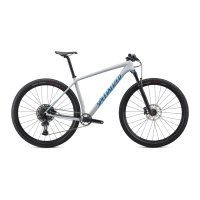
Install the stem (G). Adjust the stem height by adding spacers (H) as
needed.
Finger-tighten the stem bolts (I). You’ll torque them to specification
later in the process.
Make sure the headset cover and steerer tube clamp are aligned with
the stem and centerline of the frame.
Install the top cap (J) and compression bolt (K). Using a torque wrench
and a 4 mm hex bit, torque the bolt to 3 Nm / 27 in-lbf.
You should not be able to rotate the stem spacers by hand if the
system is sufficiently tightened.
The S-Works model has an integrated stem/handlebar system.
The bolts (I) are installed on the same side with a corresponding
nut (M) on the other side. Finger tighten as noted above. You’ll
torque them to specification later in the process.



 To Next Page