23
I
E
I
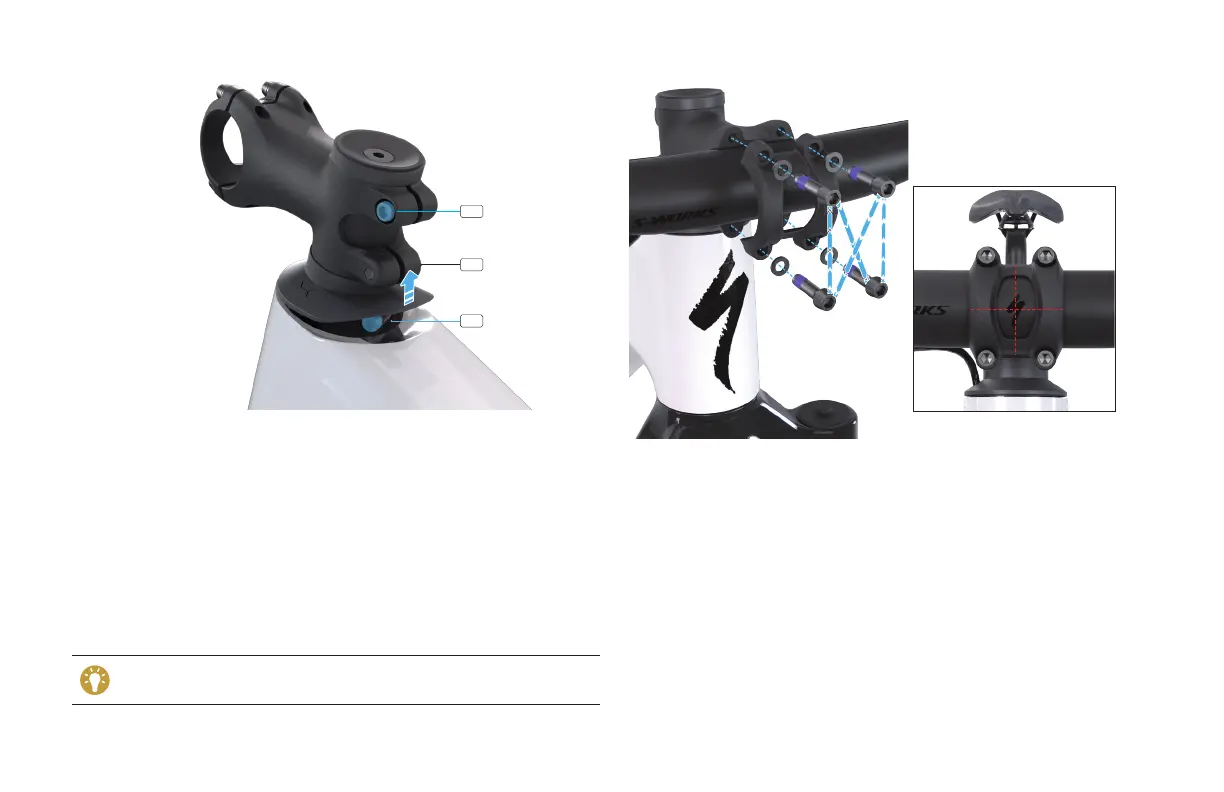
Turn the stem toward the drive side of the bicycle then lift the headset
cover.
Using a torque wrench and 3 mm hex bit, torque the steerer tube clamp
bolt (E) to 4 Nm / 35 in-lbf.
With the bicycle on the ground, pull the front brake and rock the bicycle
back and forth to ensure the headset is fully seated and there is no
looseness. If there is, loosen the steerer tube clamp bolt and repeat the
previous steps starting with adding tension to the top cap compression
bolt.
For both the regular stem and the S-Works integrated stem and
handlebar system, use a torque wrench and a 4 mm hex bit to tighten
the stem bolts (I) to 5 Nm / 44 in-lbf.
Before making any torque adjustments to the headset preload (top
cap and bolt), you must loosen the steerer tube clamp (E).
Using a 4 mm hex key, remove the faceplate bolts and faceplate.
Place the handlebar against the stem
and rotate it to your preferred
position
, then loosely thread the faceplate bolts through the faceplate
and into the stem body.
Using a torque wrench and a 4 mm hex bit, tighten each faceplate bolt
approximately a half turn at a time in an alternating (cross) pattern
until each is torqued to 5 Nm / 44 in-lbf.
Check that the handlebar is installed correctly by trying to move/rotate
the handlebar. If there is any movement, the faceplate pieces are not
sufficiently tightened and should be re-torqued.



 To Next Page