English
16
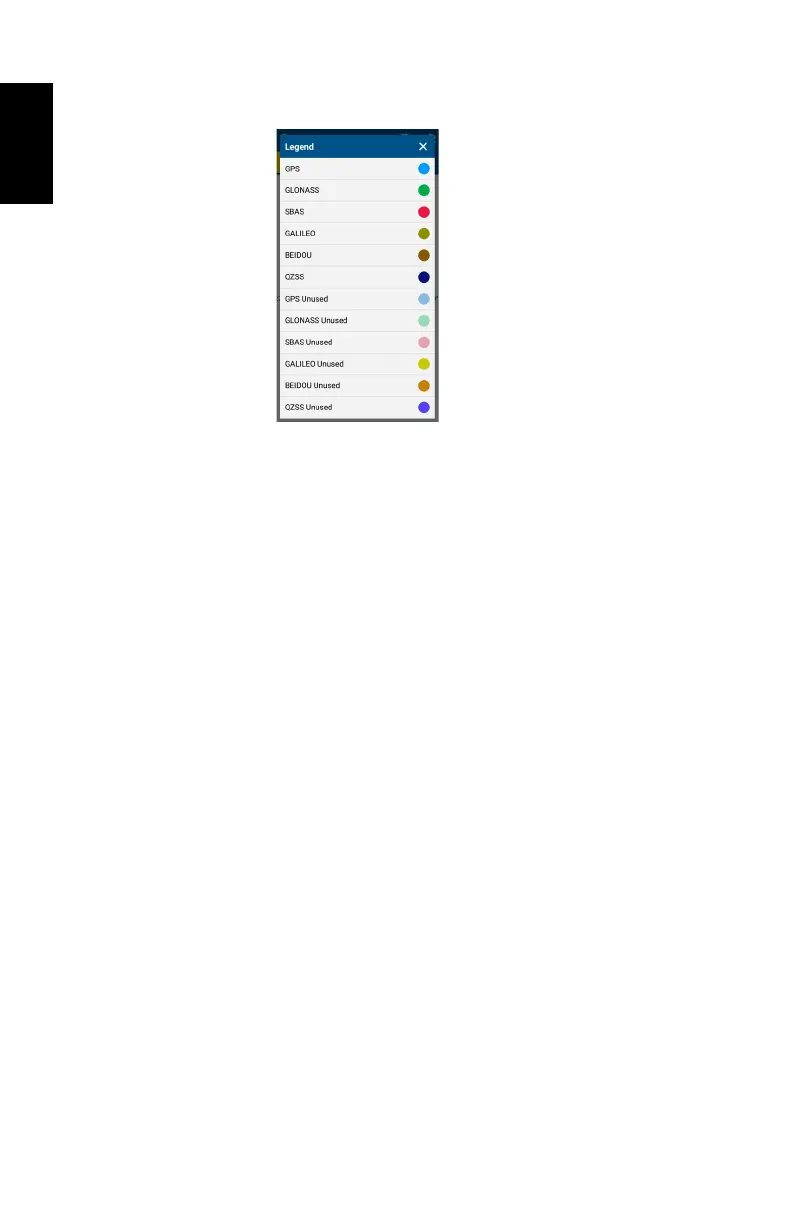
Touch Legend ([4]) to read the color convention used to
represent satellites on the sky view for each constellation:
In the lower part of the screen, you can read the total number
of currently tracked satellites and total number of satellites
currently used.
The POSITION INFORMATION tab ([2]) provides the following
information, from top to bottom:
• Receiver name (SP20)
• Latitude and Longitude of current position
• Altitude of current position
• Geoidal separation (vertical distance between datum used
and geoid used)
• HRMS, VRMS: Horizontal and vertical errors
• Speed: SP20 speed, in meters/second
• Fix quality: Position computation mode (AUTONOMOUS,
DGPS, FLOAT RTK, FIXED RTK).
The CORRECTION INFORMATION tab ([3]) provides the
following information, from top to bottom:
• Host Name or IP Address: Identification of the NTRIP, DIP
or RTX server providing the corrections used.
• Port Number: IP port number of the NTRIP, DIP or RTX
server providing the corrections used (blank for SBAS)
(the presence of a hyphen in any field means “Blank”).
• Type: Type of connection used (SBAS, NTRIP, DIP or RTX)
to let SP20 acquire corrections.
• Mount Point: Name of mount point used in NTRIP or RTX
(blank for SBAS and DIP).
• Network: Indicates which medium (Mobile or Wi-Fi) is used
to make a network connection (blank for SBAS).


 To Next Page