English
5
Discover Your New Equipment
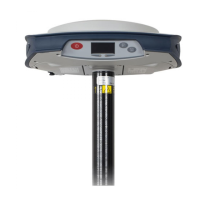
Take a few minutes to discover your new SP80.
Front Panel
• [1]: Power button. Hold the button depressed for about
two seconds to turn on or off the receiver.
• [2]: Display screen
• [3]: Battery A LED indicator.
• [4]: Battery A compartment.
• [5]: Battery B LED indicator.
• [6]: Battery B compartment.
• [7]: Scroll button. Press this button to scroll through all
the display functions (including alarm screens if any).
Also used to accept or reject prompts in some particular
contexts.
• [8]: Log button. From the memory screen, press this
button to start or stop GNSS raw data recording. From all
other screens, pressing this button takes you back to the
General Status screen. Also used to accept or reject
prompts in some particular contexts.
NOTE: Pressing these buttons simultaneously gives
access to special receiver functions. See all the possible
combinations in Special Key Combinations on page 10.
[1] [2] [3] [5]
[4] [6]
[7] [8]


 To Next Page