Install the Shipping Bracket Ensure ESD Protection
December 2022 Shipping Bracket Installation & Removal — Spectra Stack Library
8
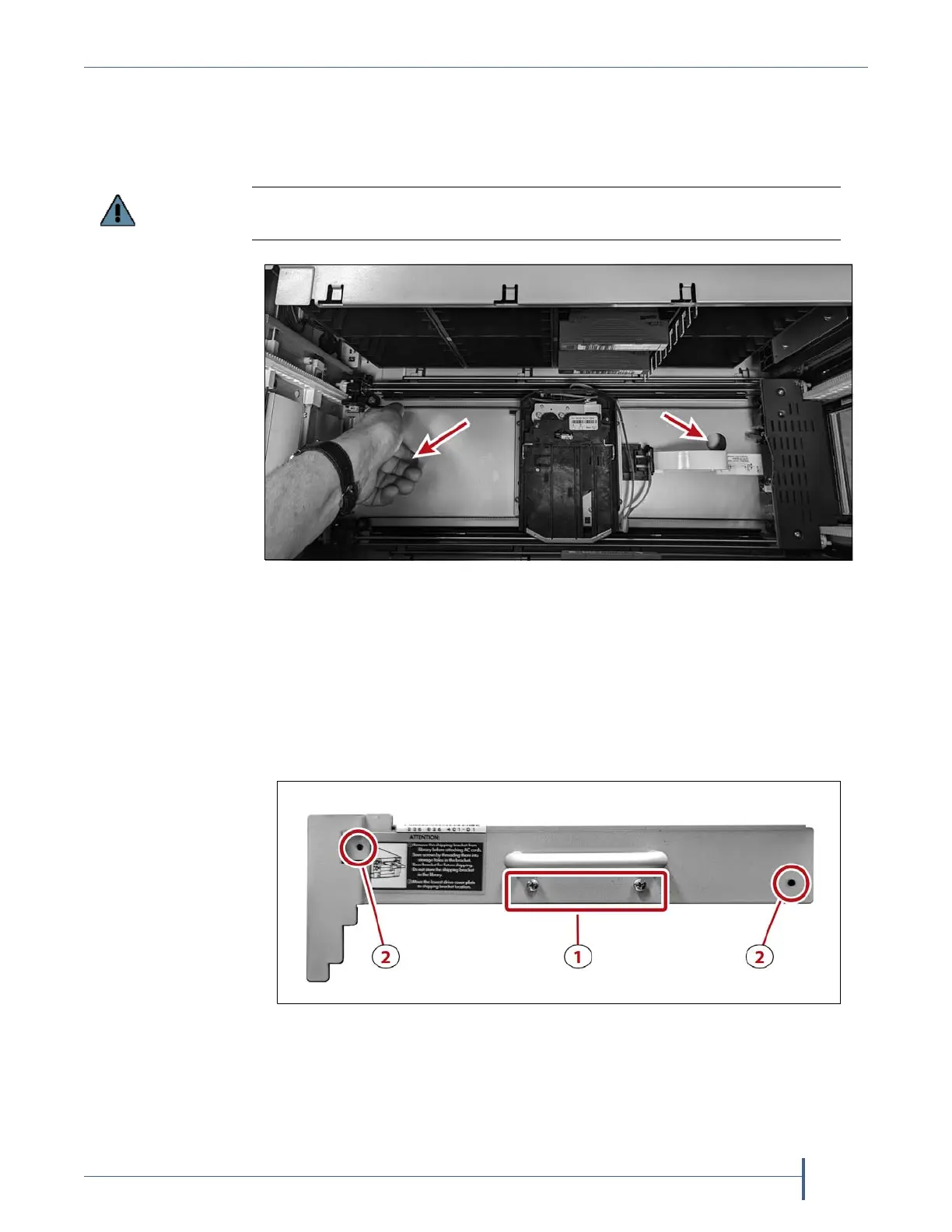
8. Usingyourfingers,raisetheroboticelevatorusingthetwocutoutholes
onbothsidesoftherobotuntilitislevelwiththetopofthelibrary
chassis.Ittakesapproximatelytento15secondstoraisetherobotic
elevatorfully.
9. Whileholdingtheroboticelevatoratthetopofthechassis,installthe
roboticshippingbracketintheslot5drivebay(seeFigure2onpage6).
Note: Itmaybehelpfultohaveasecondpersoninstallthebracket
whileyouholdtheelevatorinplace.
10. Usinga#1Phillipsscrewdriver,removethetwoscrewsunderthe
handleoftheroboticshippingbracket(1)andinstallthetwoscrewsat
theendsoftheshippingbrackettosecureittothechassis(2).
11. Oncethebrac
ketisinplace,releasetheelev atorandallowittoreston
theroboticshippingbracket.
Do not raise the robotic elevator higher than the top of the chassis to avoid
disengaging the elevator from the track.
Figure 6 Use the cutout holes to raise the robotic elevator.
Figure 7 The robotics shipping bracket rear panel.



 To Next Page