English-11
T86- ******
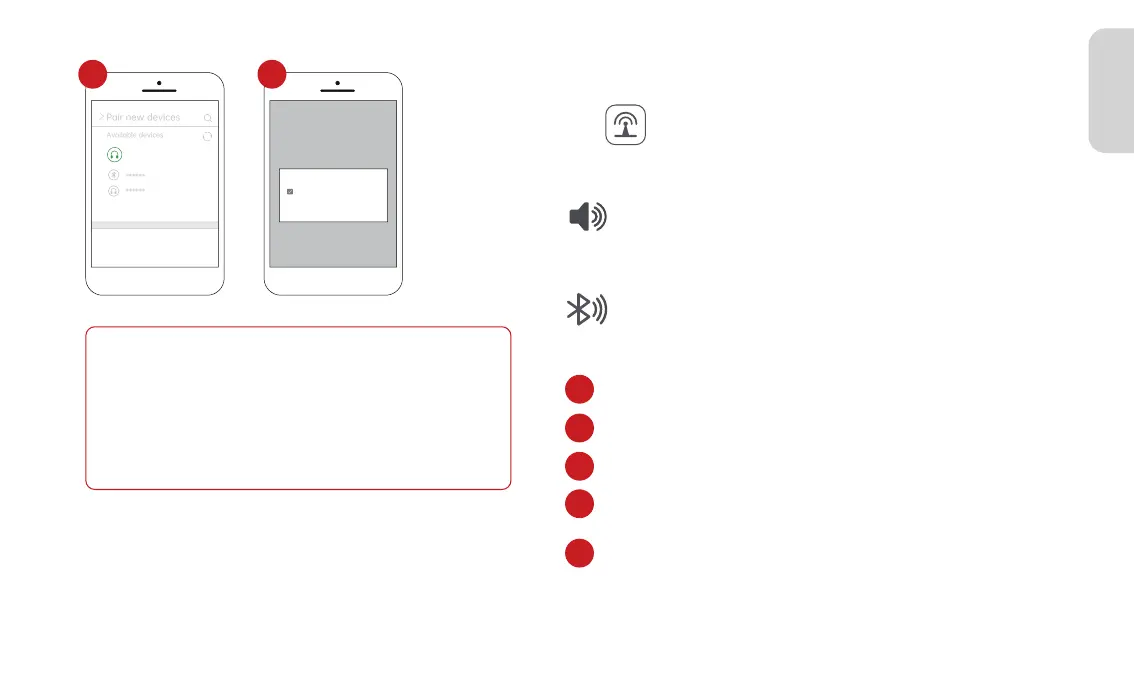
Pair new devices
Available devices
Pairing...
>
Spedal- ******
******
******
Pair with T86- ****** ?
Allow access to your contacts
and call history
Cancel
Pair
Note
Different models of Android phones may display differently, please
refer to the actual situation.
The first connection takes a longer time, please be patient.
If you want to switch to CarPlay/AirPlay/Android Cast, you need to
turn off Bluetooth and WIFI on your phone and disconnect from
Android Auto connection mode.
3.3.2 Andorid Auto Audio Out
In CarPlay/Android Auto mode, the phone is directly
connected to the car's Bluetooth (if the phone has been
paired with the car's Bluetooth before, there is no need to
repeat the connection operation).
2. Bluetooth
1. Built-in Speaker
Click“ ”on the home screen to enter the Audio Out.
The sound is played from the speaker of the device.
2.1 Go to Settings on your phone > Bluetooth,turn on the “Bluetooth”.
2.2 Enter Bluetooth search page.
2.3 Click“Pair new devices”to search new Bluetooth device.
2.4 Select your car's Bluetooth name pairing from the list of
searched Bluetooth.
2.5 Wait for about 20 seconds, the phone pops up the box "Pair
with "Car******"", click "Pair", wait for the Bluetooth pairing
to finish. The audio will be played from the car.
1
2
3
4
5
4 5



 To Next Page