English-12
Car******
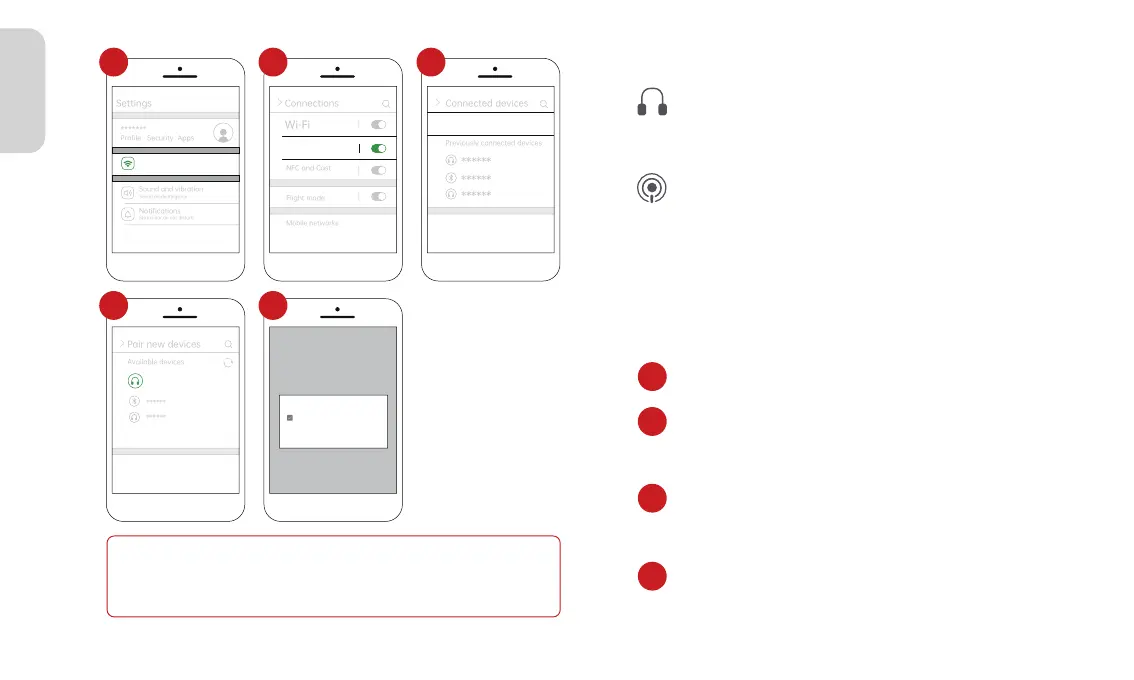
Pair new devices
Available devices
Pairing...
>
Spedal- ******
******
******
Pair with Car****** ?
Allow access to your contacts
and call history
Cancel
Pair
Connections
Wi-Fi,Bluetooth,Flight mode
Status bar,do not disturb
1
Bluetooth
2
Pair new devices
Previously connected devices
+
3
4 5
The same as the page 09--3.2.2--4.FM Transmitter.
The same as the page 09--3.2.2--3.Aux Connection.
3. AUX Connection
4. FM Transmitter
Note
1.Due to differences in Android phone models, the display may vary.
Refer to your specific device for accuracy.
2.The initial connection time might be relatively long, please be patient.
3.4 Apple AirPlay
Apple AirPlay Wileless Connect
1. Go to Settings on your iPhone > Wi-Fi
2. Select the WiFi network with the name starting
with "CARLINK-*****" and connect to it. Enter the
password, the default password is “12345678”.
3. Swipe down from the top of the iPhone screen to
access the Control Center menu, then tap "Screen
Mirroring".
4. Click on “SmartScreen” to complete Screen
Mirroring.
1
2
3
4



 To Next Page