English-03
Note
The installation position of equipment and brackets should not
block the driver's sight and affect driving safety.
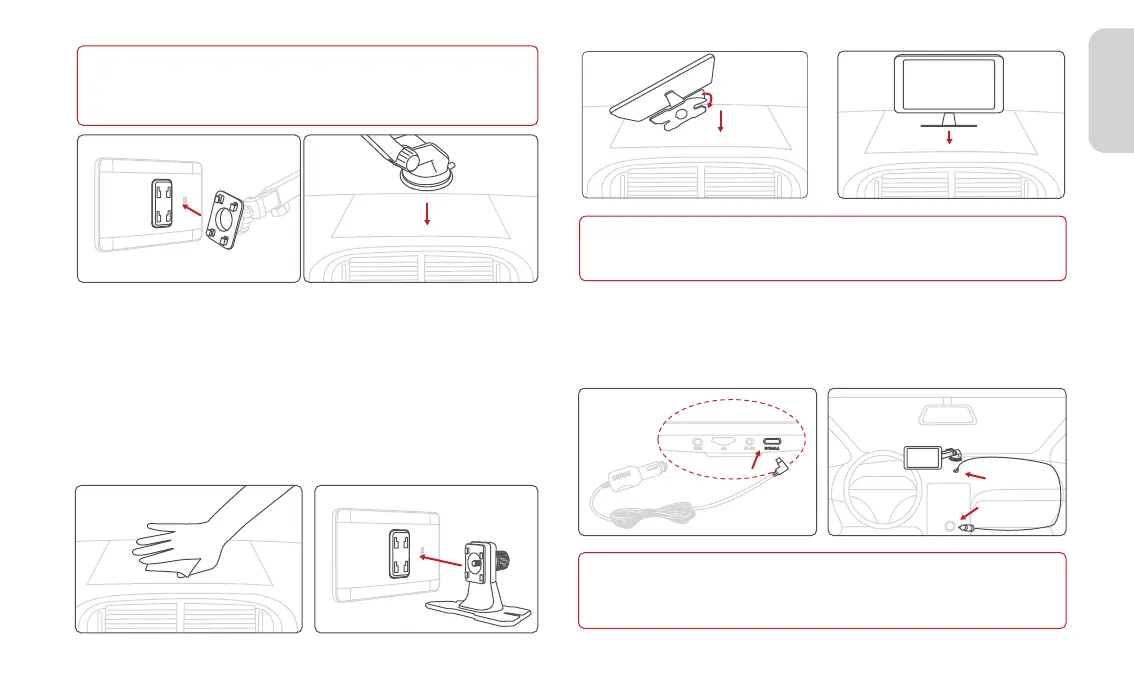
2.4 Dash Bracket Installation(Optional)
Note
Depending on the vehicle, the cigarette lighter socket may be located in
a different position. The figure provided is for reference only.
2.5 Device Installation
Insert the power cable into the car cigarette lighter, and connect the
other end to the power interface of the device.
1. Thoroughly clean and dry the surface of the car dashboard,
removing any dust or debris and ensuring a smooth surface.
2. Peel off the protective film from the bottom adhesive of the
device bracket.
3. Stick the device onto the appropriate position on the dashboard.
4. Press down on the bottom bracket of the device to ensure a
secure adhesive bond.
5. Adjust the device screen to the desired angle.
Note
The installation position of equipment should not block the driver's
sight and affect driving safety.



 To Next Page