a 2
5/14
SpeedyBee F405
Mini Flight Controller
Layout
5/14
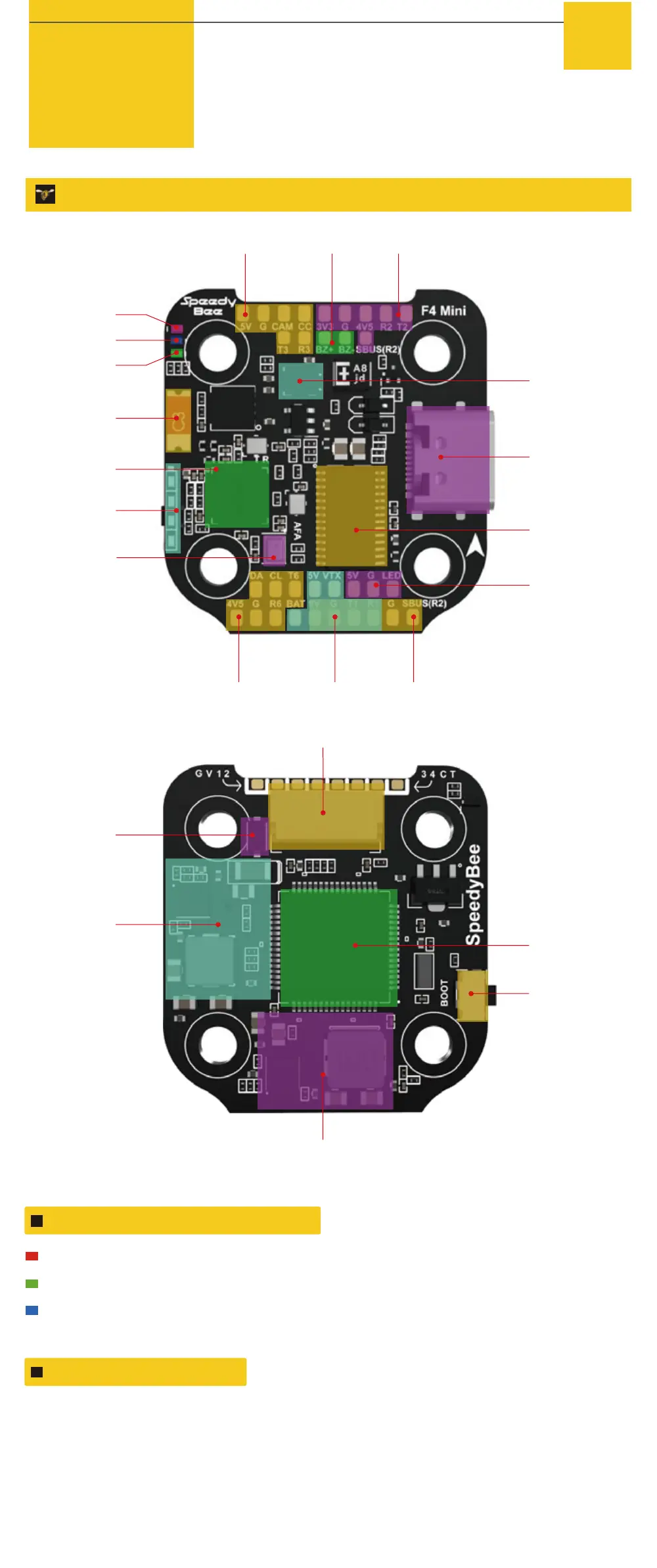
FPV Cam Buzzer Receiver
Gyro(ICM42688P)
USB TYPC-C Port
OSD
Chip(AT7456E)
Betaflight LED
Red LED
Blue LED
Green LED
Bluetooth
Antenna
Bluetooth Chip
4-level LED
battery
indicator
Barometer
GPS&Compass VTX(Analog) VTX(DJI)
8pin Connector(to ESC)
TVS Diode
(Anti-volatge spike)
5V 2A BEC
9V 3A BEC
BOOT Button
MCU: F405
LED Indicator Denition
RED LED - Power Indicator.Solid Red after powering up.
GREEN LED - Bluetooth status light. Solid Green indicates Bluetooth is connected.
BLUE LED - Flight controller status light which is controlled by the ight
controller rmware.
BOOT Button
Only if the flight controller gets bricked and can’t power up, please follow these
steps to re-flash firmware for it:
① Insert a USB A to TYPE-C cable to your PC.
② Press and hold the BOOT button, insert the USB cable into the flight controller, then release
the BOOT button.
③ Open Betaflight/INAV configurator on the PC, go to the ‘Firmware Flashing’ page, choose the
target ‘SPEEDYBEEF405MINI’ and flash.



 To Next Page