13/14
ESC Firmware Update
This 8-bit 55A ESC can run BLHeliS or Bluejay rmware. It is loaded
with BLHeliS rmware by default. You could also ash it to Bluejay
rmware which can suppo RPM ltering and Bi-directional Dhsot.
Firmware ashing steps are as follows:
● Remove all the propellers from your drone.
● Ensure that the ight controller is connected properly to the ESC,
then power up the drone. This step ensures that the ESC stas
up correctly.
● Connect the ight controller to the computer using a
USB Type-C cable.
● Open the Chrome browser and visit the following
website:
https://www.esc-congurator.com/
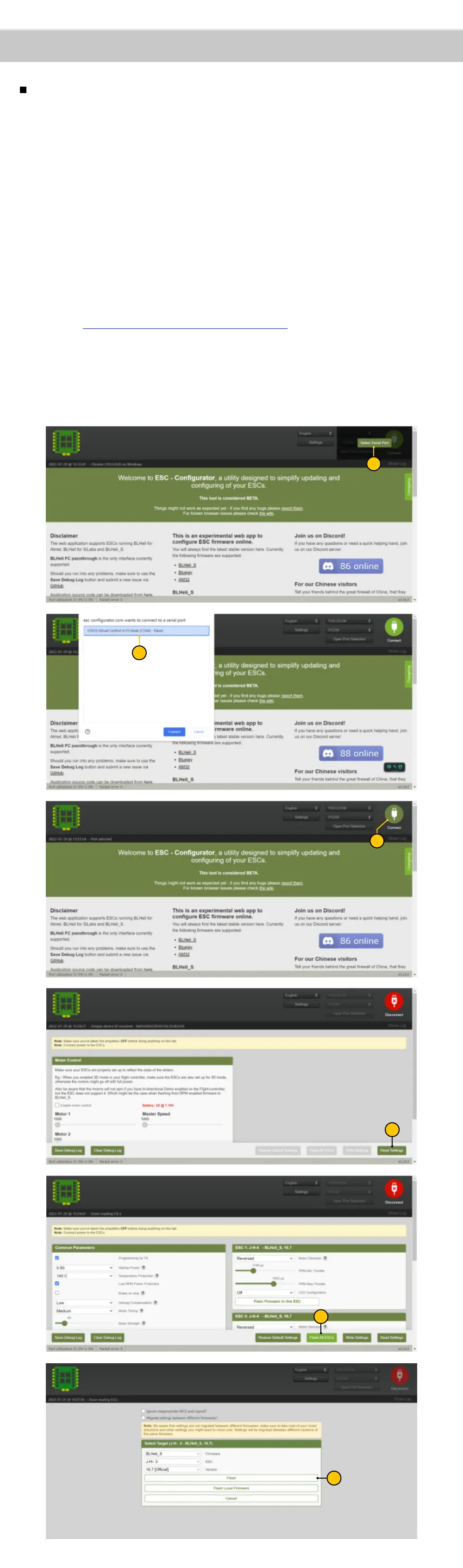
● Follow the rmware ashing steps as shown in the screenshots below.
Impoant note:
On the 6th inteace, the "ESC" type must be selected as "J-H-40".
4
5
1
2
3
0
0
6
4
4


 To Next Page