EasyManua.ls Logo

Spektrum AR10360T - User Manual

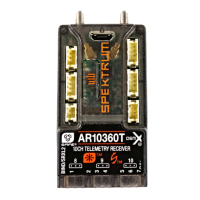
Spektrum AR10360T
28 pages
Print Icon
To Next Page IconTo Next Page
Loading...
AR10360T 10 Channel Telemetry Receiver User Guide
AR10360T Telemetrieempfänger mit 10 Kanälen
Bedienungsanleitung
Guide de L’utilisateur - AR10360T Récepteur de
télémétrie 10 Canaux
Guidea Dell’utente - AR10360T Ricevitore di
telemetria 10 CH
SPMAR10360T

Questions and Answers

  • B
    Bryan IngramAug 12, 2025
    What to do if Spektrum Receiver has inconsistent flight performance?
    • M
      Mark MorrisonAug 12, 2025
      Inconsistent flight performance with your Spektrum Receiver can occur due to a few reasons. If you adjust trim more than 8 clicks or make changes to Sub-Trim after the initial setup, select 'Relearn Servo Settings' in the Forward Programming menu after landing. Also, ensure the aircraft remains immobile for 5 seconds after connecting the battery. To do this, put the throttle stick in the lowest position, disconnect and reconnect the battery, and keep the aircraft still for 5 seconds.
  • S
    Sean MossOct 27, 2025
    Why is my Spektrum Receiver causing oscillation?
    • G
      Gregory CopelandOct 28, 2025
      Oscillation in your Spektrum Receiver can stem from several factors. Check for a damaged or imbalanced propeller or spinner, and replace or balance it as needed. Motor vibration can also be a culprit; replace parts, correctly align the propeller or other components, and tighten fasteners. Ensure the receiver is securely mounted in the fuselage. Loose aircraft controls (servo, arm, linkage, horn, and control surface) should be tightened. Worn parts, especially the propeller, spinner, or servo, should be replaced. If you notice irregular servo movement, replace the servo and/or servo extension(s). Also, reduce the gain if it is too high. Finally, if travel or rates are reduced, move the pushrod in on the servo horn, or move the pushrod out on the control horn, and increase travel and/or rate...

Summary

SPECIFICATIONS

Installing the AR10360 T Receiver

Initial Setup

Outlines steps for transmitter software verification, receiver installation, binding, and basic airplane configuration.

AR10360 T Receiver - Basic AS3 X Setup

AS3 X Reaction Test

Procedure to verify AS3X system function and correct control surface reaction.

AR10360 T Receiver - SAFE Setup

Other Settings (Forward Programming)

Channel Limitations

Range Testing

Troubleshooting Guide AS3 X

Troubleshooting Guide

1-Year Limited Warranty

Warranty and Service Contact Information

Spektrum AR10360T Specifications

General IconGeneral
Channels10
ModulationDSMX/DSM2
TelemetryYes
Voltage Range3.5V - 9.6V
Weight0.6 oz (17 g)

Related product manuals