EasyManua.ls Logo

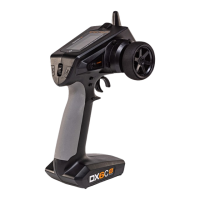
Spektrum DX6C - User Manual

Spektrum DX6C
23 pages
Print Icon
To Next Page IconTo Next Page
Loading...
Instruction Manual
Bedienungsanleitung
Manuel d’utilisation
Manuale di Istruzioni
DX6C
6-Channel 2.4GHz
DSMR
®
Radio System
Scan the QR code and select
the Manuals & Support tab
from the product page
or the most up-to-date
information

Questions and Answers

Summary

Warranty Registration

Safety Precautions

Warning Against Counterfeit Products

Warning about purchasing counterfeit Spektrum products and the implications for support and warranty.

Spektrum SR315 Sport Surface Receiver

Typical Electric Vehicle Installation

Illustrates typical installation of the receiver in an electric vehicle.

Typical Nitro Vehicle Installation

Illustrates typical installation of the receiver in a nitro vehicle.

Binding Process

Process of teaching the receiver the specific transmitter's code for operation.

Failsafe Operation

Receiver behavior when radio link is lost during use, setting failsafe positions.

Receiver Compatibility

Compatibility of the SR315 receiver with Spektrum DSM2 and DSMR radio control surface systems.

Receiver Antenna

Details the coaxial antenna design for easy installation and optimal placement.

DX6 C Controls and Switches

Installing Batteries

Instructions for installing batteries into the transmitter.

Main Screen Overview

Overview of information displayed on the transmitter's main screen.

Navigation

Using the Scroll Wheel Selector

How to navigate menus, select options, and change values using the scroll wheel.

Individual Direction Adjustments

Adjusting control directions independently for steering or throttle.

Auto Switch Select

Procedure for easily selecting a switch for functions like program mixes.

Switch Selection Tip

Advice on handling switch assignments when functions are already assigned.

Menu Functions: Model Management

Model Select and Name

Managing model memories and assigning custom names.

Menu Functions: Servo Adjustments (Part 1)

Travel and Sub Trim Settings

Adjusting servo endpoints (travel) and center positions (sub-trim).

Reverse and Speed Settings

Configuring servo direction (reverse) and response time (speed).

Menu Functions: Servo Adjustments (Part 2)

Rates and Exponential

Configuring travel reduction (rates) and sensitivity response (exponential).

Timer Functionality

Utilizing the built-in countdown timer and stopwatch features.

Menu Functions: Binding and Frame Rate

Failsafe Functionality

Explains failsafe behavior when radio link is lost and how throttle failsafe is set during binding.

Binding Procedure

Process of teaching the receiver the transmitter's code and storing failsafe values.

Menu Functions: Mixing

Steering Mix Options

Pre-configured mixes for vehicles with two steering servos, including 4WS and Dual Steering.

Programmable Mix Setup

How to set up a second channel to follow a primary channel using a freely assignable mix.

Menu Functions: Configuration

AVC Programming Menu

Setting up and tuning the Active Vehicle Control system.

Trim Setup and Assignment

Adjusting trim steps and assigning trims to switches.

Aux Assign Function

Assigning switches or trimmers as input to auxiliary channels.

Menu Functions: Telemetry and USB

Telemetry Sensor Settings

Access and edit settings for various telemetry sensors.

SMART Throttle Functionality

Details Spektrum ESC telemetry function combining throttle signal with ESC data.

USB Settings

Configuring transmitter mode for PC connection or normal operation.

System Settings

Display Settings

Adjusts screen contrast, duration, and brightness for optimal viewing.

User Name and Inactive Alarm

Assigns a user name and configures the inactivity alarm.

Trim Assignment Options

Assigns trims to any trimmer or switch on the transmitter.

System Setup

Sound Settings and About

Configures transmitter sounds and displays serial number/registration.

Control Calibration

Calibrates transmitter controls like steering, throttle, and knob.

Model Select Functionality

Accesses and manages the 20 internal model memory locations.

Model Utilities Overview

Functions to create, delete, copy, reset, and sort model memories.

Physical Transmitter Adjustments

Standard Wheel Conversion

Instructions for removing and re-installing the steering wheel using a hex wrench.

Steering Tension Adjustment

How to adjust the steering tension using a Phillips screwdriver.

Data Port for Updates

Information about the micro USB port for future updates and firmware.

AVC Tuning Procedures

Understanding AVC Gain

Explains steering and throttle gain values and their effect on electronic corrections.

Understanding AVC Priority

Defines priority and how it affects the receiver's override authority.

Heading Hold Functionality

Describes heading hold function and how it maintains vehicle direction.

AVC Tuning Steps

Step-by-step guide for tuning AVC settings for optimal performance.

General AVC Tuning Tips

Provides advice for tuning gain values based on driving conditions and vehicle power.

Battery Voltage Impact on AVC

How battery voltage changes affect AVC gain settings and tuning.

Troubleshooting Guide

System Connection Issues

Common issues and solutions for system connection problems, including bind and response.

AVC Troubleshooting

Specific troubleshooting steps for AVC related issues like oscillation or calibration.

Optional Parts List

Lists optional parts available for the Spektrum DX6 transmitter.

1-Year Limited Warranty

Warranty Coverage Details

Details what the warranty covers and what it does not cover.

Purchasers Rights and Limitations

Outlines remedies, liability limits, and governing law for the warranty.

Warranty and Service Contact Information

Obtaining Service and Support

How to get help, submit for service, and understand warranty requirements.

FCC Information

FCC Compliance Statement

Declarations regarding interference, modifications, and compliance with FCC rules.

IC Information

Industry Canada Compliance

Details compliance with Industry Canada license-exempt RSS standards for device operation.

European Union Compliance

EU Compliance Statement

Details EU compliance, including RED, RoHS directives, and WEEE notice.

Summary

Warranty Registration

Safety Precautions

Warning Against Counterfeit Products

Warning about purchasing counterfeit Spektrum products and the implications for support and warranty.

Spektrum SR315 Sport Surface Receiver

Typical Electric Vehicle Installation

Illustrates typical installation of the receiver in an electric vehicle.

Typical Nitro Vehicle Installation

Illustrates typical installation of the receiver in a nitro vehicle.

Binding Process

Process of teaching the receiver the specific transmitter's code for operation.

Failsafe Operation

Receiver behavior when radio link is lost during use, setting failsafe positions.

Receiver Compatibility

Compatibility of the SR315 receiver with Spektrum DSM2 and DSMR radio control surface systems.

Receiver Antenna

Details the coaxial antenna design for easy installation and optimal placement.

DX6 C Controls and Switches

Installing Batteries

Instructions for installing batteries into the transmitter.

Main Screen Overview

Overview of information displayed on the transmitter's main screen.

Navigation

Using the Scroll Wheel Selector

How to navigate menus, select options, and change values using the scroll wheel.

Individual Direction Adjustments

Adjusting control directions independently for steering or throttle.

Auto Switch Select

Procedure for easily selecting a switch for functions like program mixes.

Switch Selection Tip

Advice on handling switch assignments when functions are already assigned.

Menu Functions: Model Management

Model Select and Name

Managing model memories and assigning custom names.

Menu Functions: Servo Adjustments (Part 1)

Travel and Sub Trim Settings

Adjusting servo endpoints (travel) and center positions (sub-trim).

Reverse and Speed Settings

Configuring servo direction (reverse) and response time (speed).

Menu Functions: Servo Adjustments (Part 2)

Rates and Exponential

Configuring travel reduction (rates) and sensitivity response (exponential).

Timer Functionality

Utilizing the built-in countdown timer and stopwatch features.

Menu Functions: Binding and Frame Rate

Failsafe Functionality

Explains failsafe behavior when radio link is lost and how throttle failsafe is set during binding.

Binding Procedure

Process of teaching the receiver the transmitter's code and storing failsafe values.

Menu Functions: Mixing

Steering Mix Options

Pre-configured mixes for vehicles with two steering servos, including 4WS and Dual Steering.

Programmable Mix Setup

How to set up a second channel to follow a primary channel using a freely assignable mix.

Menu Functions: Configuration

AVC Programming Menu

Setting up and tuning the Active Vehicle Control system.

Trim Setup and Assignment

Adjusting trim steps and assigning trims to switches.

Aux Assign Function

Assigning switches or trimmers as input to auxiliary channels.

Menu Functions: Telemetry and USB

Telemetry Sensor Settings

Access and edit settings for various telemetry sensors.

SMART Throttle Functionality

Details Spektrum ESC telemetry function combining throttle signal with ESC data.

USB Settings

Configuring transmitter mode for PC connection or normal operation.

System Settings

Display Settings

Adjusts screen contrast, duration, and brightness for optimal viewing.

User Name and Inactive Alarm

Assigns a user name and configures the inactivity alarm.

Trim Assignment Options

Assigns trims to any trimmer or switch on the transmitter.

System Setup

Sound Settings and About

Configures transmitter sounds and displays serial number/registration.

Control Calibration

Calibrates transmitter controls like steering, throttle, and knob.

Model Select Functionality

Accesses and manages the 20 internal model memory locations.

Model Utilities Overview

Functions to create, delete, copy, reset, and sort model memories.

Physical Transmitter Adjustments

Standard Wheel Conversion

Instructions for removing and re-installing the steering wheel using a hex wrench.

Steering Tension Adjustment

How to adjust the steering tension using a Phillips screwdriver.

Data Port for Updates

Information about the micro USB port for future updates and firmware.

AVC Tuning Procedures

Understanding AVC Gain

Explains steering and throttle gain values and their effect on electronic corrections.

Understanding AVC Priority

Defines priority and how it affects the receiver's override authority.

Heading Hold Functionality

Describes heading hold function and how it maintains vehicle direction.

AVC Tuning Steps

Step-by-step guide for tuning AVC settings for optimal performance.

General AVC Tuning Tips

Provides advice for tuning gain values based on driving conditions and vehicle power.

Battery Voltage Impact on AVC

How battery voltage changes affect AVC gain settings and tuning.

Troubleshooting Guide

System Connection Issues

Common issues and solutions for system connection problems, including bind and response.

AVC Troubleshooting

Specific troubleshooting steps for AVC related issues like oscillation or calibration.

Optional Parts List

Lists optional parts available for the Spektrum DX6 transmitter.

1-Year Limited Warranty

Warranty Coverage Details

Details what the warranty covers and what it does not cover.

Purchasers Rights and Limitations

Outlines remedies, liability limits, and governing law for the warranty.

Warranty and Service Contact Information

Obtaining Service and Support

How to get help, submit for service, and understand warranty requirements.

FCC Information

FCC Compliance Statement

Declarations regarding interference, modifications, and compliance with FCC rules.

IC Information

Industry Canada Compliance

Details compliance with Industry Canada license-exempt RSS standards for device operation.

European Union Compliance

EU Compliance Statement

Details EU compliance, including RED, RoHS directives, and WEEE notice.

Spektrum DX6C Specifications

General IconGeneral
Channels6
Frequency2.4 GHz
DisplayLCD
ProgrammingYes
TelemetryYes
ModulationDSM2/DSMX
Battery4 AA
ModesMode 1 and Mode 2