EN
6
ESC Connection
WARNING: Always remove the pinion gear or disconnect the main
drive motor from the ESC to disengage the drive system during
initial setup. The main rotor blades may turn in response to setup changes or
transmitter inputs. Failure to do so could result in serious personal injury or
property damage.
IMPORTANT: For fuel powered models, do not connect the throttle servo until
the throttle setup step 17.
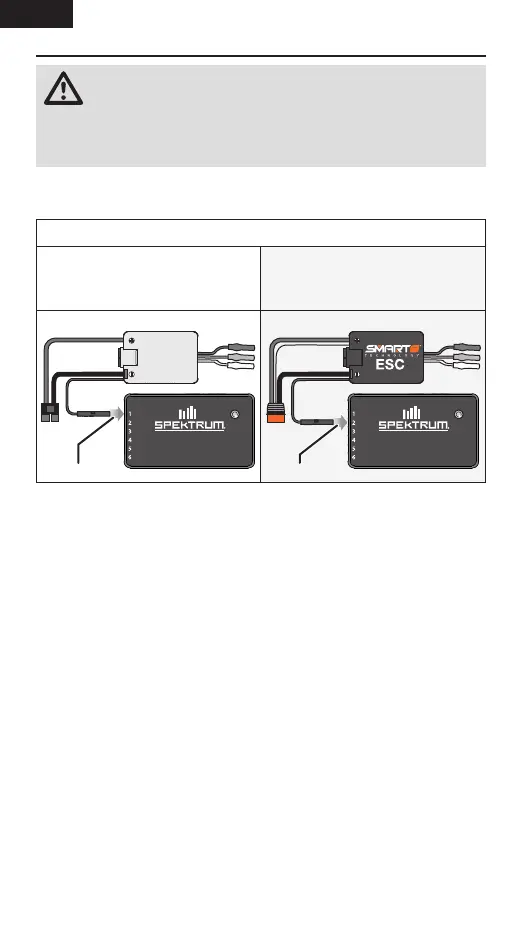
Connect your ESC to the Flybarless System
Conventional ESCs/Throttle Servo
(PWM signal) connect to Port 1.
Spektrum Avian Smart ESC must be
connected to Port 2 to enable Smart
ESC Telemetry.
FC6350HX
RX/PRG
RPM | X-BUS
FLYBARLESS SYSTEM
RX
FC6350HX
RX/PRG
RPM | X-BUS
FLYBARLESS SYSTEM
RX
Port 2
Port 1
Conventional ESC Avian Smart ESC
Before Setup
The FC6350HX Flybarless System is setup, programmed, and tuned via the
Forward Programming menu on a compatible Spektrum aircraft radio system.
A firmware update on your transmitter may be required to access Forward
Programming. Visit spektrumrc.com to register and update your transmitter.
• Before entering Forward Programming, engage Throttle Hold.
• Before exiting Forward Programming, lower the throttle to the full stop
position. Wait until the LED flashes green before powering down to ensure
settings are saved.
• Always exit forward programming before disconnecting the power source
to ensure parameters are saved.
• The Flybarless System must be powered on and connected (bound) to your
transmitter to access the forward programming menus.



 To Next Page