EN
8
FC6350HX Setup
1. If you are using a remote receiver without a bind button see the
section Binding with Optional Second Remote Receiver for binding
instructions. Power ON the FC6350HX Flybarless System and press the
bind button on the 4651T remote receiver.
Lower the throttle stick to the stop position, and enter bind mode on the
transmitter. See your transmitter manual for more information.
Once the binding process is complete, the remote receiver(s) LED turns
solid orange, indicating the remote receiver is bound and connected to the
transmitter.
The FC6350HX LED will begin flashing green, indicating a successful bind.
A red flashing LED indicates binding was not successful. Repeat step 1.
2. In the transmitter menu, select Forward Programming.
The transmitter connects to the Flybarless System and the forward
programming menu is displayed on the transmitter.
3. Navigate to the SetupSwashplateOutput Setup menu.
4. Set the Frame Rate to the operating frequency specified by your servo
manufacturer.
5. Select the Type menu. Set the swashplate type to match your helicopter’s
configuration.
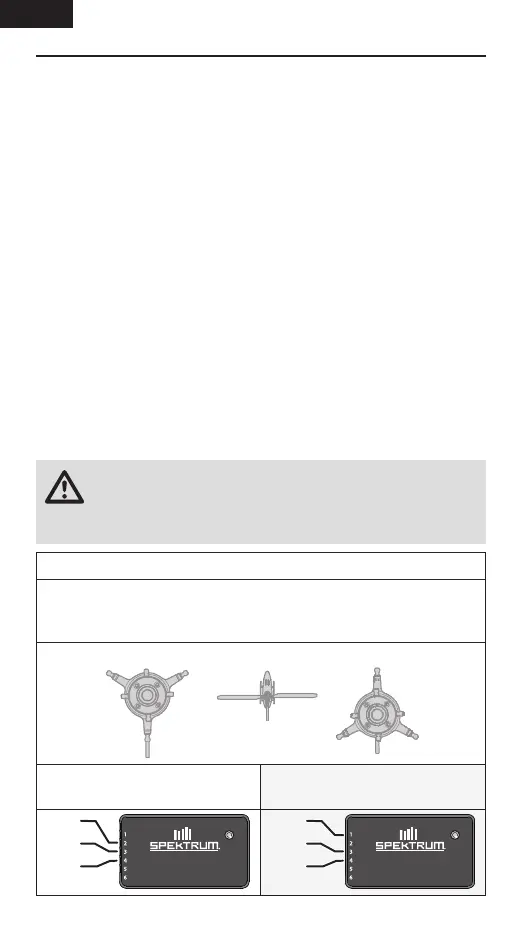
Connect your swashplate servos to the Flybarless System.
Your transmitter will show you the location of the ports on the swashplate,
Connect the servo from each labelled location to the corresponding
Flybarless System port, as shown in the illustrations below.
CCPM 120° and 120°R swashplate types are shown for reference.
Conventional ESCs/Throttle Servo
(PWM signal) connect to Port 1.
Spektrum Avian Smart ESC connects
to Port 2.
FC6350HX
RX/PRG
RPM | X-BUS
FLYBARLESS SYSTEM
RX
FC6350HX
RX/PRG
RPM | X-BUS
FLYBARLESS SYSTEM
RX
FC6350HX
RX/PRG
RPM | X-BUS
FLYBARLESS SYSTEM
RX
A2
B3
C4
WARNING: You must select the swashplate type that matches
your helicopter, and connect the servos as shown in forward
programming. A mistake at this step will cause problems with tuning and
flight performance.
C
C
A
A
B
B
Front of helicopter
A1
B3
C4



 To Next Page