SPHINX Myth 5 Service Manual
7
5. SPHINX REMOTE CONTROL
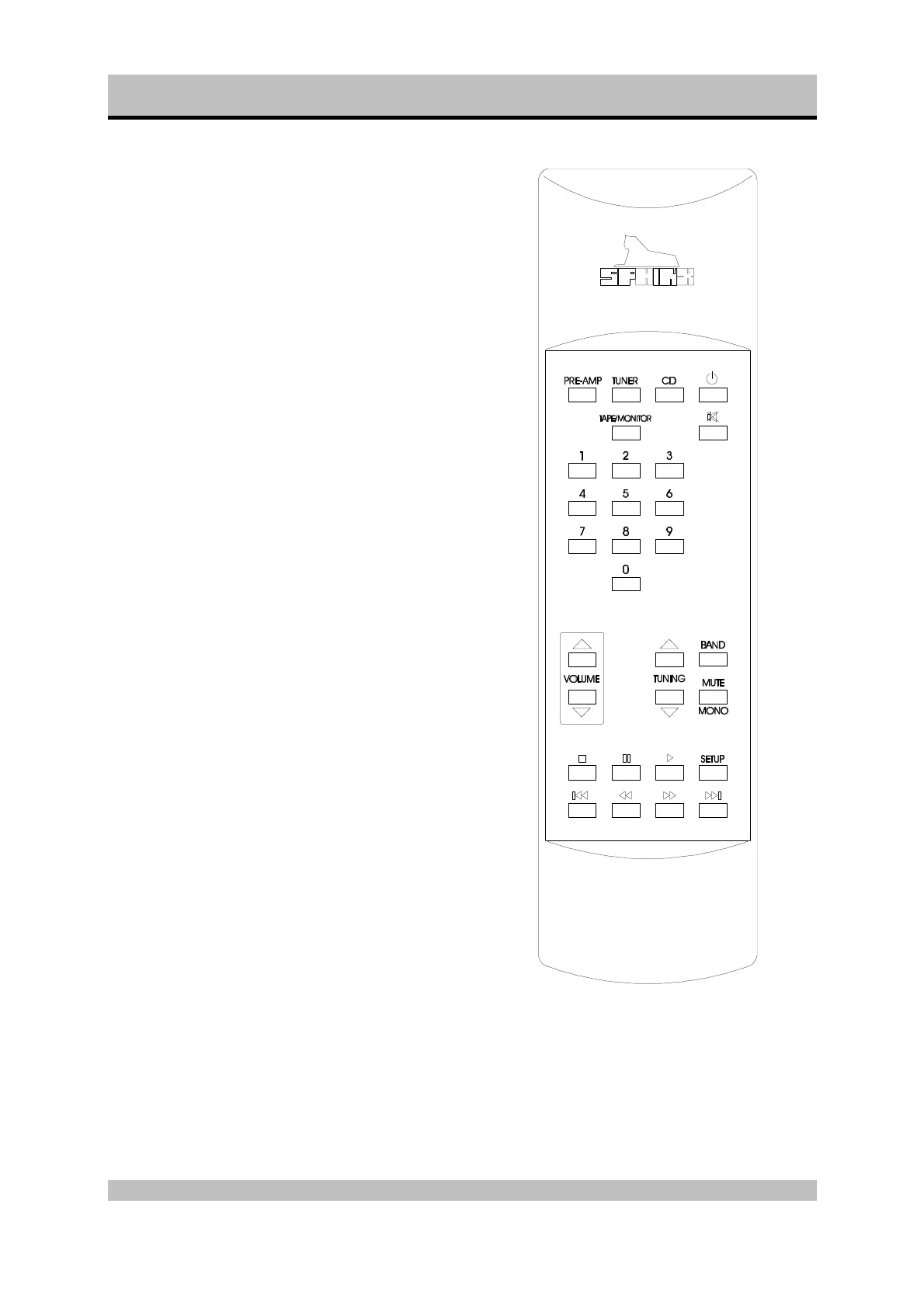
This single Sphinx Remote Control allows you to
control all functions: not only of the Myth 5, but of all
other Sphinx equipment.
Only the following buttons and indications on the
Remote apply to the Myth 5 (the others will not
function):
Buttons
1. PRE-AMP: To select the amp. All buttons
pressed hereafter will control only the amp
functions.
2. STANDBY: Use this red button to switch the
loudspeaker outputs of the Myth 5 off (standby).
3. 1 - 4: To select inputs CD to Line 2 (Note: 5 to 0
do not function):
1 CD
2 Tuner
3 Line 1
4 Line 2
4. TAPE/MONITOR: Use this button to select the
Tape IN input.
5. + button: Pressing this button has the same
effect as rotating the VOLUME control on the
front panel clockwise. You increase the volume.
6. — button: Pressing this button has the same
effect as rotating the VOLUME control on the
front panel anti-clockwise. You decrease the
volume.


 To Next Page