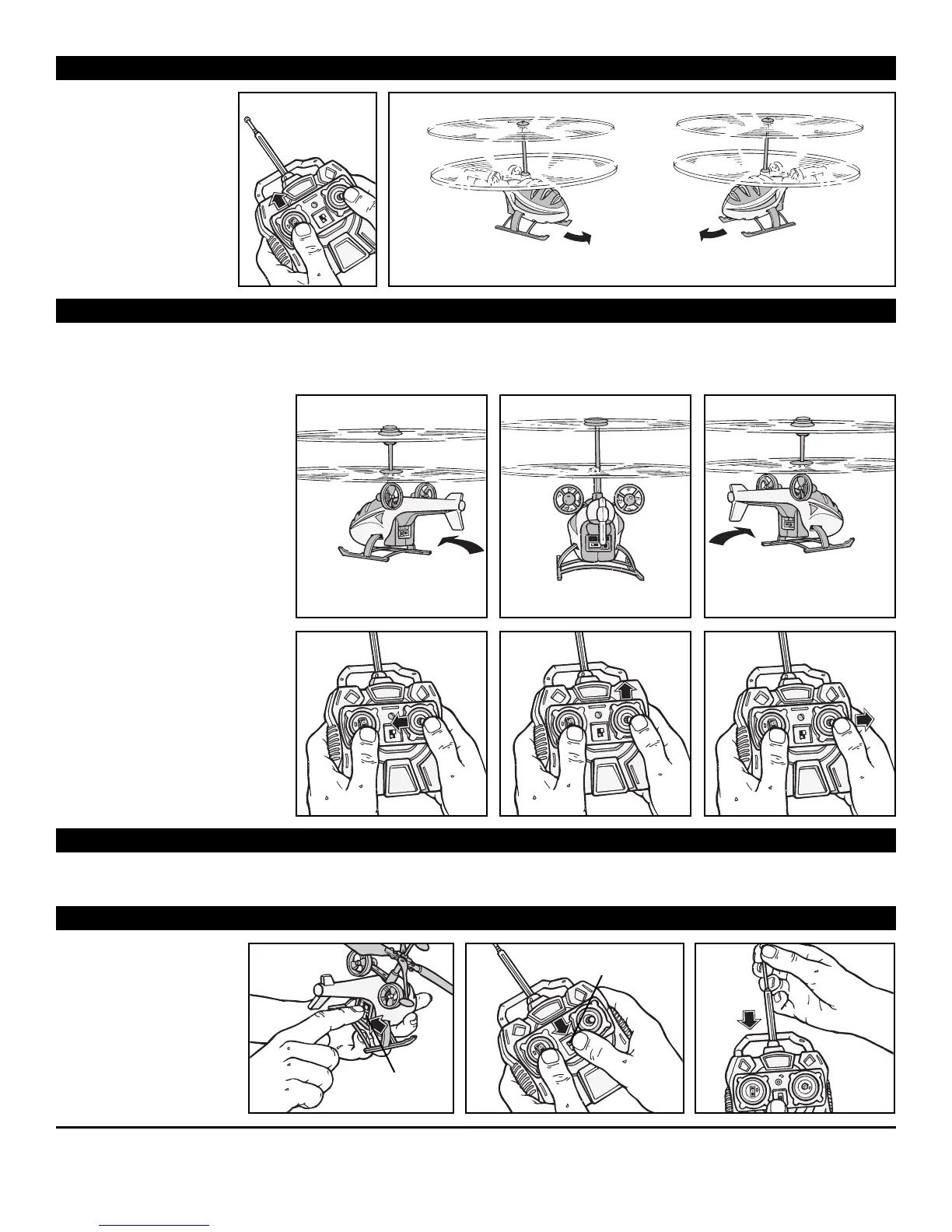
HOVERING YOUR HELIX
TM
HELICOPTER
FLYING YOUR HELIX
TM
HELICOPTER
1. Slowly push on the
throttle until the
helicopter takes off from
the ground.
2. The helicopter will
alw
ays hover slowly
f
orward and in a bit of a
tur
n either right or left.
1
Ho
vering Left or Hovering Right
2
Slowly apply the throttle until the
helicopter takes off from the
ground. Once it is in flight, increase
or decrease the throttle slowly to
get to a clear flying altitude.
Once you have tentatively set your
altitude, let helicopter float around
the room and center itself before
giving any directional inputs.
The helicopter will always hover
slowly forward and in a bit of a turn.
Learn how the helicopter tends to
fly and controlling it will be much
easier.
NOTE: When direction inputs
(Forward/ Back, Right / Left) are
applied, the helicopter will lose
some altitude. You can compensate
for this with small increases to the
throttle.
IMPORTANT: TO BEST FLY THE HELICOPTER, DIRECTIONAL INPUTS NEED TO BE SPACED OUT AND ACTIVATED WHEN
THE HELICOPTER IS FLYING RELATIVELY STABLE. CRAMMING DIRECTIONAL INPUTS OR TRYING TO COMPLETELY
CHANGE DIRECTIONS IN A HARSH MOVE WILL DE-STABILIZE THE HELICOPTER’S FLIGHT PATTERN.
LANDING
Y
OUR
HELIX
TM
HELICOPTER
LEFT TURN
RIGHT TURNFORWARD
•
When flying the helicopter near obstacles
, alw
a
ys land it when it seems lik
e it is going to hit something.
• To land the helicopter, reduce throttle slowly. A fast reduction in throttle will crash the unit.
WHEN FINISHED FLYING
1
32
“ON/OFF”
Switch
“ON/OFF”
Switch
1. When finished flying the
helicopter, turn the
“ON/OFF” switch on the
helicopter to the “OFF
position.
2. Turn the “ON/OFF” switch
on the controller to the
“OFF” position.
3. Then push the controller
antenna in to its stored
position.







 To Next Page